Installation
ACIST RXi System User’s Guide | 27901700-001,01 2019-09 English
Installation Procedures
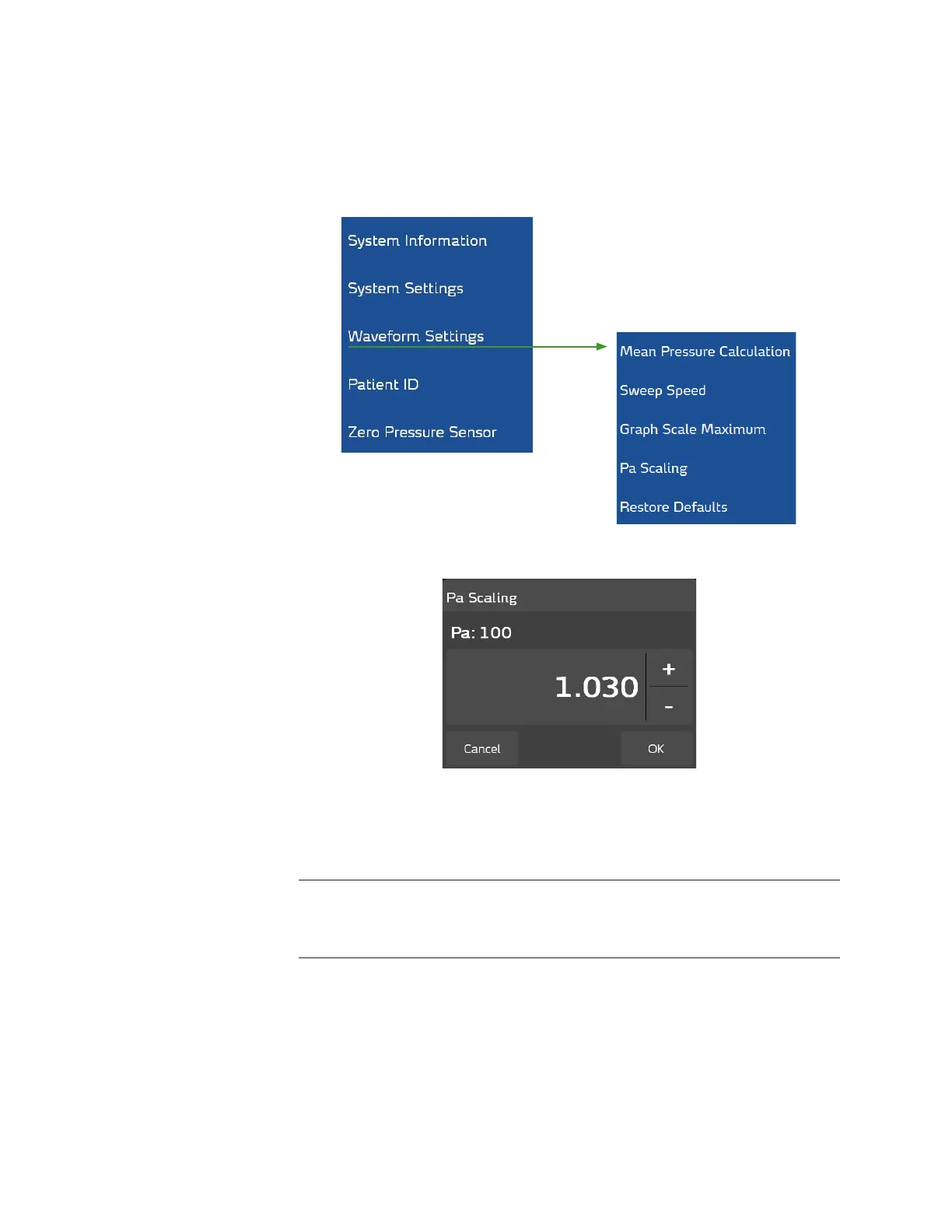
Perform Pa Scaling
Select the Waveform Settings option on the ACIST Main Menu, which
provides a submenu of waveform conguration options. From this submenu,
select Pa Scaling.
Aer selecting Pa Scaling, the following screen is displayed.
Aer zeroing the aortic pressure, Pa scaling must be performed if the value
on the hemodynamic system is dierent from the Pa value that appears on
the RXi touchscreen. If the two values are equal or within ±1 mm Hg, it is not
necessary to perform this procedure.
Note
The signal from the hemodynamic system must be something other than zero before
this procedure can be performed.
If the transducer has a backplate that creates a steady test pressure, use this
to articially apply a steady test pressure of 100 mm Hg. is is preferable to
using a live pressure. However, if unable to send a steady pressure, getting the
two values to match can be achieved, but may require more eort.
Use the + and − buttons on the RXi screen to adjust the signal from the
hemodynamic system (1.030 was used in this example) to match the RXi Pa
value displayed on the hemodynamic system screen. When these are equal,
press OK.



 To Next Page