Basic Operating Procedures
ACIST RXi System User’s Guide | 41901700-001,01 2019-09 English
Record the FFR for the First Vessel
Record
Note
Before recording the FFR, ensure that system settings are correct and the Navvus
MicroCatheter was properly delivered as described in the previous sections.
WARNING
Do not disturb pressure sensing system elements during equalization or FFR recording.
Record the FFR:
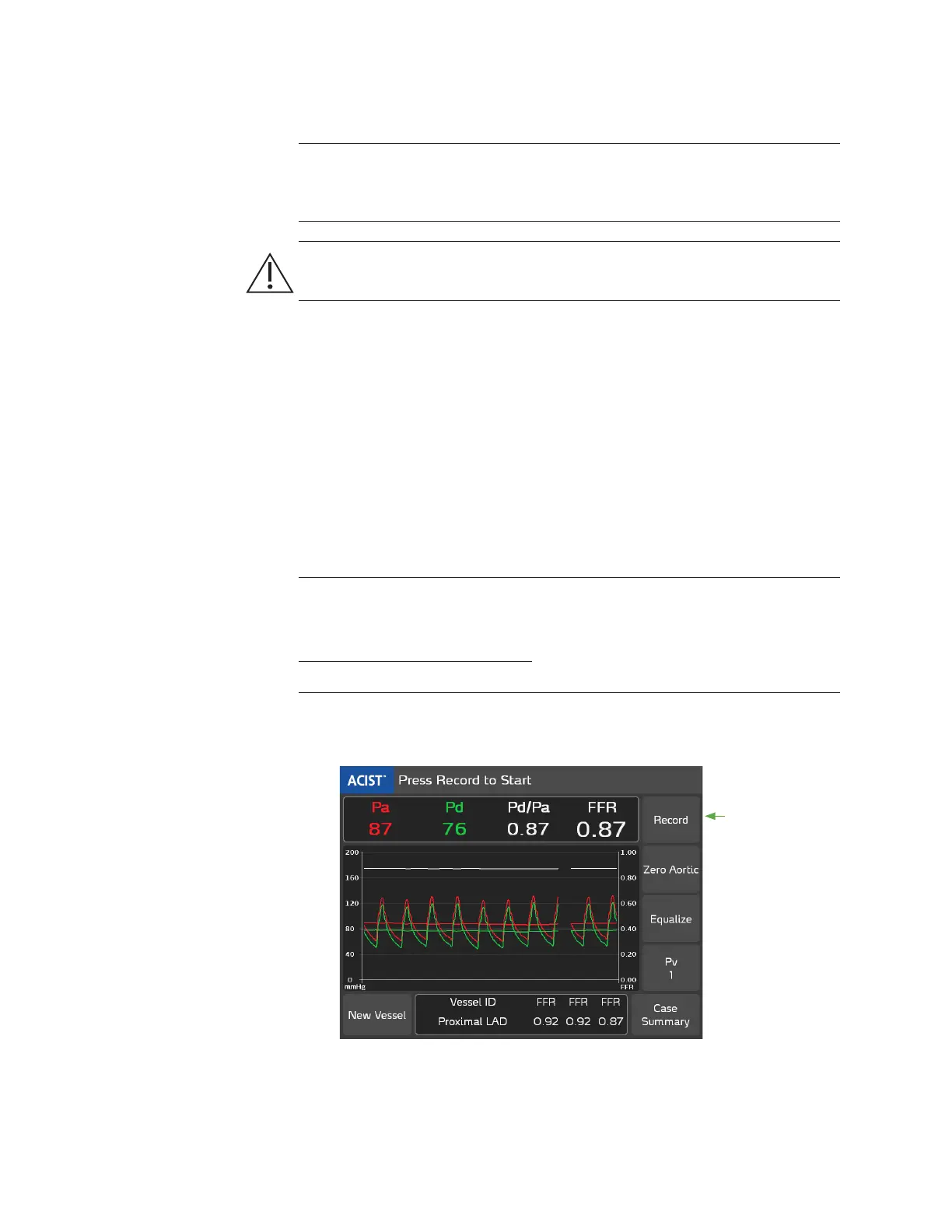
1. Verify the system is displaying this message.
Press Record to Start
2. Ensure the Vessel ID is correct (in the example below, Proximal LAD is
selected).
3. With the Navvus MicroCatheter tip still present just outside the guide
catheter tip, ensure the Pa and Pd values are equal (Pd/Pa = 1.00).
4. To properly position the pressure sensor, carefully advance the Navvus
MicroCatheter until the marker band at the distal tip is 1-2 cm distal to the
lesion being evaluated.
Note
When performing a resting Pd/Pa assessment, the live resting Pd/Pa value is available
on the main screen (as shown below). If a recording of the resting Pd/Pa value is desired,
without administering the vasodilator press Record and the FFR value represents the
resting Pd/Pa.
5. Administer Adenosine (or another vasodilator) and press the Record
button before or during maximum hyperemia.
Press
Record
Record the FFR for
the First Vessel



 To Next Page