EasyManua.ls Logo

Acteon XMIND DC - Chapter 6: Configuration; System Configuration

Acteon XMIND DC
80 pages
Print Icon
To Next Page IconTo Next Page
To Previous Page IconTo Previous Page
Loading...
Page 36 of 61
INSTALLATION & MAINTENANCE MANUAL • XMIND DC • W1100100 • V1 • (15) • 12/2015 • NXDCEN020B
ENGLISH
CHAPTER 6
6.1. CONFIGURATION
The “Xmind®dc” radiographic system is provided in the “standard mode” conguration.
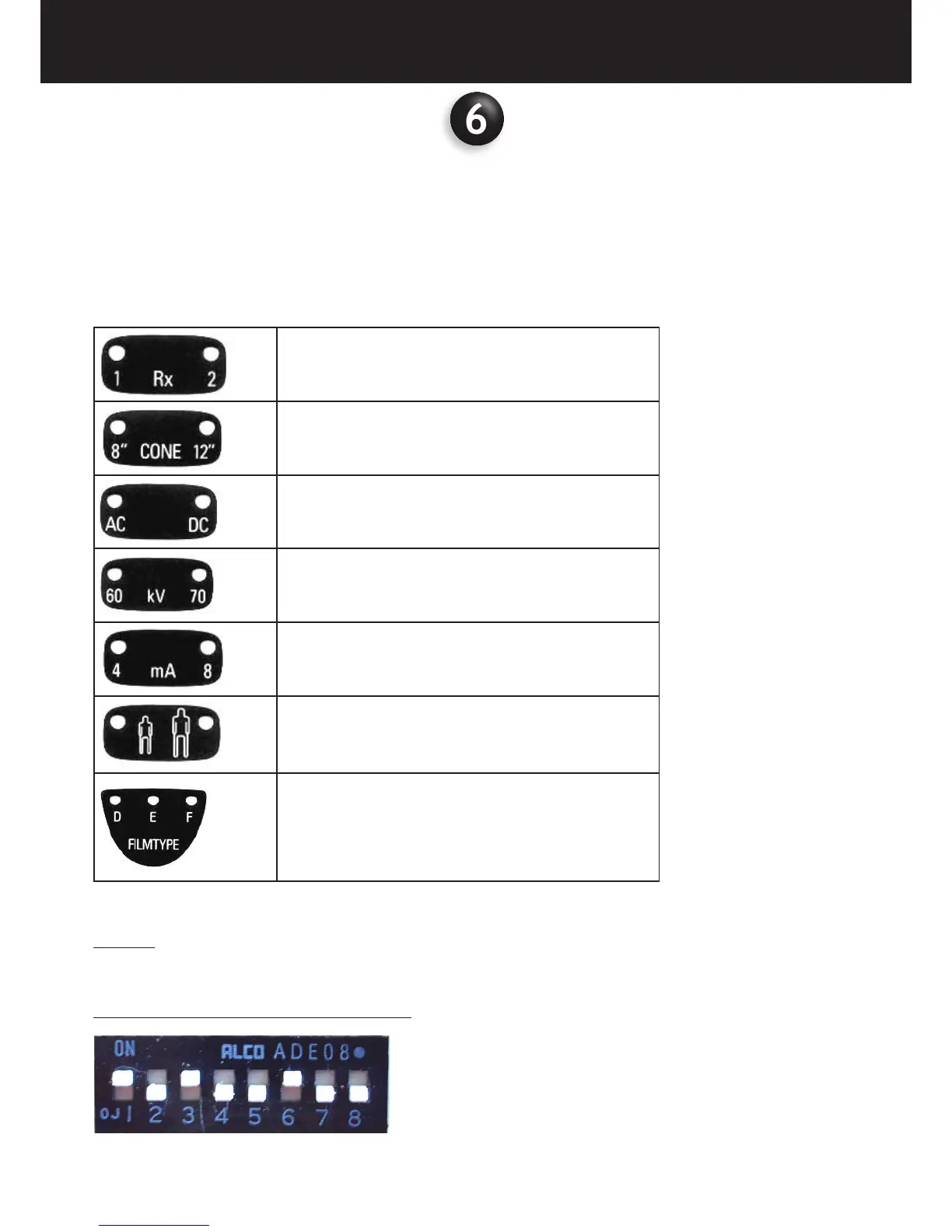
On the control panel the LED relevant to the following exposure parameters will light up
No of the selected tubehead
LED 1
supplied cone
LED 8” = SHORT CONE
LED 12” = LONG CONE
type tubehead
LED DC = DIRECT CURRENT
radiographic voltage
LED 70kV
radiographic current
LED 8mA
type of patient
LED ADULT
radiographic technique
CONVENTIONAL LED D
The above conguration depends on the position of dip-switch on the timer electronic card:
LEGEND
ON = INSTALLED
OFF = NOT INSTALLED
IF THE LONG CONE IS USED 31cm = 12” (SSD)
66

Related product manuals