EasyManua.ls Logo

ACTi ECD-1000 - Managing Network Loss; Scheduling Network Loss Trigger

ACTi ECD-1000
129 pages
Print Icon
To Next Page IconTo Next Page
To Previous Page IconTo Previous Page
Loading...
www.acti.com
ECD-1000 Product Manual
116
1
2
3.8 Managing Network Loss
When a camera suddenly disconnects from the network, the Decoder will trigger a network
loss notification by displaying a network loss icon and a beep sound.
By default, the trigger is enabled for 24 hours a day and 7 days a week. However, the beep
sound must be enabled and configured separately.
Scheduling Network Loss Trigger
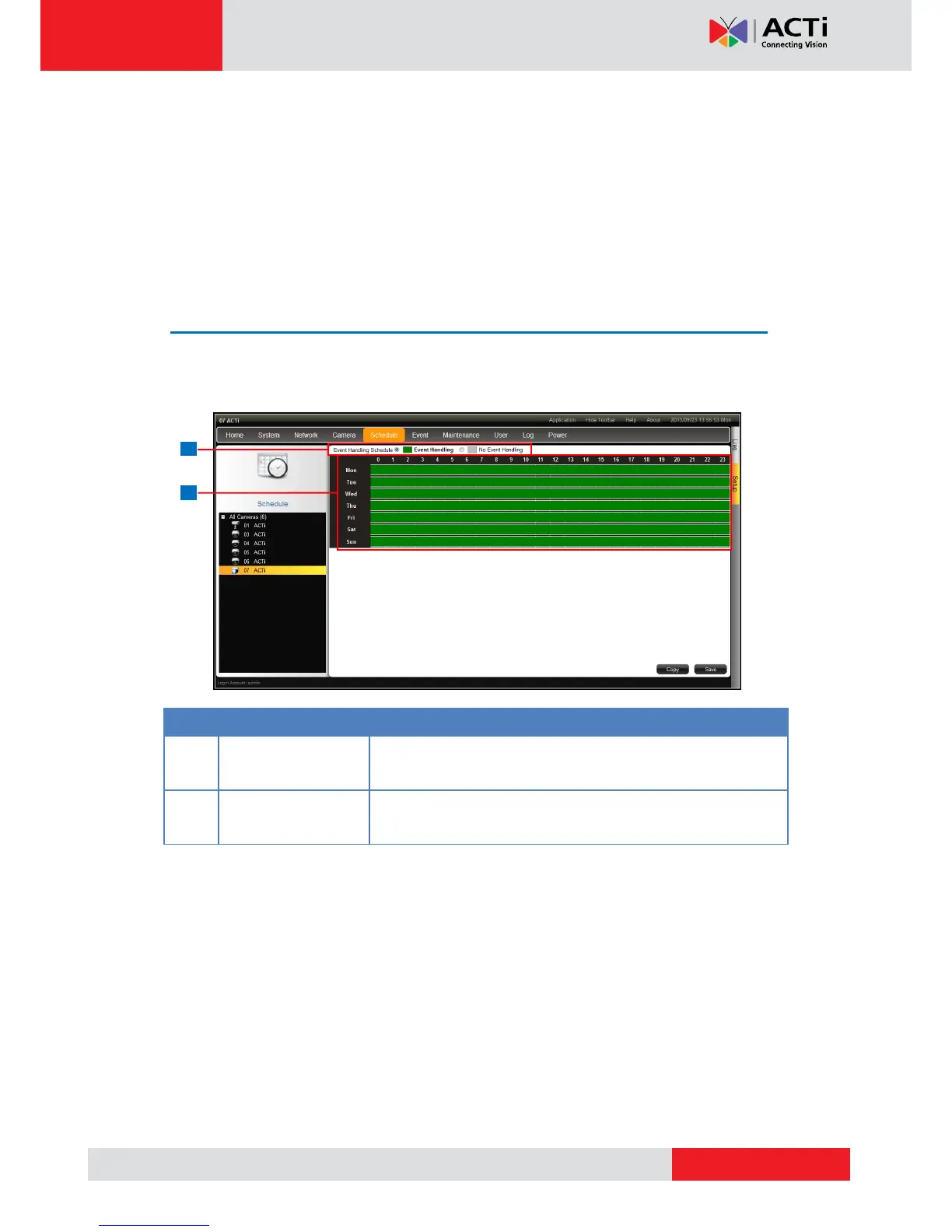
1. On the Setup screen, click Schedule.
2. Select the camera from the camera list panel.

Item
Description
1
Event Handling
Schedule
Event Handling: Enables event trigger.
No Event Handling: Disables event trigger.
2
Time Table
Shows green cell if event trigger is enabled and gray cell if
event trigger is disabled.
3. Select either Event Handling or No Event Handling.

Table of Contents

Other manuals for ACTi ECD-1000

Related product manuals