EasyManua.ls Logo

ACTi ECD-1000 - Sync Date and Time with NTP Server

ACTi ECD-1000
129 pages
Print Icon
To Next Page IconTo Next Page
To Previous Page IconTo Previous Page
Loading...
www.acti.com
ECD-1000 Product Manual
93
1
2
4
2
3
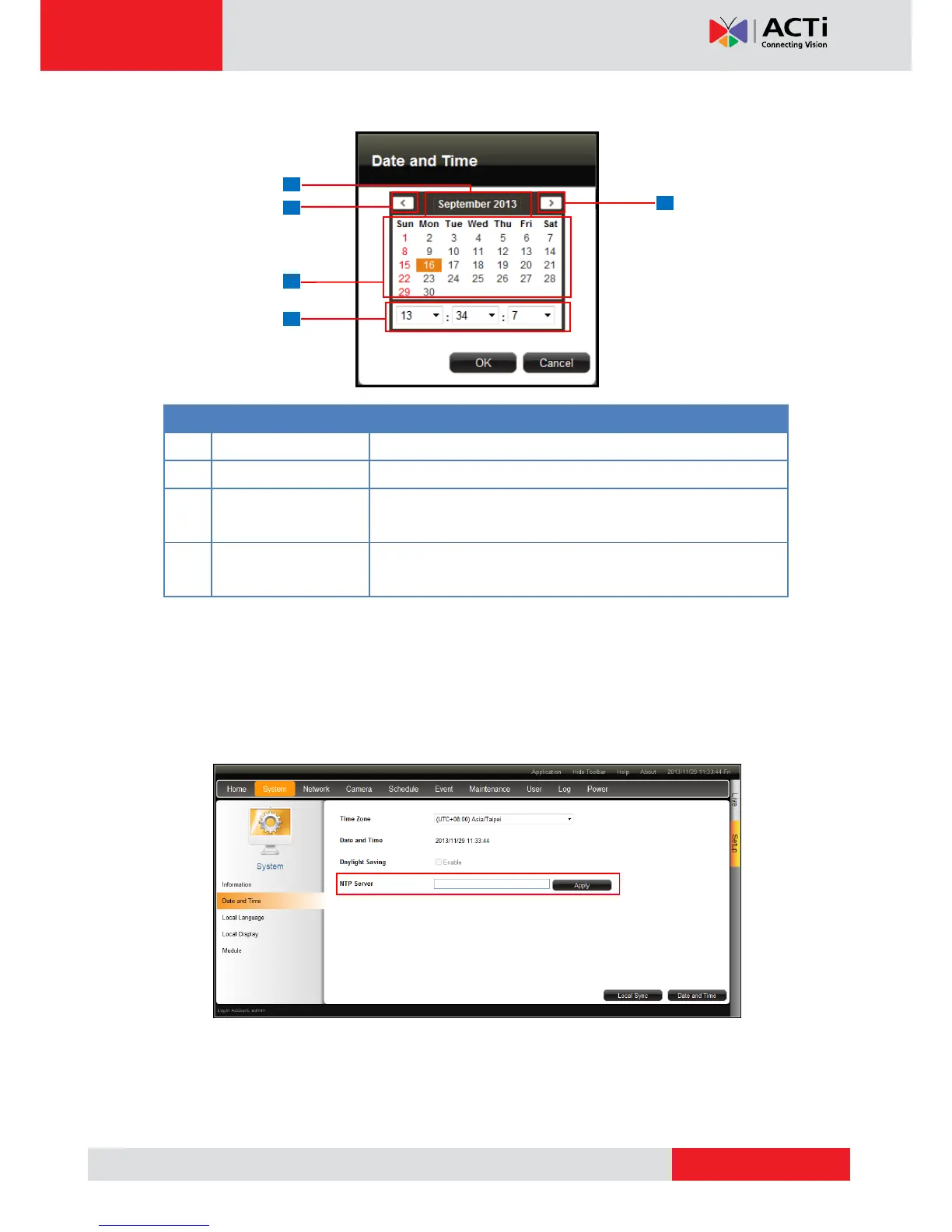
3. Modify the date and time.
Item
Description
1
Select the month and year from the box.
2
Click to view the calendar of the previous or the next month.
3
Click a date to set the date. Selected date is highlighted in
orange, while the current date is in yellow.
4
Select the hour, minute, and second from the corresponding
boxes.
4. When done, click OK to save.
Sync Date and Time with NTP Server
1. On the Setup screen, click System > Date and Time.
2. On NTP Server, type the URL address of the NTP server.
3. Click Apply. A message will appear to confirm if synchronization is successful.
NOTE: If the NTP Server is a domain name, make sure the IP setting and DNS setting of
the system gateway are correct.


Table of Contents

Other manuals for ACTi ECD-1000

Related product manuals