ECD-1000 Product Manual
57
Adding Cameras Manually via RTSP
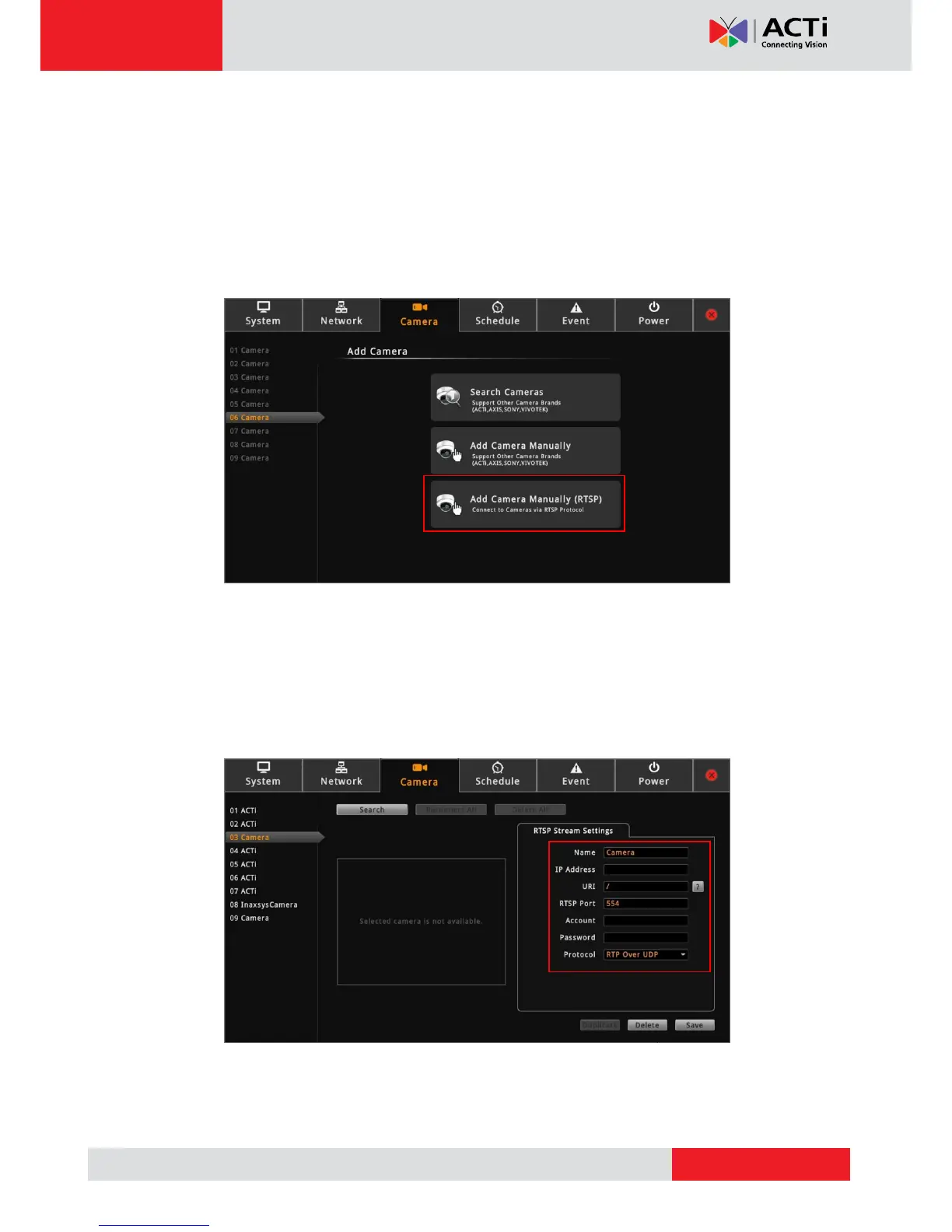
In case you want to add cameras via Real Time Streaming Protocol (RTSP), use the Add
Camera Manually (RTSP) function. This feature is useful when adding third party cameras
which support the standard RTSP.
1. On the Setup screen, click Camera.
2. Click on an empty channel number from the left panel, and click Add Camera Manually
(RTSP).
3. On Name, type a name you want to use to identify the camera (maximum of 32
alphanumeric characters, no spaces nor symbols). This name is saved only on the
Decoder and does not affect the settings on the camera side.
4. Enter the IP Address, URI (Uniform Resource Identifier), RTSP Port (by default 554),
Account and Password of the camera you want to connect to and select the streaming
protocol.
TIP: If you do not know the URI of the camera, click to select from the most common
manufacturers on the list. Once a manufacturer is selected, its URI is filled up on the field.
If the predefined URI does not work, check the camera specifications for details.



 To Next Page