EasyManua.ls Logo

ACTi ECD-1000 - Manually Change the Date and Time

ACTi ECD-1000
129 pages
Print Icon
To Next Page IconTo Next Page
To Previous Page IconTo Previous Page
Loading...
www.acti.com
ECD-1000 Product Manual
45
1
2
4
2
3
changes according to the current date and time of the time zone.
3. If applicable, check the Enable Daylight Saving Time box. Note that this box becomes
enabled only if the Daylight saving time can be applied to the selected time zone.
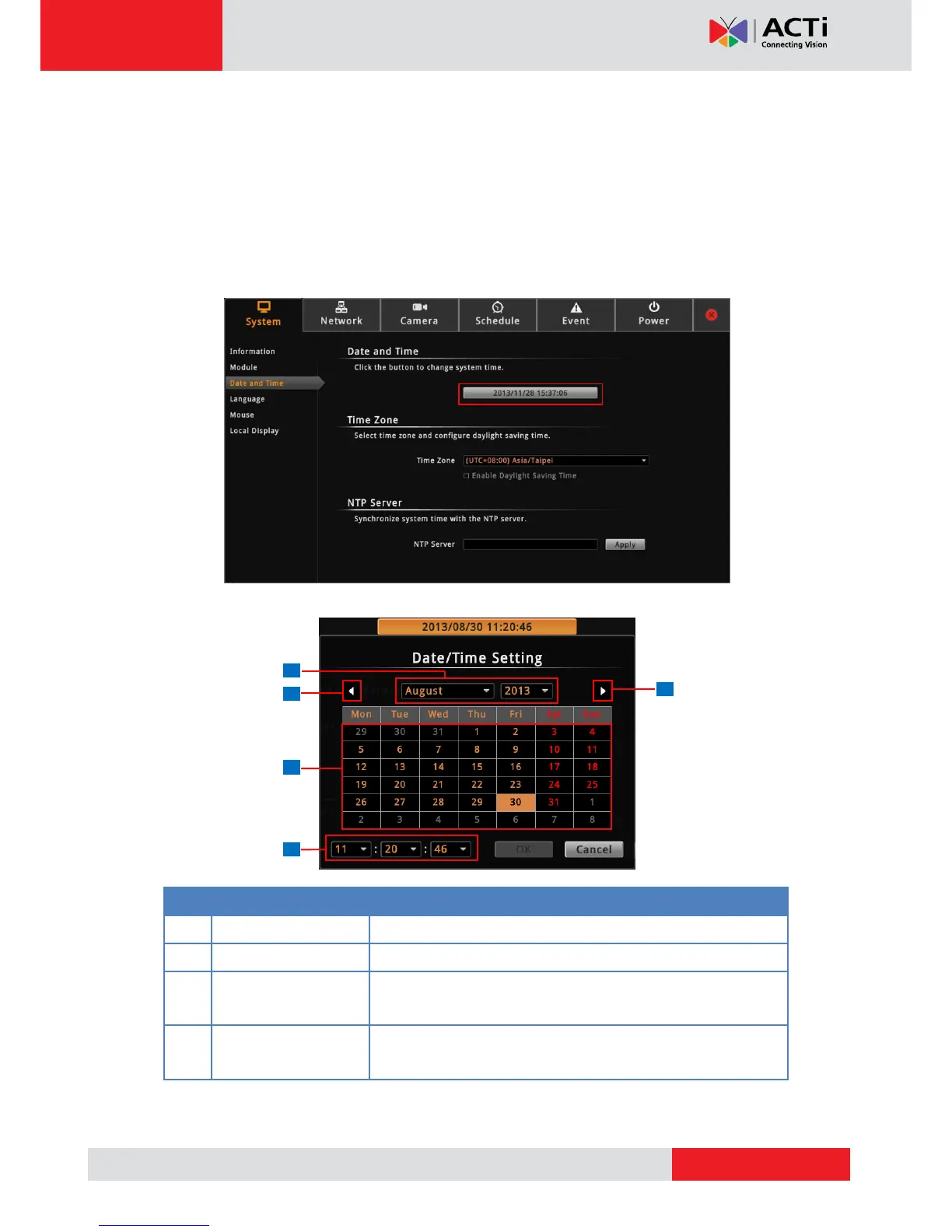
Manually Change the Date and Time
1. On the Setup screen, click System > Date and Time.
2. Click the system date and time button.
3. Modify the date and time.
Item
Description
1
Select the month and year from the box.
2
Click to view the calendar of the previous or the next month.
3
Click a date to set the date. Selected date is highlighted in
orange, while the current date is in yellow.

4
Select the hour, minute, and second from the corresponding
boxes.
4. When done, click OK to save.

Table of Contents

Other manuals for ACTi ECD-1000

Related product manuals