11 80-0180-307, Rev A
Handing the eForce 150
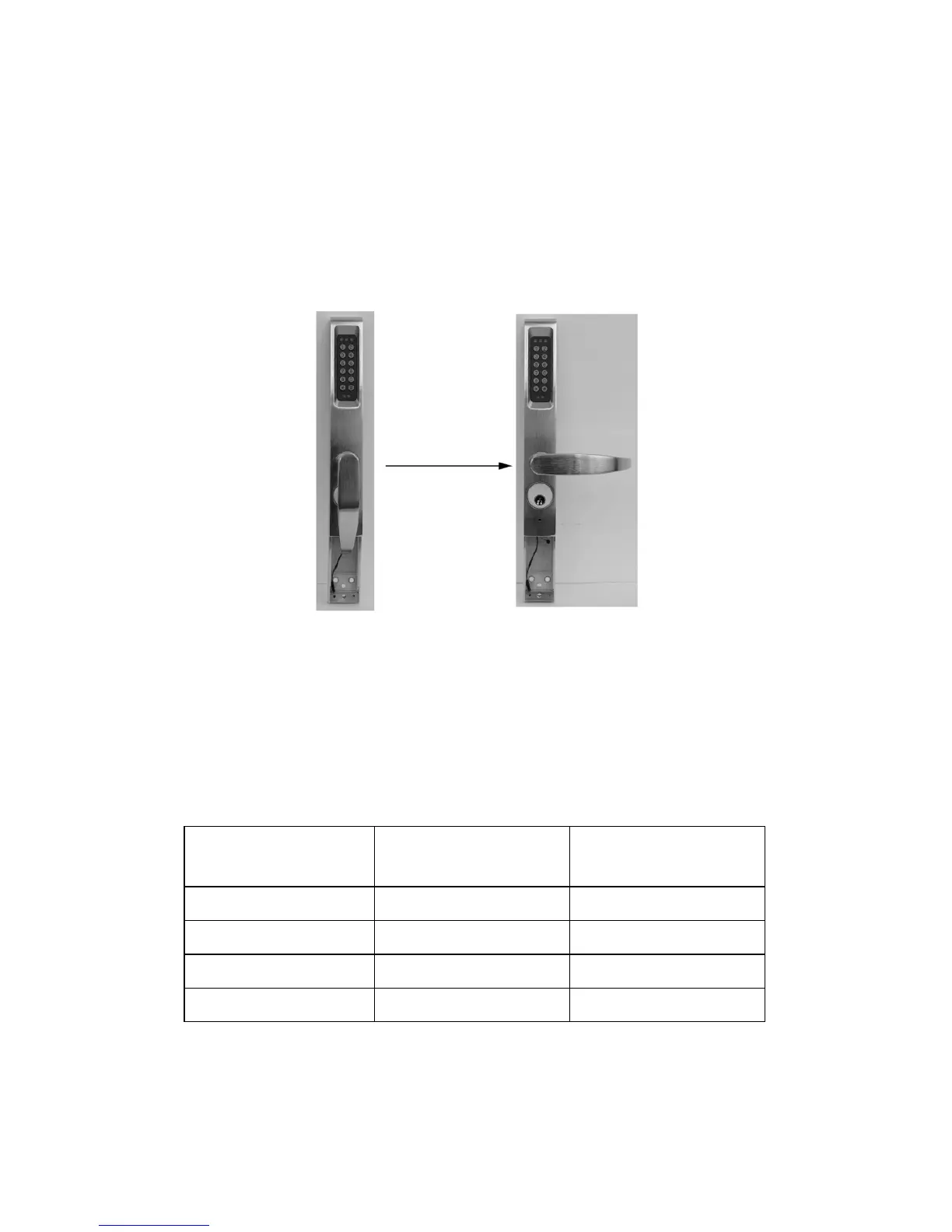
NOTE: The eForce 150 is shipped in a non-handed, neutral position
with the access cover off (see Figure 12).
1. IF installing the Model 3090-02,
THEN GOTO the “Installing the Mortise Cylinder” section.
2. To hand the eForce 150, ROTATE the handle until it clicks into the
horizontal position (see Figure 13).
Figure 13
NOTE: The output hub, located on the back of the eForce 150, is
shipped with a clockwise rotation as viewed from rear. In
some instances, this rotation must be changed to match the
device and/or hand of the door (see Table 1, “Handing Setup).
Table 1. Handing Setup
Device Type Left Hand
Reverse Rotation
Right Hand
Reverse Rotation
SVR Clockwise Clockwise
Mortise Latch Counter-Clockwise Clockwise
CVR Clockwise Clockwise
RIM Counter-Clockwise Counter-Clockwise



 To Next Page