9 80-0180-307, Rev A
Configuring the Model 3090 for Lock Series
NOTE: Steps 1–3 are performed to configure a Model 3090-01 for a
mortise latch application using 4500/4900 Deadlatches
(including 8300/8400 Exit Devices).
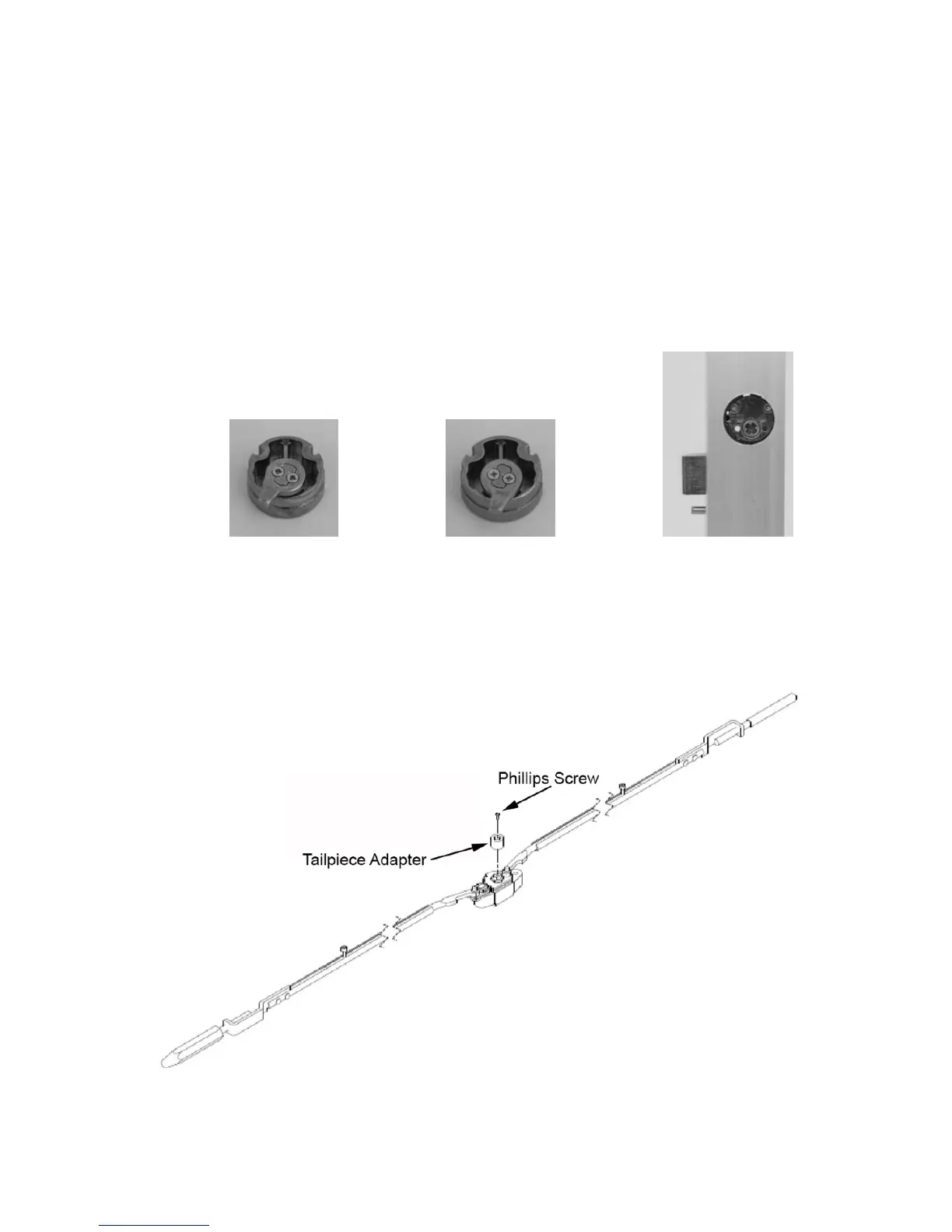
1. CONFIGURE the supplied cam plug to match the hand of door (see
Figures 7 and 8).
2. INSERT cam plug into latch case with notch on the cam plug aligned
with latch case set screw.
3. TIGHTEN set screw and SECURE with the two brass cam plug
screws (see Figure 9).
Figure 7 Figure 8 Figure 9
NOTE: Steps 4–5 are performed to configure a Model 3090-01 for a
CVR exit device application using 8500/8600 Exit Devices.
4. INSTALL tailpiece adapter on the vertical rod.
5. FASTEN with Phillips screw (see Figure 10)
Figure 10



 To Next Page