Afinia H800+ 3D Printer User’s Manual
27
Support Settings
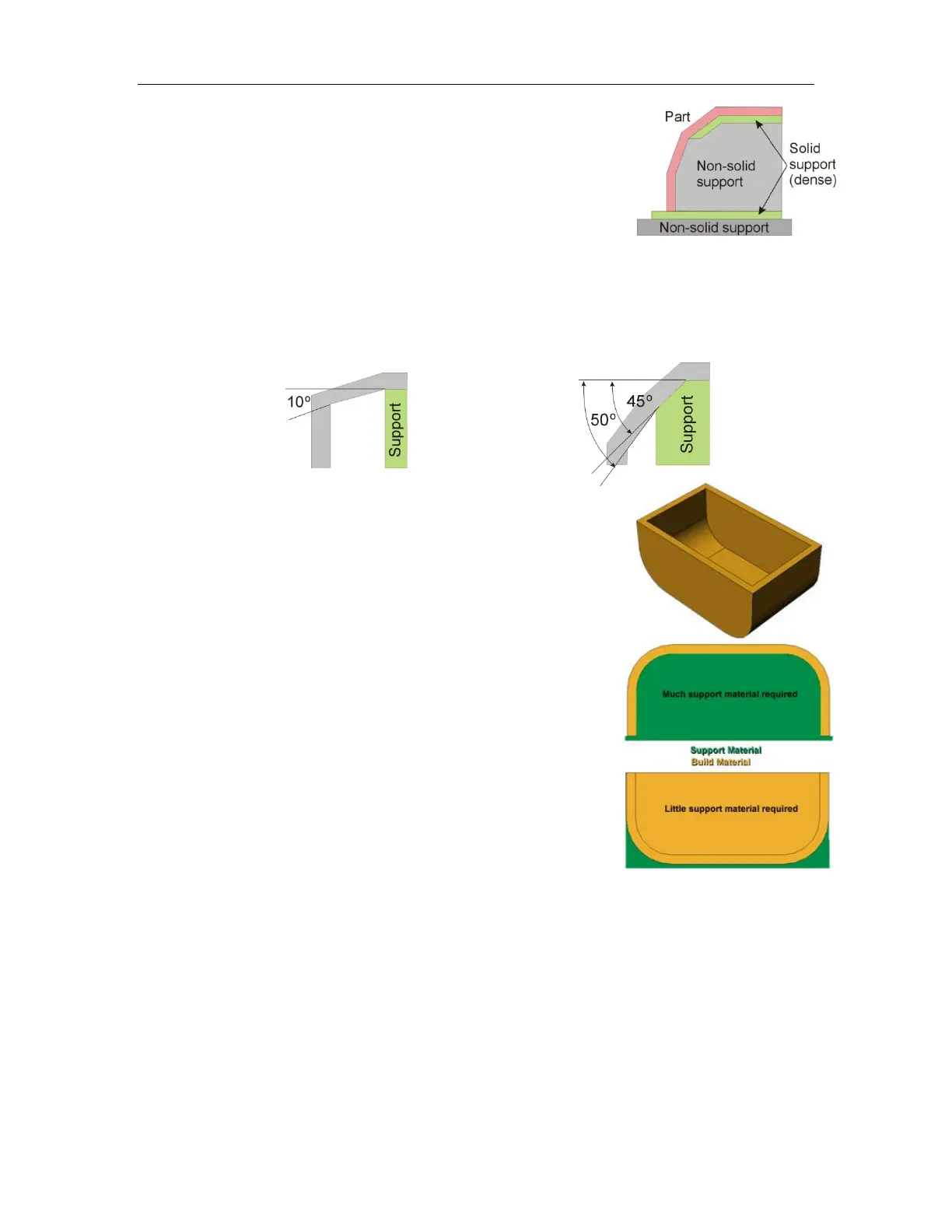
Dense
This sets how many layers of dense support material are printed
directly beneath the model. More layers of dense support makes for a
more stable print but takes longer to print.
Angle
The Support Angle setting specifies the maximum Angle at which support material will be printed.
If the angle from horizontal is smaller than the selected setting, the printer will add solid support
layers under the part surface.
If the setting is 10 Deg, only surfaces that are less than 10 degrees from horizontal will be given
support. Changing the value to 50 Deg will print support material to hold up surfaces that are less
than 50 degrees from horizontal.
Increasing this value adds more material and time to the print.
Decreasing this value may result in poor printing of overhanging
surfaces.
There is a balance between minimizing the amount of support
material and maintaining the quality of the part, as well as minimizing
the difficulty of removing support material.
The orientation of the part on the print platform also determines how
much support material is printed and how difficult the support
material will be to remove.
As a general rule, it is easier to remove support material from the
outside of a part than from the inside. In the picture to the right, the
part would use a lot more support material if printed with the opening
facing down than if it were facing up.
Space
Space sets the distance between the lines of support material. Changing this value will change
how the support material is printed; removal of support material and print quality can be affected.
Only advanced users should change the Space setting.
Angle set to > 10º
Angle set to > 50º



 To Next Page