Page 40
H
L R
B
3) Setting the mixing level
<Left side, High side>
Move
u to the right of L (or H) with the ENTER key, and then set the
mixing level by pressing the Inc.+ or Dec.- key.
<Right side, Brake side, Low side>
Move
u to the right of R (or B or L) with the ENTER key, and then set
the mixing level by pressing the Inc.+ or Dec.- key.
The H key displays the graph in the in the constant
display area.
4) Setting the SLAVE channel
Move u to the right of SLAVE with the ENTER key,
and then select the SLAVE channel by pressing the
Inc.+ or Dec.- key.
* Setting range ST, TH, AUX, BR
* The AUX channel always becomes the slave of the
third channel, regardless of the ACT/INH setting of
3CH-BRAKE.
5) Setting the amount of OFFSET
Move u to the right of OFFSET with the ENTER key,
and then set the amount of offset by pressing the Inc.+
or Dec.- key.
Using the Offset Function
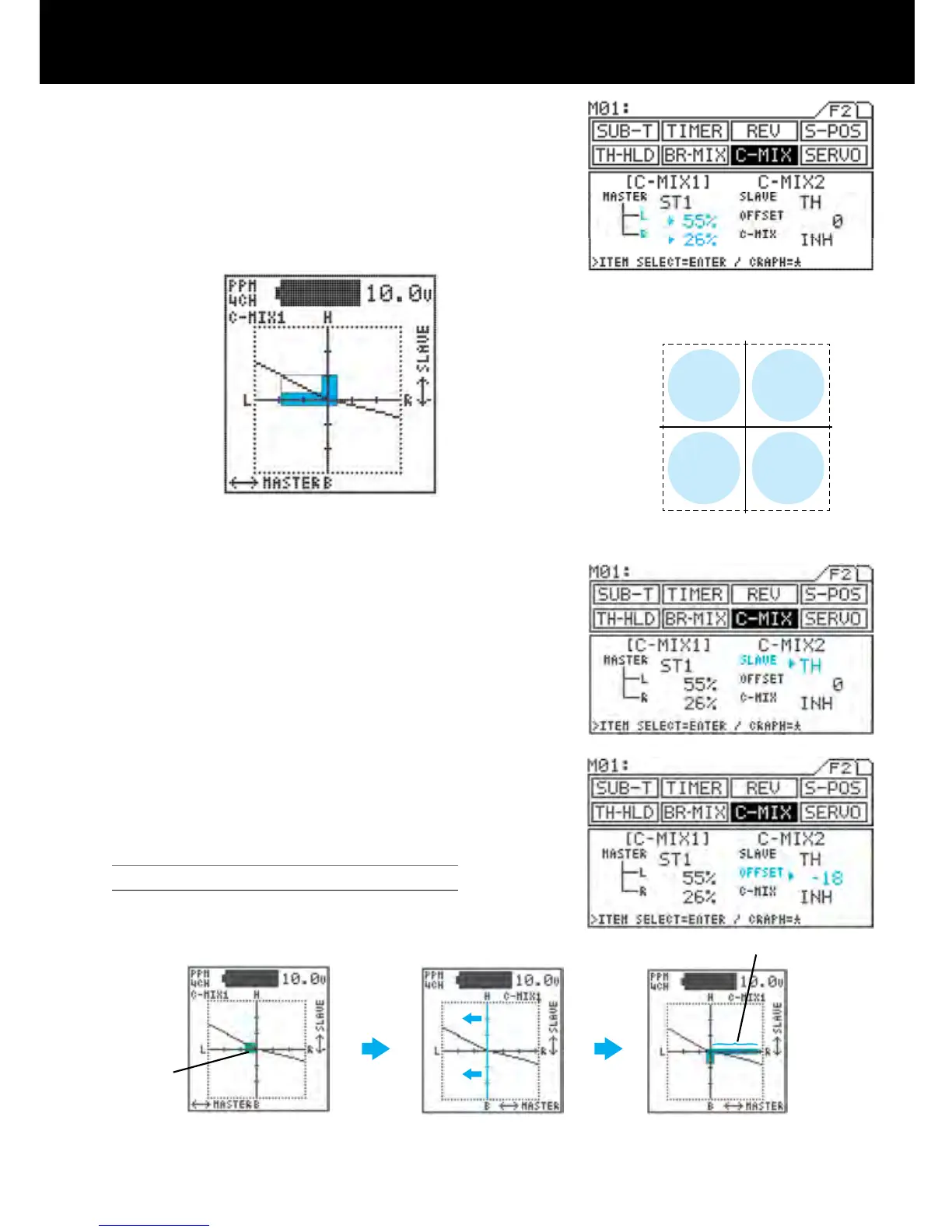
(1) Correcting Master 2 trim deviation using OFFSET
Graph display
for L side setting
(55%)
Bar graph of master
operation
Master is horizontal axis
Slave is vertical axis
Mixing level bar graph for slave
(Mixing level varies as indicated
according to slope of graph.)
Graph display
for R side setting
(26%)
* Adjust offset value in nega-
tive direction, moving vertical
axis to left and erasing bar
graph.
Master ST3,SLAVE TH
Bar graph shows extent of
steering operation
* When trim deviation appears
in graph as shown above with
steering at neutral position.
* By adjusting to the point where
deviation disappears, the steer-
ing neutral position can become
the origin for mixing.
deviation
L side +%
graph
R side -%
graph
L side -%
graph
R side +%
graph



 To Next Page