22
WEBSERVER HUB AIRZONE CLOUD DUAL (AZX6WSPHUB)
Assembly
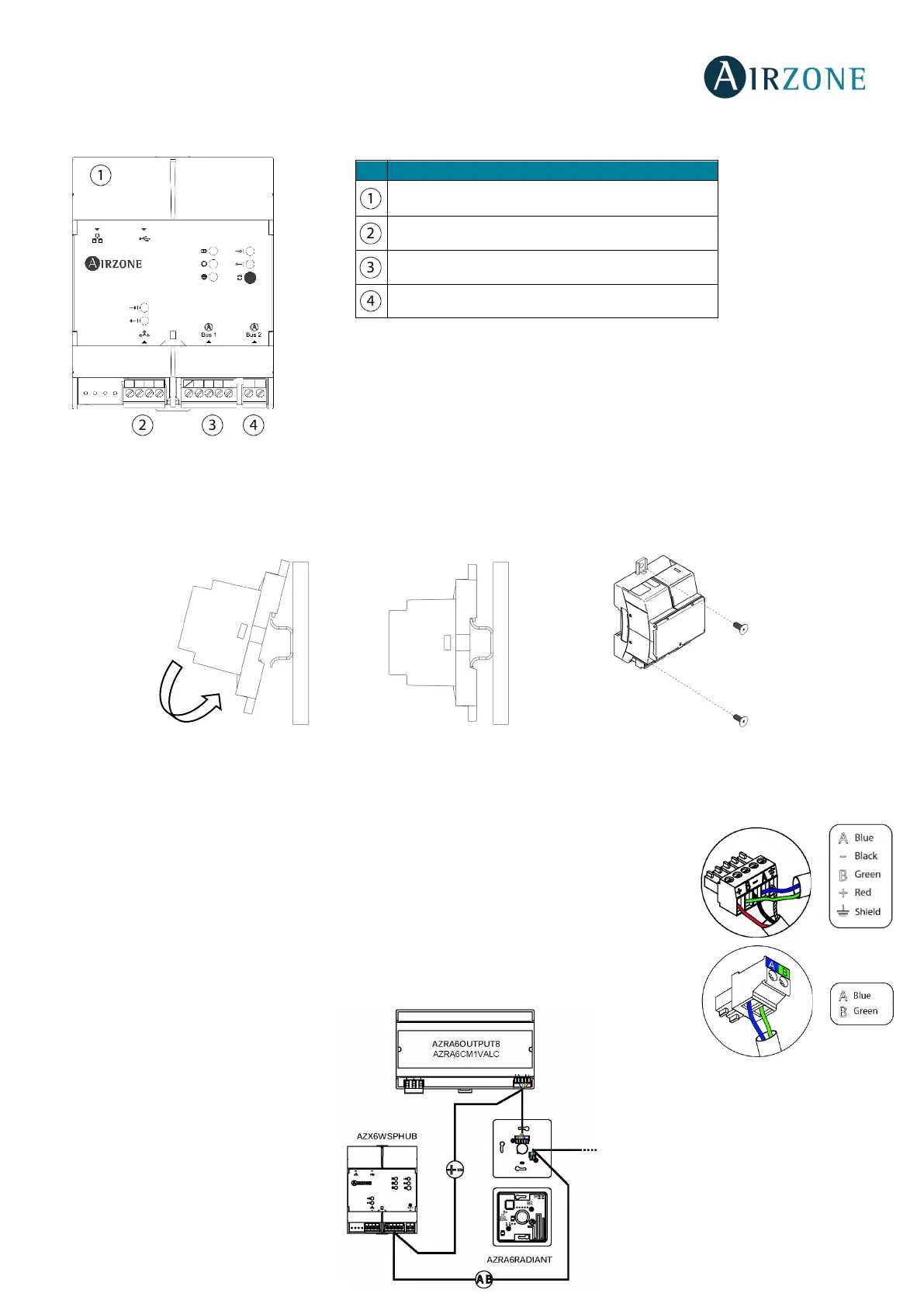
The Webserver HUB is mounted on DIN rail or on wall. It is should be placed and mounted in accordance with the current
electrotechnical regulations.
Note: To remove the module on DIN rail, pull the tab down to release it.
Connection
For connection to the first main control board, use the DM1 automation bus’s 5-pin terminal to
connect the Webserver HUB to the main control board's automation bus. Use the appropriate
cable: 2-wire twisted shielded cable: 2 x 0.22 mm
2
(2 x AWG 23) for communication with the main
control board, and 2-wire twisted shielded cable: 2 x 0.5 mm
2
(2 x AWG 20) to supply the
Webserver HUB. Fix the cables with the screws on the terminal, following the color code.
To connect the Webserver HUB to the remaining main control boards, you can use the DM2
automation bus with its 2-pin terminal 2 x 0.22 mm
2
(2 x AWG 23).
Ethernet
Modbus port
Airzone connection bus 1 – DM1
Airzone connection bus 2 – DM2


 To Next Page