37
SW1
Once all the main control boards have been addressed, you must save the configuration of the installation in
the production control board. To do that, press SW1 (Fig. 44). If you make any changes in the installation,
remember to save the new configuration. To reset the production control board, press SW1 for 10 seconds.
SW2
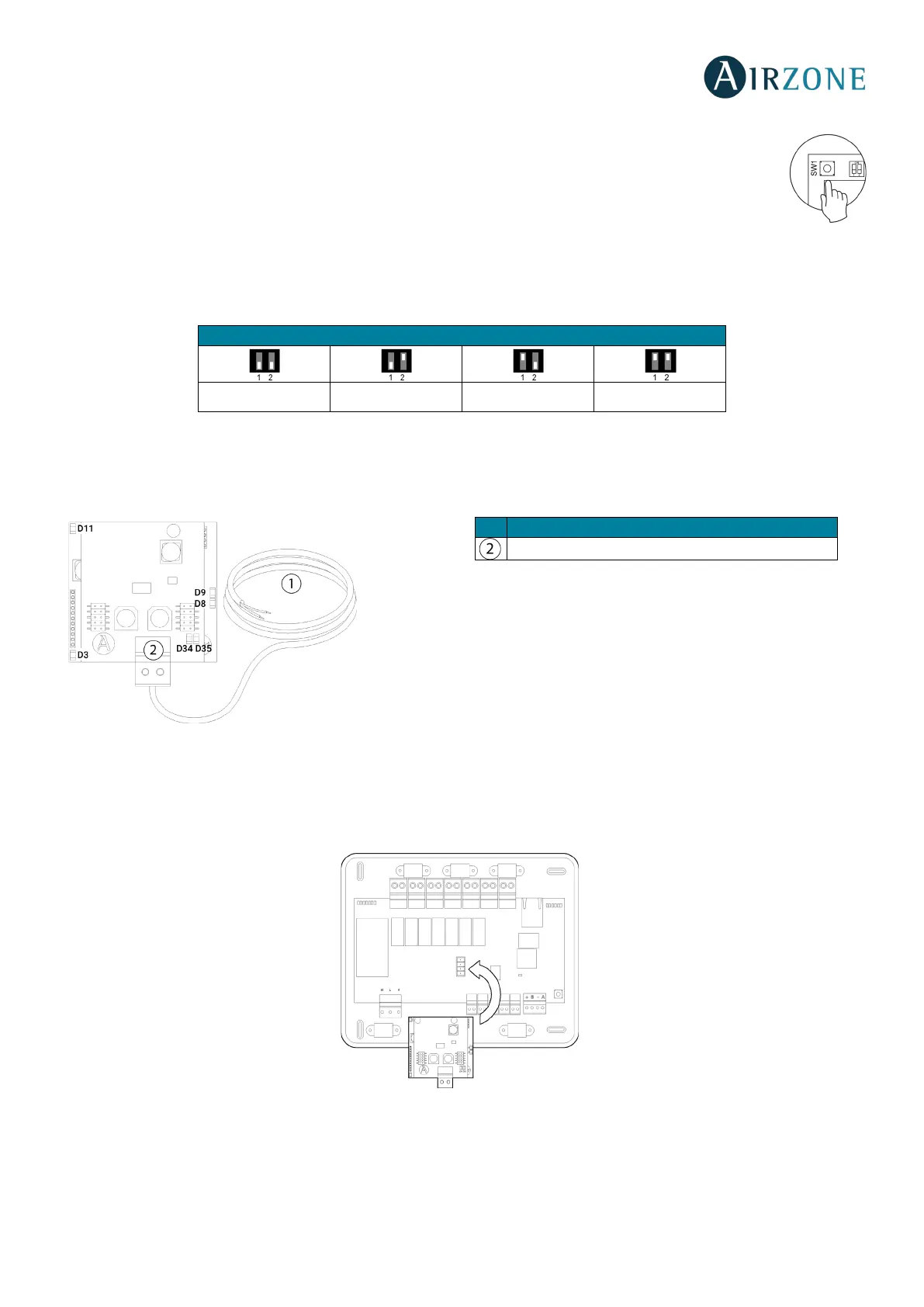
The microswitch SW2 sets the type of installation to control by the central production control. The operation logic of the
microswitch is as follows:
AIRZONE AIR TO WATER HP GATEWAY (AZX6GAW XXX)
Important: Only available for installations with AZX6CCPGAWI.
Assembly
The Airzone air to water gateway is integrated into the domotic bus of the Cloud Ethernet Production Control Board,
(AZX6CCPGAWI). It has a 4-pin terminal. Disconnect the terminal to which you want to connect to the Webserver and fit the
connector (Fig. 57)
Configuration
It is required to configure the relays control logic for the production control board, as well as the other parameters of the cloud
production control board. The cloud production control board settings are only available in the master Blueface thermostat of
the system nº1 (see section Cloud CCP Parameters).
Aerothermal 2 pipes 3/4 pipes RadianT
Domotic Bus


 To Next Page