HM135/HM435 Programmer software guide
Preliminary version Page 24
6.6.b Setting procedure
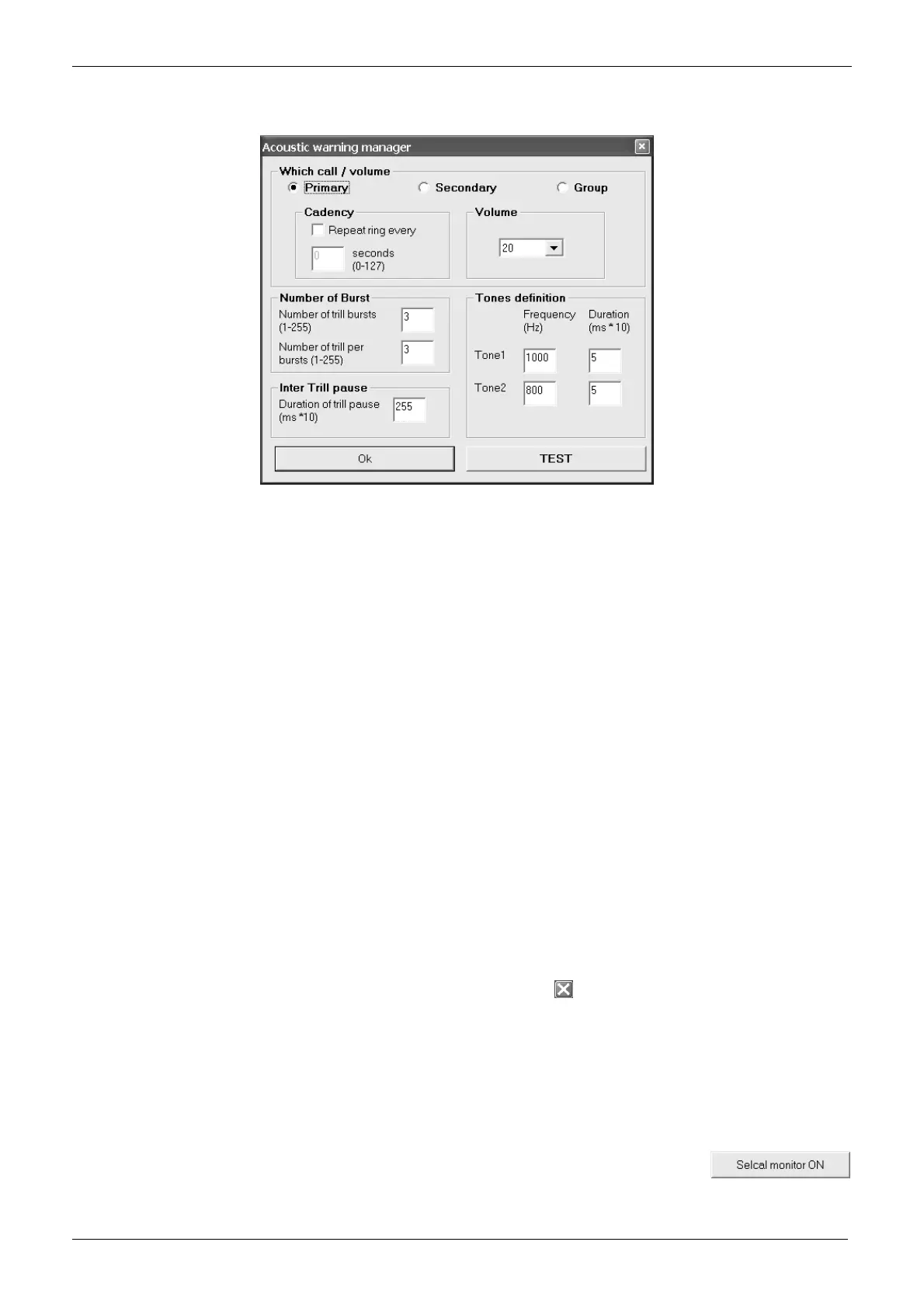
1) From the Global Data window - Set-Up area - click the Acoustic signals button: the Acoustic warning manager window will open.
2) Select the event which you want to change the acoustic signal using the related radio button in the Which call area:
• Primary – When primary selcal (with Sequence I) is properly received
• Secondary – When secondary selcal (with Sequence II) is properly received
• Group – When group selcal (with group sequence) is properly received
3) In the Volume area, use the Volume drag down button to select the volume which the acoustic signals are sent from the speaker.
You might decide to temporarily reduce the volume during the following tests, in this case don’t forget to restore the regular volume after
them.
4) Press the TEST button in order to check the current ring for the selected event. Now you have three choices:
If you need to change it, go on with the following step(s)
If you want to check another ring, go back to the step 2)
If you don’t want to change any ring, go to step 10)
5) If you need to continuously repeat the ring, go to the Cadency area, tick the Repeat ring every checkbox in order to make available the
seconds (0-127) box (normally disabled), then type in it the time interval (in seconds) between each repeating
6) If you want to change the number of bursts to be emitted for each ring, go to the Number of burst area, then type the number of burst
you need in the Number of burst (1-255) box, then type the number of trills (alternations of Tone 1 and Tone 2) per burst in the Number
of trill per burst box
7) If you have selected more than one burst for each ring, you can set the pause time between each burst. Go to the Inter trill pause area
and type the duration of the pause between each burst (1 to 255) in the Duration of trill pause box.
This parameter is expressed in x 10 ms, so if you type 20 you will obtain 200 ms.
8) If you want to change the frequency and/or the duration of Tone 1 or Tone 2 which compose each burst, go to the Tones definition area,
then type the frequency (from 300 to 3000 Hz) and duration (from 1 to 255) of each tone in the proper boxes
The tone duration is expressed in x 10 ms, so if you type 20 you will obtain 200 ms
9) When finished, press the TEST button in order to check the new ring obtained. You have several choices:
If you need to provide other modifications to the current ring, go back to step 5)
If you need to change another ring, go back to step 2)
If you want to exit without any modification (in case of big mistakes). Press
in the upper right corner of the Acoustic warning
manager window
10) Check if the Volume setting is the regular one you need (see the note at step 3).
11) Exit by pressing OK
6.7 Enabling/disabling the selective call audio monitor (Selcal monitor button)
Normally, when you send a selective call, you hear the related tones in the loudspeaker as an audio monitor. If your customer
requires a silent use, you can disable this monitor as follows:
From the
Global Data window - Set-Up area - click the Selcal monitor button: you will toggle it OFF
or
ON depending on the times you press the button.



 To Next Page