HM135/HM435 Programmer software guide
Preliminary version Page 13
5 SELECTIVE CALL SETUP
You can define two separate databases for selective calls: one is for TX and the other for RX. Each database can store up to
15 tone sequences, each of them can be programmed up to 20 tones. The radio can be programmed in order to:
RX - decode up to two RX sequences (Seq. I and Seq. II) per RF channel.
TX - transmit up to five fixed TX sequences per RF channel, to be set as Call1, Call2, Emergency, Transpond and ANI as you will see
later on. Moreover, if the radio is equipped with a keypad microphone, a variable selcall can be also be transmitted.
For further details about setting Call1, Call2, Emergency, Transpond and ANI fixed calls please see the par. 5.4
5.1 Defining Selcal RX parameters
1) Ensure you are in the Global Data window. If not select it as described in Chapter 4.
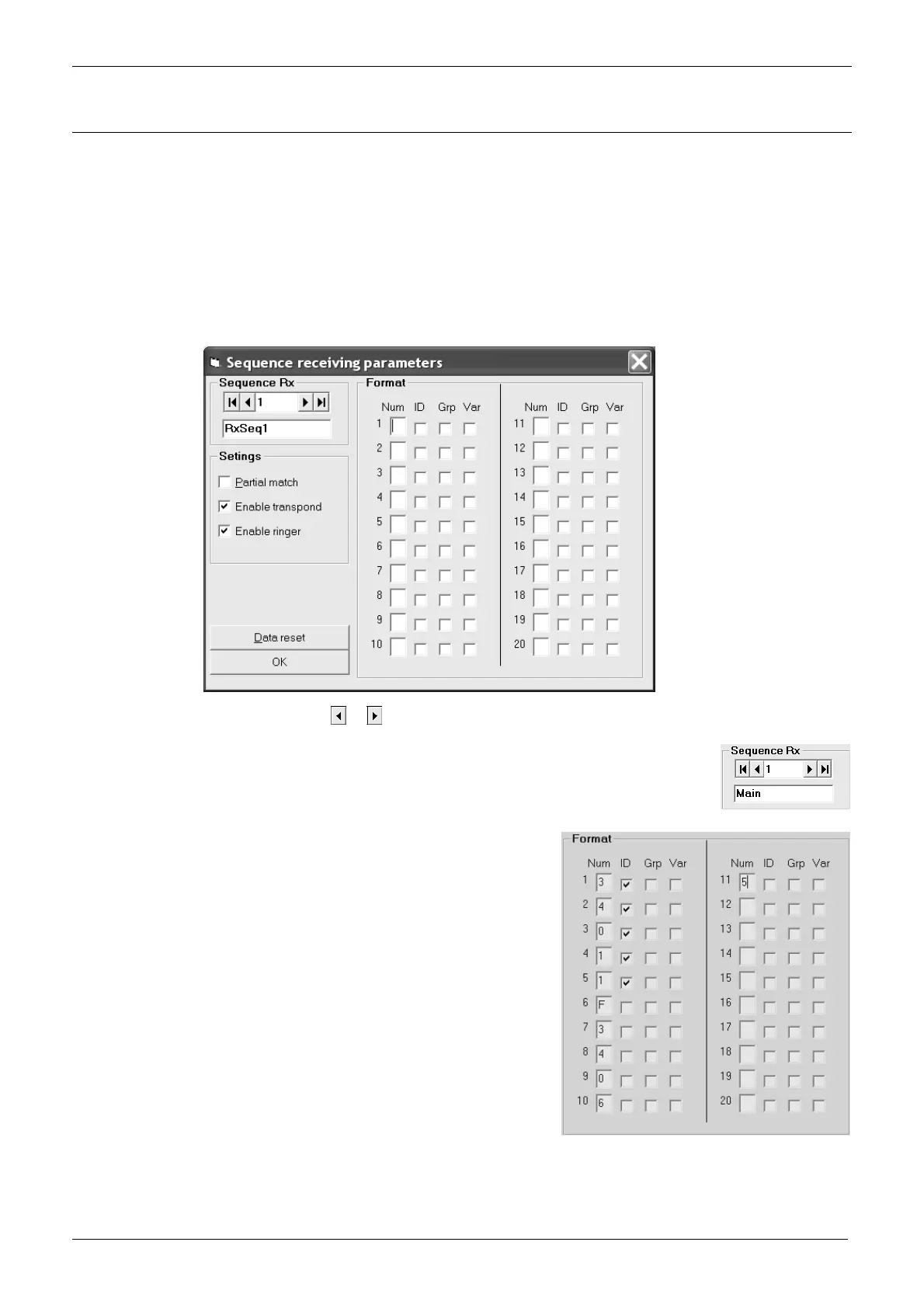
2) From the Tables area, press RX tone sequences button: the Sequence receiving parameters window will open.
3) Go to Sequence Rx area and press the
or button to select the Rx sequence you need to setup. In the following example we
selected the sequence 1.
4) If you want to assign an alphanumeric name to the selected Rx sequence, just type the new name over the
existing one RxSeq.x (in the example we renamed the sequence 1 as Main).
5) Now you have 20 decode events (from box 1 to box 20) available, in which of them you can define the
decoded tone. Type the related numbers (or letters) in each box and then enable the identification ID of the
required tones by checking the related checkbox.
In the example we typed the format 3 4 0 1 1 F(pause tone) 3 4 0 6 5, however
we enabled the ID of the first five tones by ticking only the related check boxes.
We’ll explain later the meaning of this operation.
6) If you like, you can add some additional capability to each event by checking
the related boxes:
ID means Identification. It is useful to recognize a selective call even if it
doesn’t completely match the programmed sequence. Please have a look to
Partial Match at the next step.
Grp is the group checkbox, which allow you to define the related tone as a
group one.
Var this checkbox allows to accept a variable event.
Obviously, GRP checkbox should be ticked only after the last ID digits,
because there is no reason to define the first tones to be decoded as group
ones.



 To Next Page