APOC0274 Ed.3a
Page 25 of 35
+44 (0)1235 861 483 | aleretoxicology.co.uk
Alere™ DDS
®
2 Mobile Analyser User Guide | 10. Alere DDS2 Mobile Analyser Settings
10 Alere DDS2 Mobile Analyser Settings
10.1 Alere DDS2 Mobile Analyser language settings
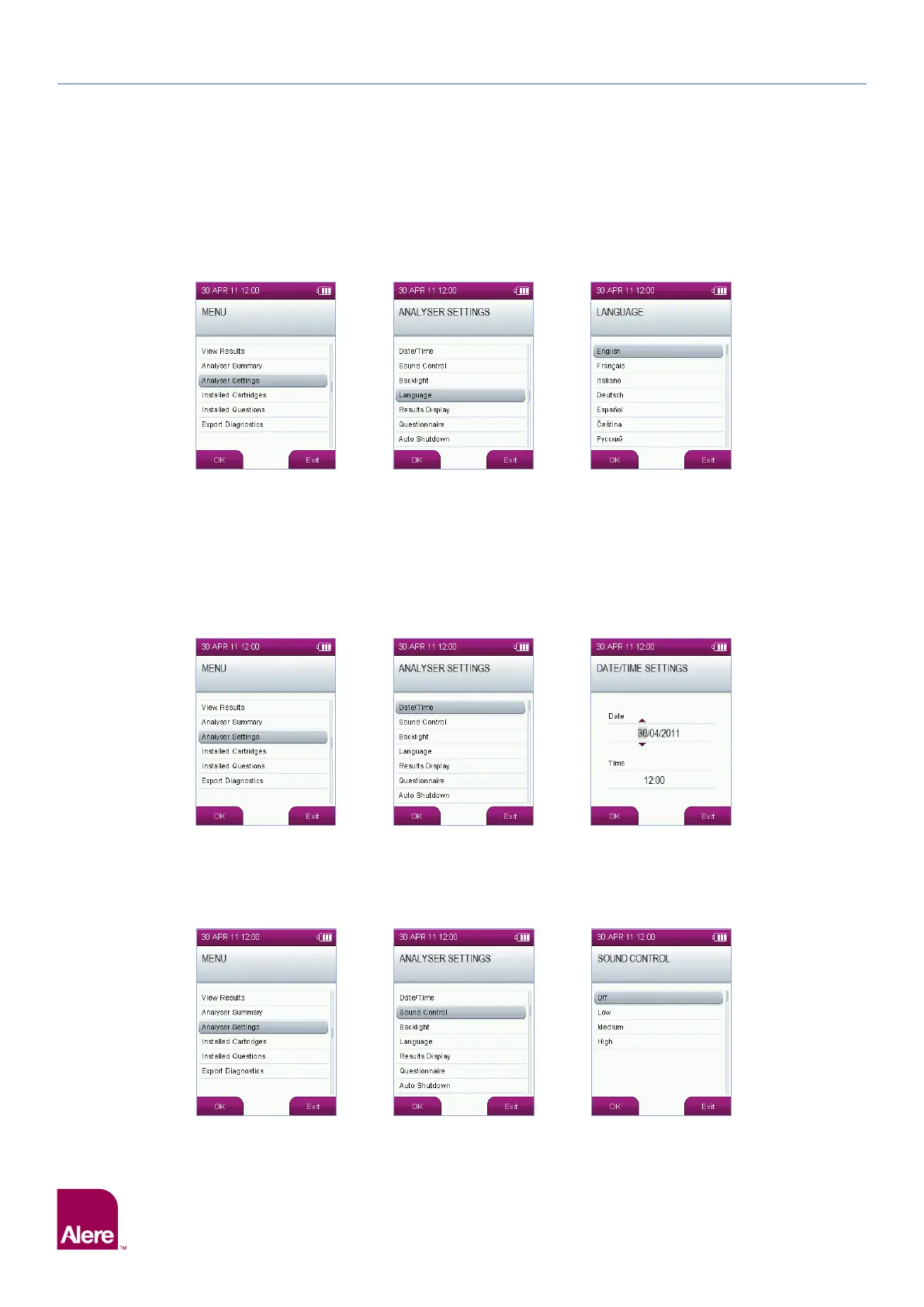
To alter the language settings on the Alere DDS2 Mobile Analyser, select the Analyser Settings option from
the main menu, and then select the Language option.
Use the five way navigation key to highlight the language required, and apply this to the analyser by
selecting OK.
10.2 Setting the date and time
Alere DDS2 Mobile Analyser time and date are set to Greenwich Mean Time (GMT) by the manufacturer. To
alter the date and time settings on the analyser, select the Analyser Settings option from the main menu,
then in the analyser settings screen, select the Date/Time option.
Use the five way navigation key to select the time and date, then press OK to save the settings.
10.3 Changing the volume settings
To alter the volume setting on the Alere DDS2 Mobile Analyser, select the Analyser Settings option from the
main menu, then in the analyser settings screen, select the Sound Control option.
Use the five way navigation key to select the required volume setting, then press OK to save the settings.


 To Next Page