APOC0274 Ed.3a
Page 5 of 35
+44 (0)1235 861 483 | aleretoxicology.co.uk
Alere™ DDS
®
2 Mobile Analyser User Guide | 1. Introduction
1.9 Alere DDS2 Mobile Analyser calibration
The Alere DDS2 Mobile Analyser is factory calibrated and does not require any further calibration by the user.
However, it is recommended to carry out a regular performance check using the quality control Alere DDS2
Test Cartridges provided with the Alere DDS2 Mobile Test System (see section 7 QC Tests).
1.10 Maintenance and cleaning
If required, the exterior of the Alere DDS2 Mobile Analyser and its accessories can be wiped with a lint free
cloth or a damp cloth with mild detergent. Wipe away any spillages immediately. Do not use abrasive cloths
or other material, and do not allow the unit to come into contact with any potentially corrosive substances. If
using a damp cloth, ensure the analyser is turned off and disconnected from mains A/C power.
DO NOT try to clean inside the analyser or open the analyser for cleaning.
The analyser does not contain any user serviceable components. If a fault is suspected or routine factory
maintenance is required, then please contact your distributor or Product Support.
1.11 Servicing
The Alere DDS2 Mobile Analyser requires an annual service which must be carried out by a qualified service
engineer. It is important to have your analyser serviced annually to ensure it is performing correctly. This
requires the analyser and accessories to be returned to the manufacturer or authorised servicing facility for a
short period of time.
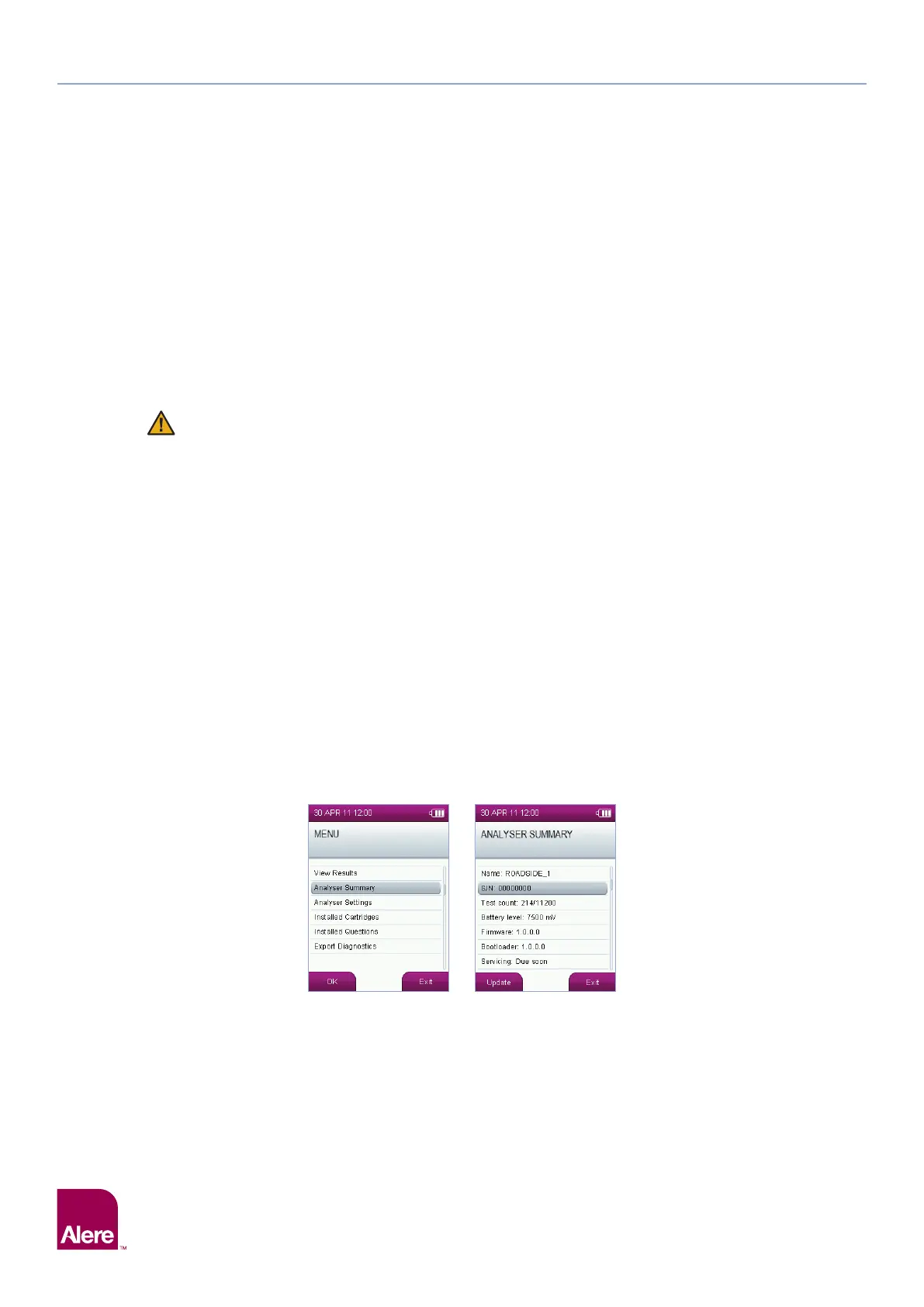
The date that the next service is next due can be viewed in the analyser summary screen, and the analyser
will automatically display the service symbol in the status line when service is due in less than one month.
If the analyser is not returned to the manufacturer for servicing within this time, the symbol will turn from
white to orange.
Service status (OK, due or overdue) will be displayed in the test details for each test and will also be printed
on test printouts.
Accuracy of tests carried out on an analyser which is overdue a service, may be reduced. Failure to return
the analyser for annual service will invalidate warranty claims.
To view the date when the next service is due:
Step 1: From the main menu, select the Analyser Summary option.
Step 2: The following screen will display the servicing status, scroll down to view the due date of the next service:
Please contact your distributor or Product Support to arrange servicing when required. The analyser and
accessories must be returned in the Carry Case for protection in transit.
Step 1
Step 2


 To Next Page