35
3.1.5 Copying data between two
receivers (CLONE)
You can copy settings stored in memory from one DJ-X2000 (master) to another
(slave). This is referred to as "cloning". Cloning requires a cable with 2.5ø stereo
plug to connect the two receivers.
1
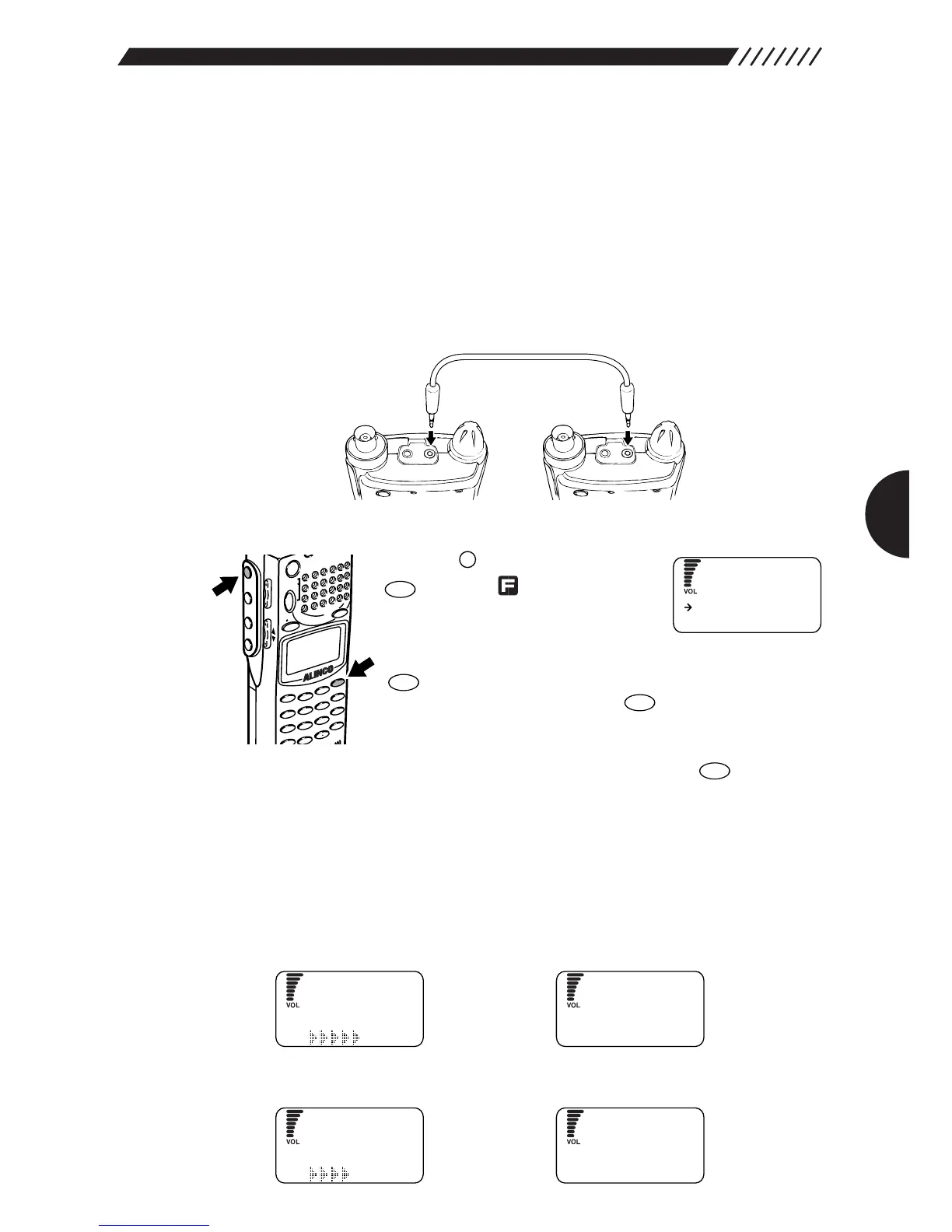
Turn ON two DJ-X2000 units and interconnect them.
Detach the cap from the top of each unit. As illustrated below, connect the cable
between the CLN terminals.
2
Execute the cloning command.
Press the key, and then press the
key while is shown on the
display. The MENU will appear.
Point the arrow at +CONFIG using
the dial or UP/DOWN key, and then press the
key. The CONFIG menu will appear. Point the arrow
at +CLONE, and then press the key.
The CLONE menu will appear.
Point the arrow at the desired cloning command using the
dial or UP/DOWN key, and then press the key. This
operation is not required for the slave unit.
READ Copies the data stored in the memory from the other DJ-X2000 unit.
WRITE Copies the data stored in the memory to the other DJ-X2000 unit.
END Cancels the cloning command without copying any data.
• When READ is selected:
Displayed on the master unit Displayed on the slave unit
• When WRITE is selected:
Displayed on the master unit Displayed on the slave unit



 To Next Page