72
3.4.5 Using the Bank Link function
This function lets you scan specific memory banks.
1
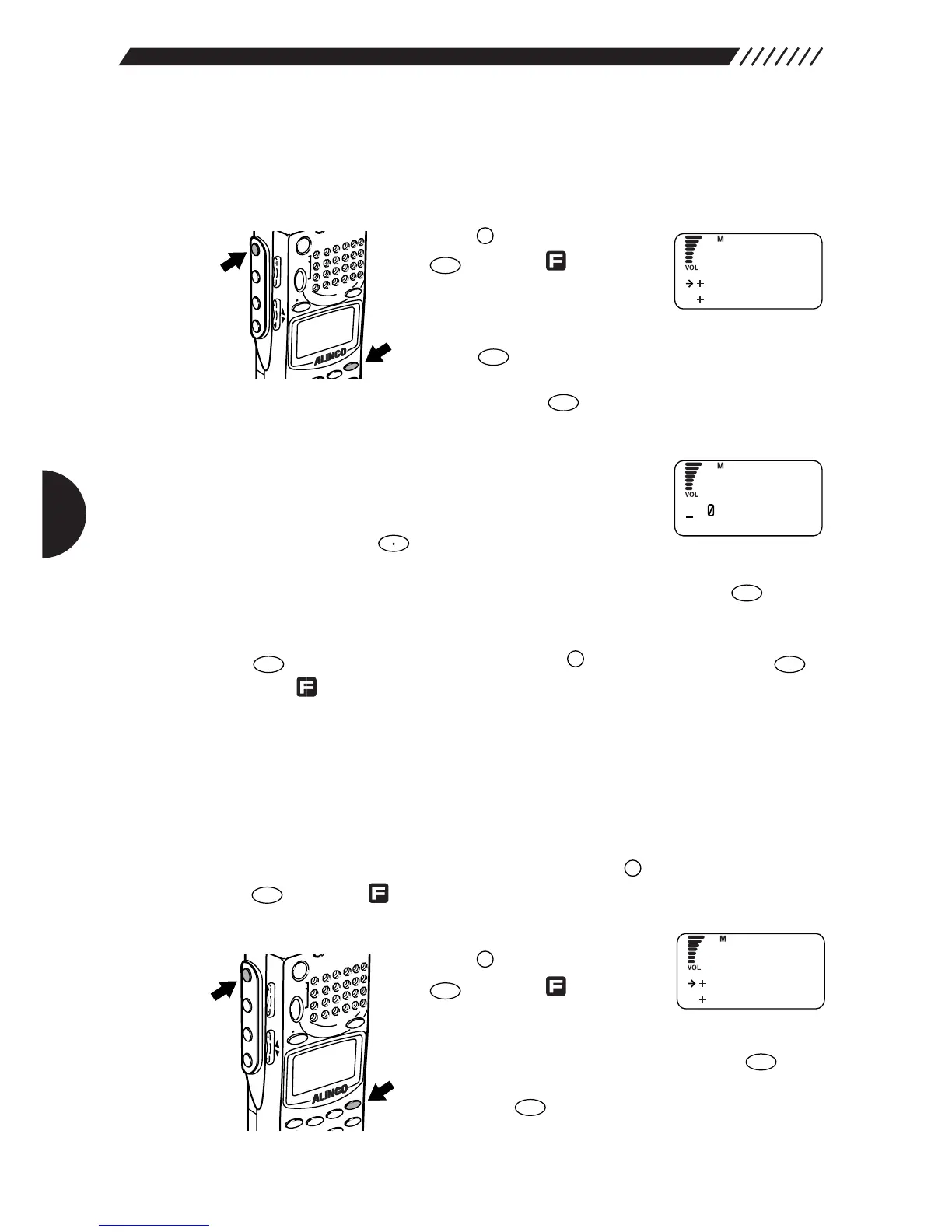
Call up the Bank Link screen.
Press the key, and then press
the key while is shown
on the display.
The MENU will appear. Point the
arrow at +MR using the dial or UP/DOWN key, and then
press the key.
The MR menu will appear. Point the arrow at +MR LINK
and then press the key.
The MR Bank Link screen will appear.
2
Select the memory bank you want to use for
scanning.
Using a numeric key, specify the bank number you want
to link. Pressing the key toggles from bank groups
A through E. To use all the memory banks for scanning, select all the banks 0
through 9. After you have finished specifying the bank(s), press the key.
The display will return to the MR screen. Point the arrow at END and then press
the key (Alternatively you may press the key, and then press the
key while is shown on the display).
3.4.6 Selecting memory channels for
scanning
Only the specified memory channels can be used for scanning. Up to 200
memory channels (20 programs x 10 banks) may be specified for scanning. To
perform scanning on the memory channels, press the key, and then press
the key while is shown on the display.
1
Call up the PMR menu.
Press the key, and then press
the key while is shown
on the display.
The MENU will appear. Point the arrow at +MR using
the dial or UP/DOWN key, and then press the key.
The MR menu will appear. Point the arrow at +PMR and
then press the key.
The PMR menu will appear.



 To Next Page