22
2.5 Switching frequency band
The DJ-X2000 uses a dual VFO system, so that a frequency change can be done
smoothly by inputting a new frequency on the second band in advance. The
frequency currently being monitored is displayed next to the capital letter on the
top line of the display. Frequency band can be switched as follows.
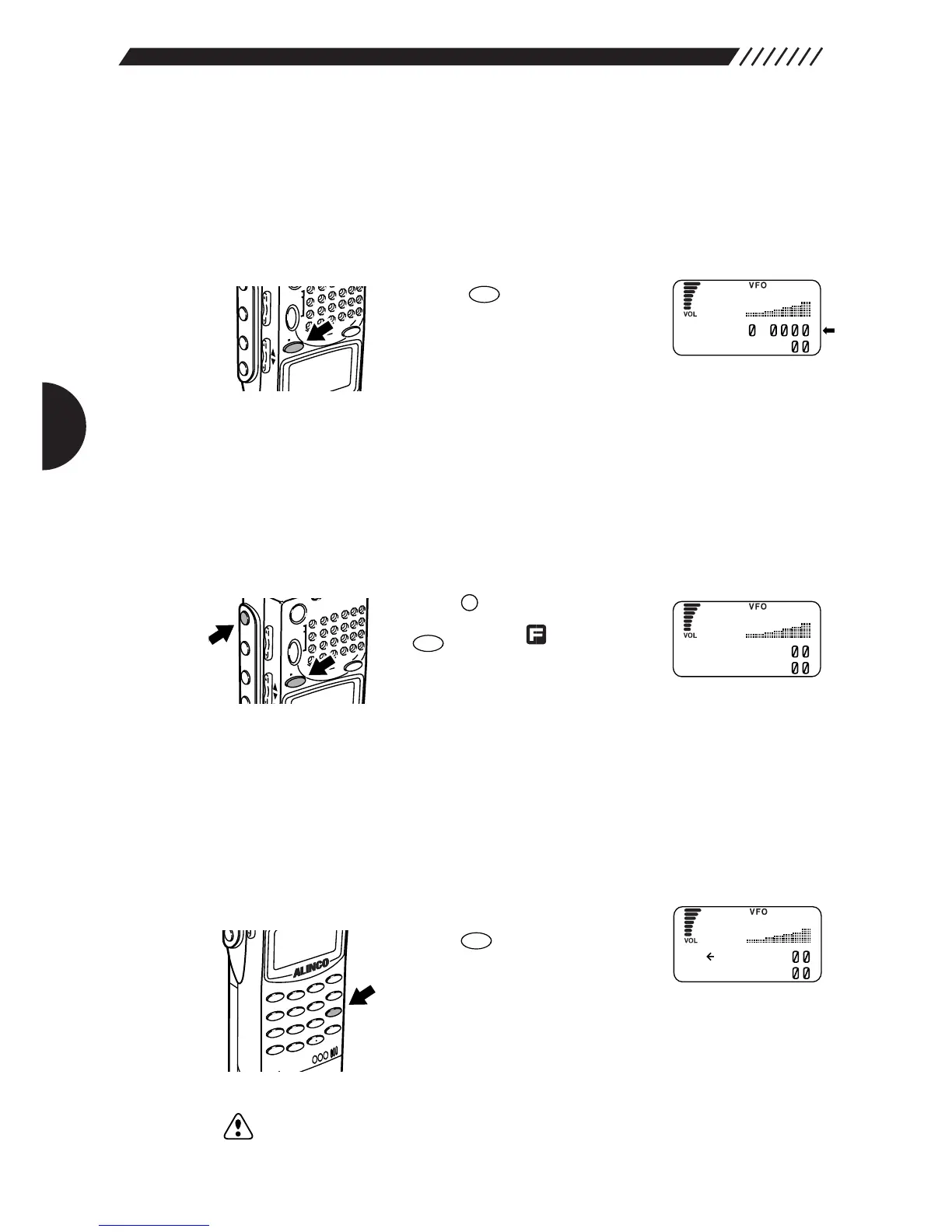
Press the key. The
frequencies on the top and bottom
lines will switch places, with the
letters changing between capital
and lower case.
2.6 Copying frequencies from one band to
the other
The frequency on the currently used band can be copied into the other band as
follows.
Press the key, and then press
the key while is shown on
the display.
This will copy the frequency on the
currently used band (displayed on top line next to capital
letter) into the other band (displayed on bottom line next to
small case letter).
2.7 Scanning
Scanning is used to locate frequencies with signals present. Basic scanning
operations are as follows.
• To scan
Press the key. Scanning will
start and will proceed in the set
frequency steps.
While scanning, an arrow icon is displayed next to the
frequency on currently used band (displayed on top line
next to capital letter). The arrow points to the left while
scanning towards the higher frequencies.
Note: If CTCSS or A/B Squelch is selected, the scan may be delayed since it takes
some time to match the selected parameters.



 To Next Page