67
REPLACING THE RIBBON CARTRIDGE
WARNING
Do not attempt to insert or unplug the power plug with wet hands.
Doing so could result in fire or electrocution.
CAUTION
Always unplug the power cord gently. Ripping the cord out of the
outlet might damage the cord and possibly result in fire or
electrocution.
Replace the ribbon cartridge when the imprint becomes too light.
・Prior to opening the top cover to replace the ribbon cartridge, be sure to first ground yourself (e.g.; touch
a large metal object such as a steel desk) to remove static electricity from your body to avoid shocking
the MX-300. This is particular important when the humidity is low (winter, et al). Failure to remove
static electricity could result in mechanical failure.
The ribbon cartridge model number is CE319250.
(This model number is subject to change without notice when new cartridges are produced.
When purchasing ribbon cartridges, be sure to check whether they are compatible for use with
the MX-300.)
1
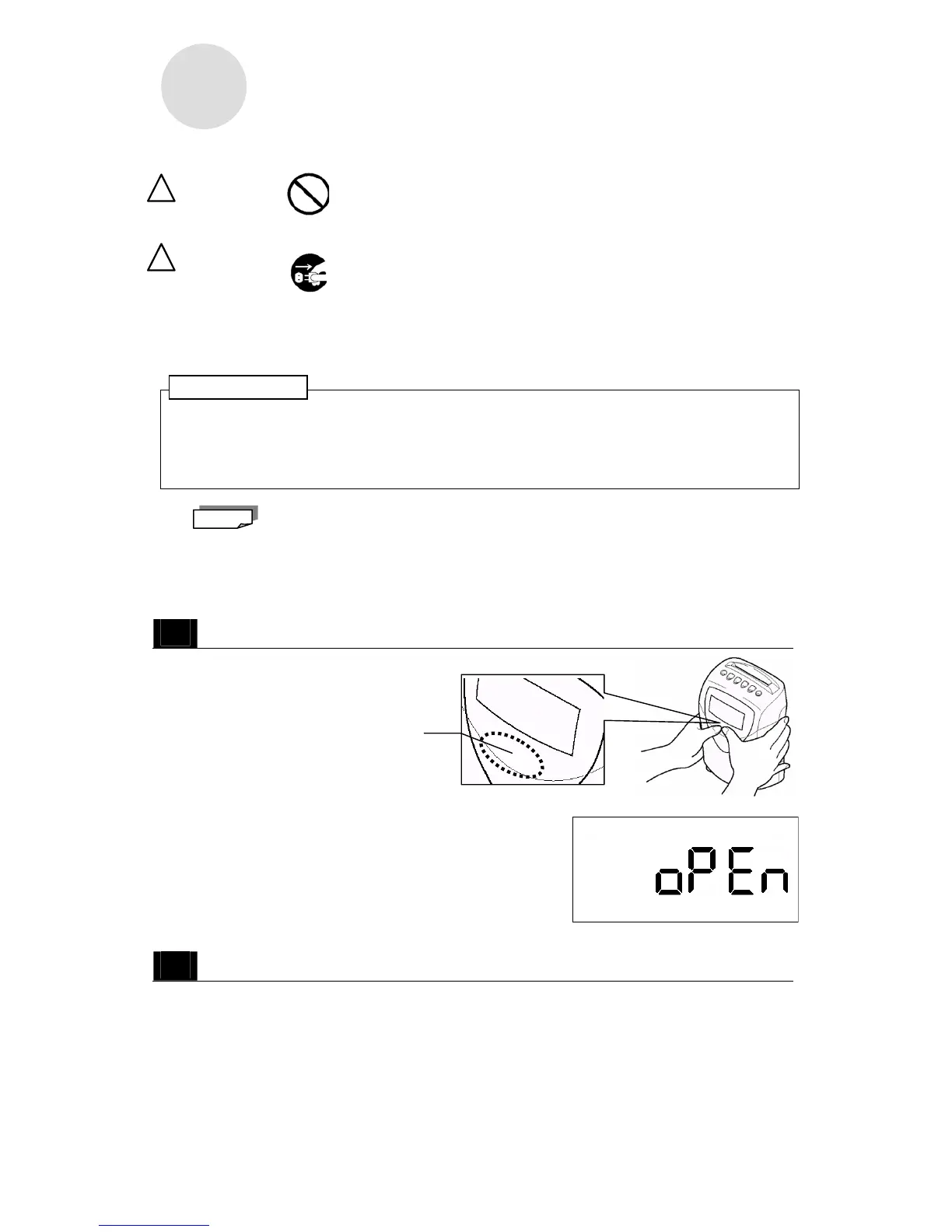
While the power is still on, remove the top cover.
・Press your thumbs (somewhat firmly)
just below the LCD display (in the
location illustrated) to remove the
top cover.
・When you remove the top case, the word "OPEN" flashes
on the display.
2
Unplug the power cord from the outlet.
Press your thumbs here.
ATTENTION!
Note
!
!
NO WET HANDS!
GENTLY UNPLUG
THE PLUG!



 To Next Page