3
The LCD Display
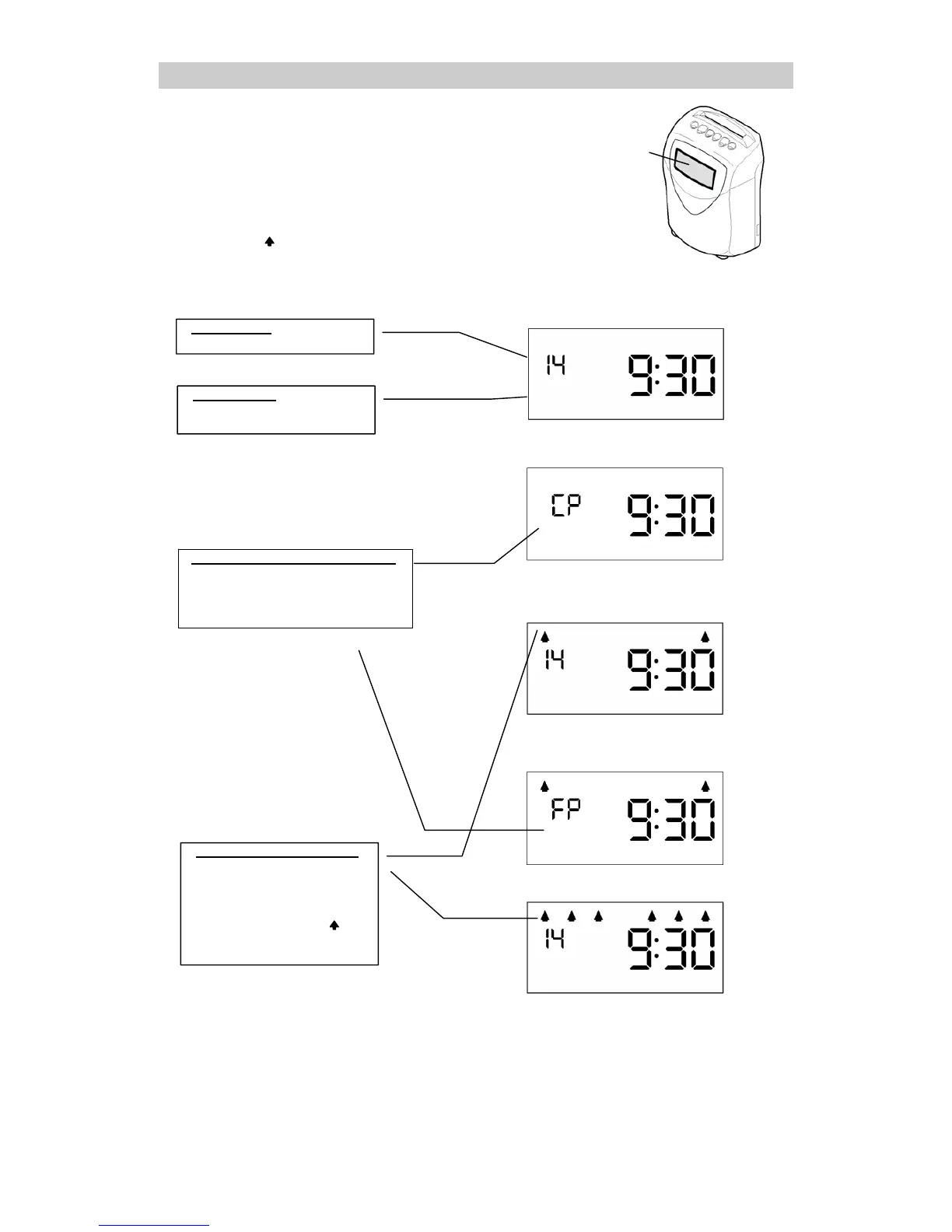
◆Display during normal operation
During normal operation, the LCD displays the date and time (24 hour
format (HH:MM)) and the currently selected calculation mode. The
arrow pattern along the top indicate the currently selected calculation
mode.
Display during "NO CALCULATION"
LCD displa
Display during "REGULAR
EMPLOYEES & HOURLY
WORKERS WITH FIXED
SHIFT" mode
Date Displa
Displays the current date.
Time Displa
Displays the current time
(HH:MM).
Combined Hourl
Worker Mode
Displays the hourly worker
category in the date display
segment when punching the time
on hourly worker time cards.
Calculation Mode Displa
The calculation mode
configured using the
programming card is
displayed. The top of the
display (arrow pattern )
indicate the currently selected
calculation mode.
Display during "HOURLY
WORKERS WITH FIXED
SHIFT" time punching
Display during "REGULAR
EMPLOYEES & HOURLY
WORKERS WITH OPEN SHIFT"
mode
Display during "HOURLY
WORKERS WITH OPEN SHIFT"
time punching



 To Next Page