Patient monitor User’s manual
Chapter 14-6
14.4 Setting Gas Parameter
Select the parameter area of CO
2
, O
2
, N
2
O and AA, to enter the setting
As the requirement of the different module types, you may select the AA
type as required. Select the correct AG type before AG measurement. Select
【
AA Type
】
in the gas parameter setting menu, and select a proper AA label
from following list as required.
The AG module can monitor two type Anesthetic gasses, and can also
recognise the gas type automatically.
Select 【 Scale 】 in the gas waveform setting menu, and you can select the
wave scale in the options as required, and the waveform amplitude will vary
Select
【
Wave Speed
】
in the gas waveform setting menu, and select the wave
speed in the options as required.
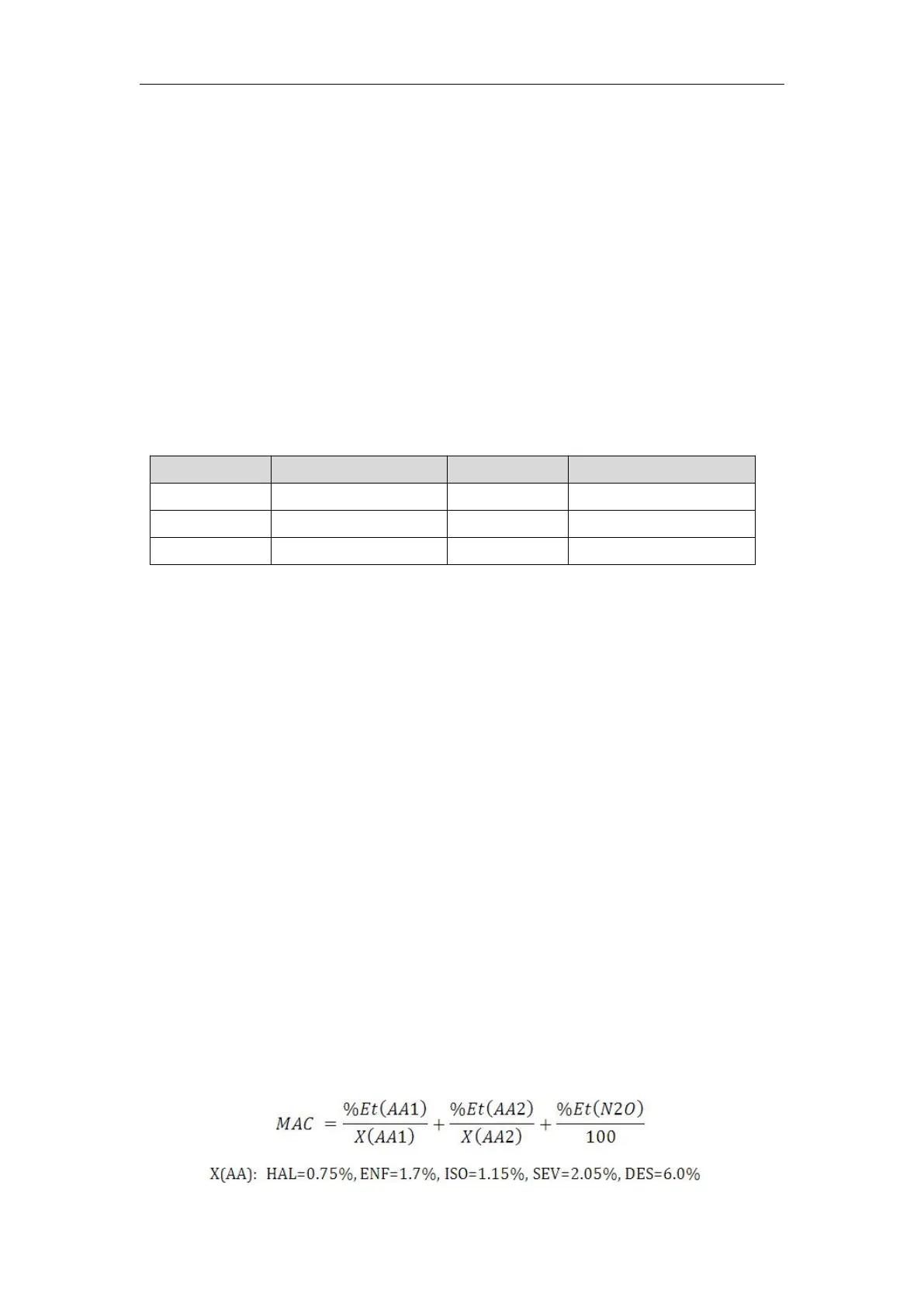
Minimum alveolar concentration (MAC) is a standard for comparing the
potency of inhalation anesthetics. The MAC value represents the alveolar
concentration of an anesthetic (at one atmosphere) that, in 50 percent of a tested
population, prevents gross muscular movement in response to a painful,
standardized stimulus.
The MAC value may be calculated and displayed by using end-tidal (Et) gas
concentrations according to the following formula:



 To Next Page