Chapter 2 Design the Standard Curve Experiment
Finish the Design Wizard
41
Applied Biosystems 7500/7500 Fast Real-Time PCR System Getting Started Guide for Standard Curve
Experiments
Notes
Finish the
Design Wizard
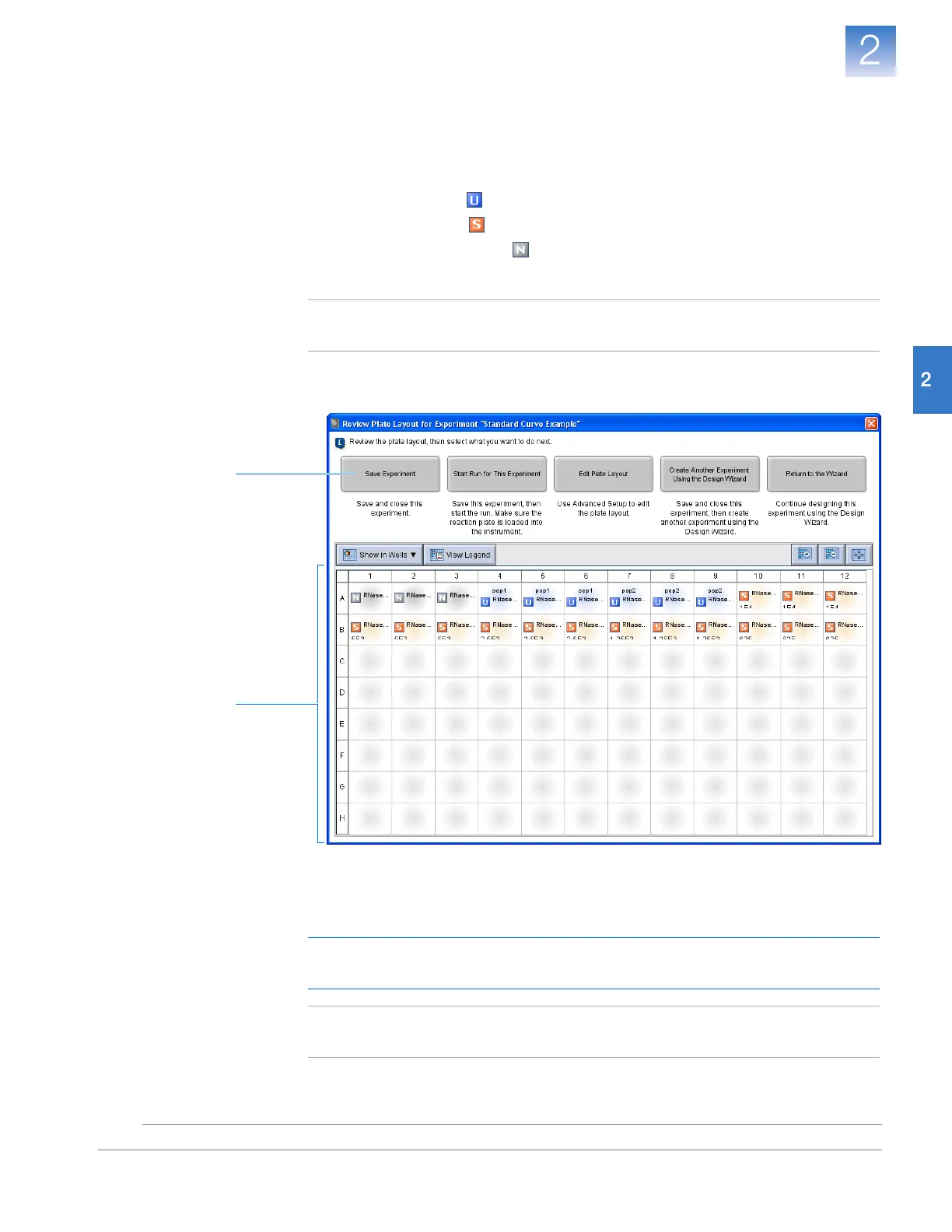
1. At the bottom of the 7500 software screen, click Finish Designing Experiment.
2. In the Review Plate Layout for Experiment window, review the plate layout. Make
sure there are:
• 6 Unknown wells
• 15 Standard wells
• 3 Negative control wells
• 72 Empty wells
Note: If the plate layout is incorrect, click Return to the Wizard and check your
entered values.
3. Click Save Experiment.
4. In the Save Experiment dialog box,
enter
Standard Curve Example Setup.eds
in
the File name drop-down list, then click
Save
. The example experiment is saved and
closed, and you are returned to the Home screen.
IMPORTANT! Do not save the experiment using the default file name. Doing so
will overwrite the example experiment already present in the experiments folder.
Note: By default, the example experiment is saved to the <drive>:\
Applied Biosystems\<software name>\experiments folder.
2
3












 To Next Page