4.0 The Joystick / Monitor Mount
Overview: !
The TRINITY Joystick is the new human interface, which controls the Tilt axes !
and the custom software presets.!
!
Joystick!
!
NOTICE!
Speed, direction and sensitivity can only be adjusted with a PC or Tablet using !
Windows 8 or 10 running the TRINITY software and will be stored in the TRINITY head !
via a USB cable.
MODE button!
!
The grey Mode botton at the front recalls !
one of your five preprogrammed user presets.!
!
NOTICE !
Touching it once, will recall preset ONE.!
Touching it twice, will recall preset TWO!
and so on up to preset FIVE.
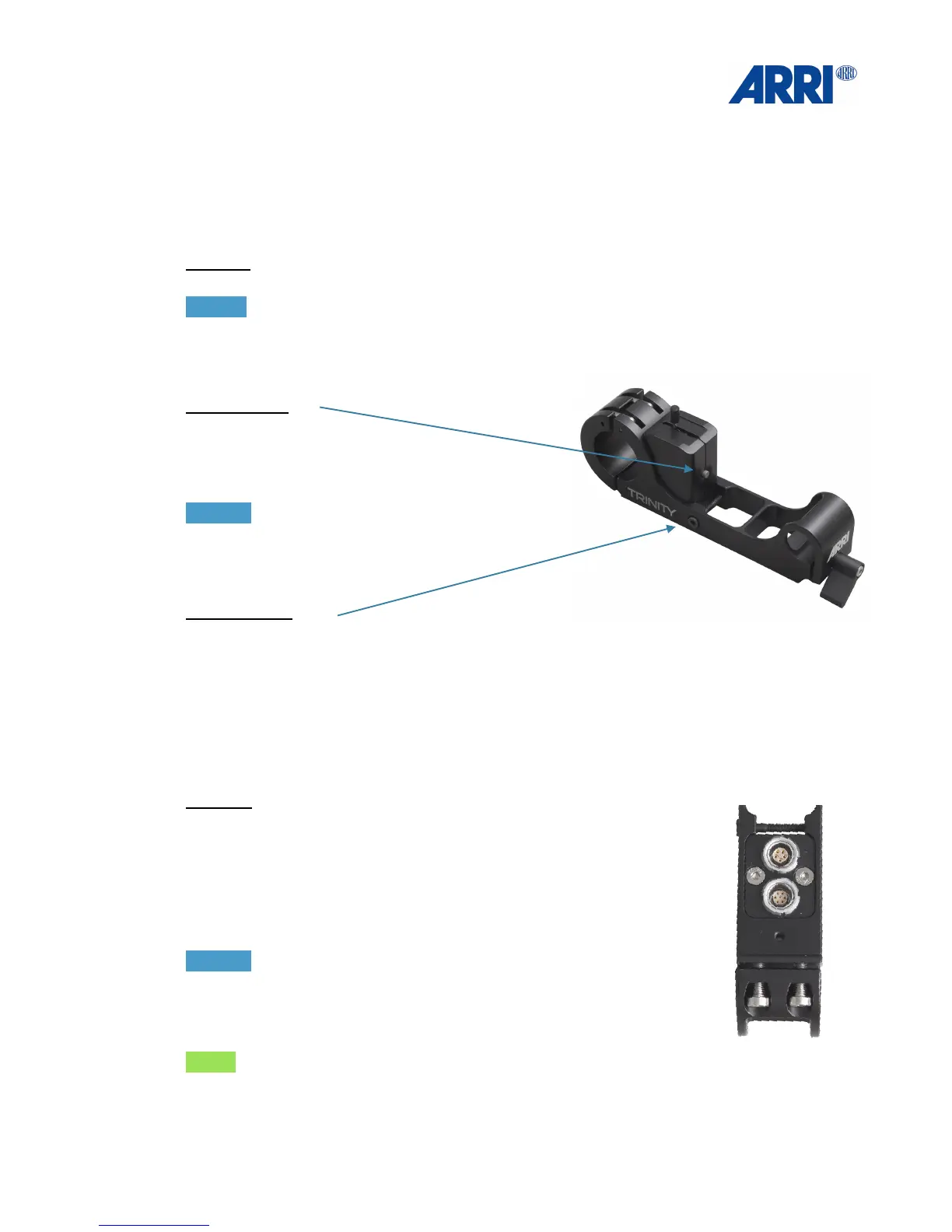
Clamp Screw:!
The screw at the side of the bracket is clamping the
Joystick housing.!
It is also possible to remove the joystick housing and flip it over to mount the joystick on the
underside of the bracket. This optional position places the Joystick at the bottom of the bracket
as an operator choice.!
!
!
!
Bottom:
There are two LEMO sockets at the bottom of the Joystick housing.
One 7pin socket for the Joystick Main Cable and a 5pin socket to
power the ARRI Starlight Monitor. !
NOTICE !
A second monitor cable with a 2pin power cable for standard Transvideo
Starlight is also included in the set.
!
NOTE:!
The Joystick / Monitor Mount is designed to fit onto the artemis gimbal
handle and the Pro handle.


 To Next Page