12.2 How do I know if I got the right P / I / D adjustment?
Or why does the TRINITY vibrate?
!
Golden rule number one:
If the MAXIMA is still vibrating while you’re holding it in your hands, than the P / I / D values !
are to HIGH. So lower the „P“ and „D“ values.!
NOTICE:!
Double check if absolutely all involved components and screws are tightened properly.
Just one loose screw can produce very strong vibrations.
Golden rule number two:
If the motors cannot hold the camera in position, then the P / I / D values are too LOW.
So increase the „P“ and „D“ values.
Golden rule number three:
The „D“ value should always be 10 higher than the „P“ value.
Golden rule number four:
If you want to play around with the „P“ and „D“ values, just program in steps of „5“, up and
down.
Lower value steps than 5 do not make a lot of a difference.
12.3 Joystick settings
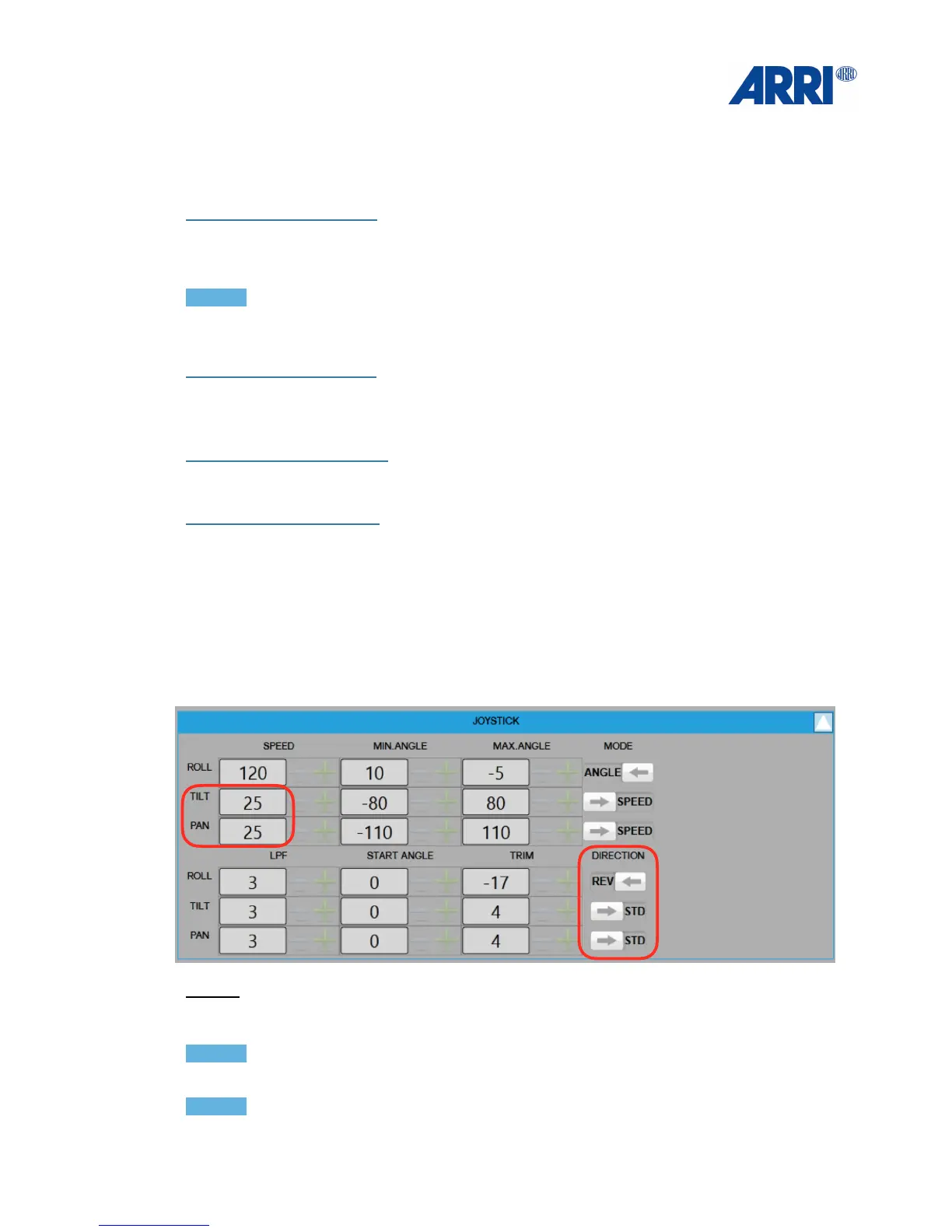
You can set the speed, the ramp and the damping as well as the direction of the joystick.
Speed:
First you should adjust the speed of the single axes to your personal taste and needs.
This can be done in the upper left corner.
NOTICE!
When using the on board joystick or the wireless remote, the speed should not be over 50.!
NOTICE
If the PLC wheels are used, please set the speed to a minimum of 100.


 To Next Page