5.0 Preparing the Monitor Mount
NOTICE!
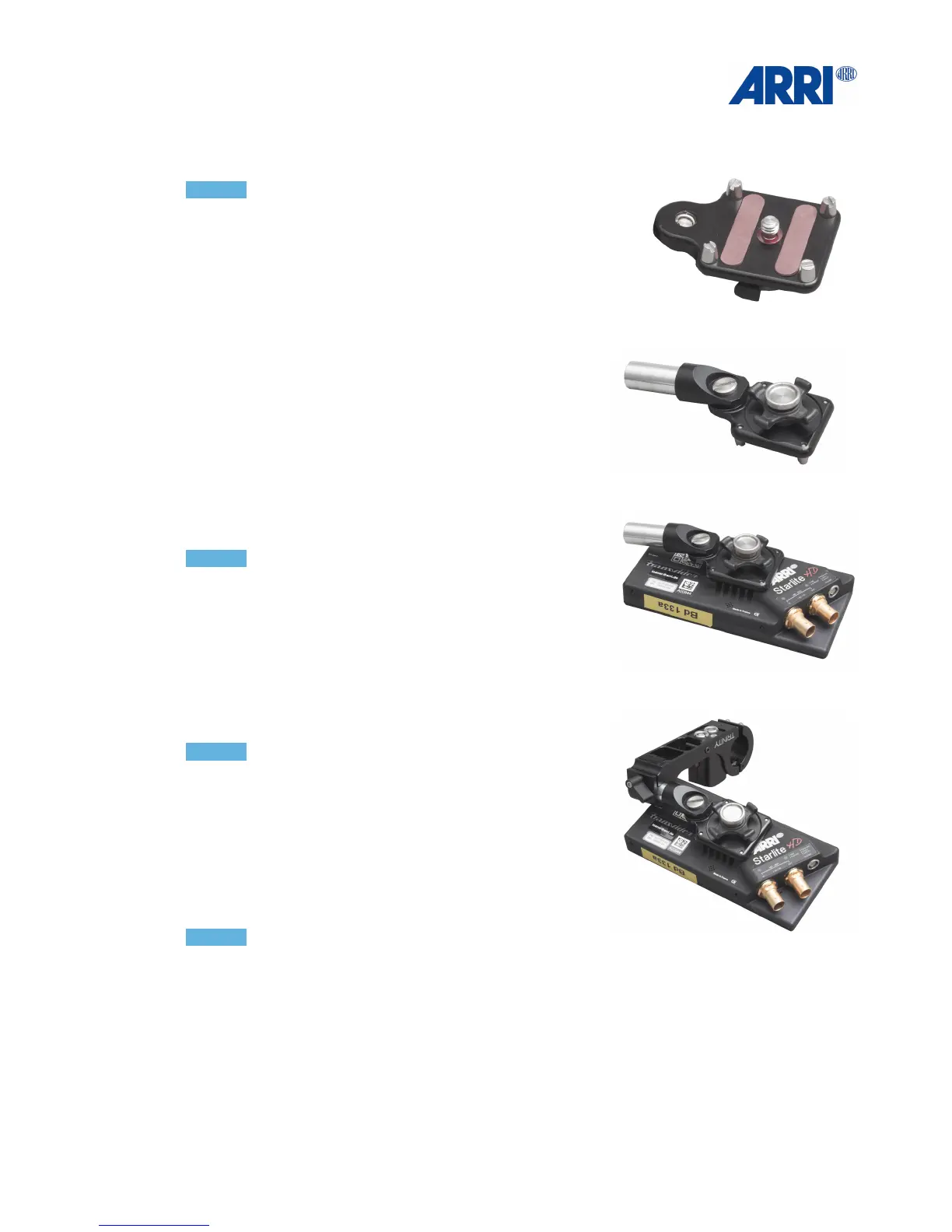
To mount the ARRI Starlight or the Transvideo Starlight to the
Joystick / Monitor Mount, this Transvideo mounting bracket is
required.
!
!
Use the 1/4“ screw to mount the TRINITY Monitor bracket
to the Transvideo mounting bracket.
!
!
Mount the bracket on the back of the ARRI Starlight or
the Transvideo Starlight monitor.!
!
NOTICE!
Ensure that the bracket rod is mounted and facing in the
opposite direction from the BNC and power connectors of
the monitor.!
!
!
Place the rod mounted on the monitor bracket into the
bushing of the TRINITY Joystick / Monitor Mount.
The photos show the setup for „regular“ usage.!
!
NOTICE!
If you a “regular” operator you will need to flip the image
in the monitor software on both axes.!
You will find the more information in Chapter 8.!
!
Left Handed or “goofy“ operators will have to attach the
monitor to the other side of the TRINITY Joystick /
Monitor Mount.!
!
!
NOTICE!
Make sure that the connectors are always pointing away
from the TRINITY Joystick / Monitor Mount.!
!


 To Next Page