7.1 Mounting the Camera
!
CAUTION!
Ensure that Cam Pwr and STAB Pwr are switched OFF.
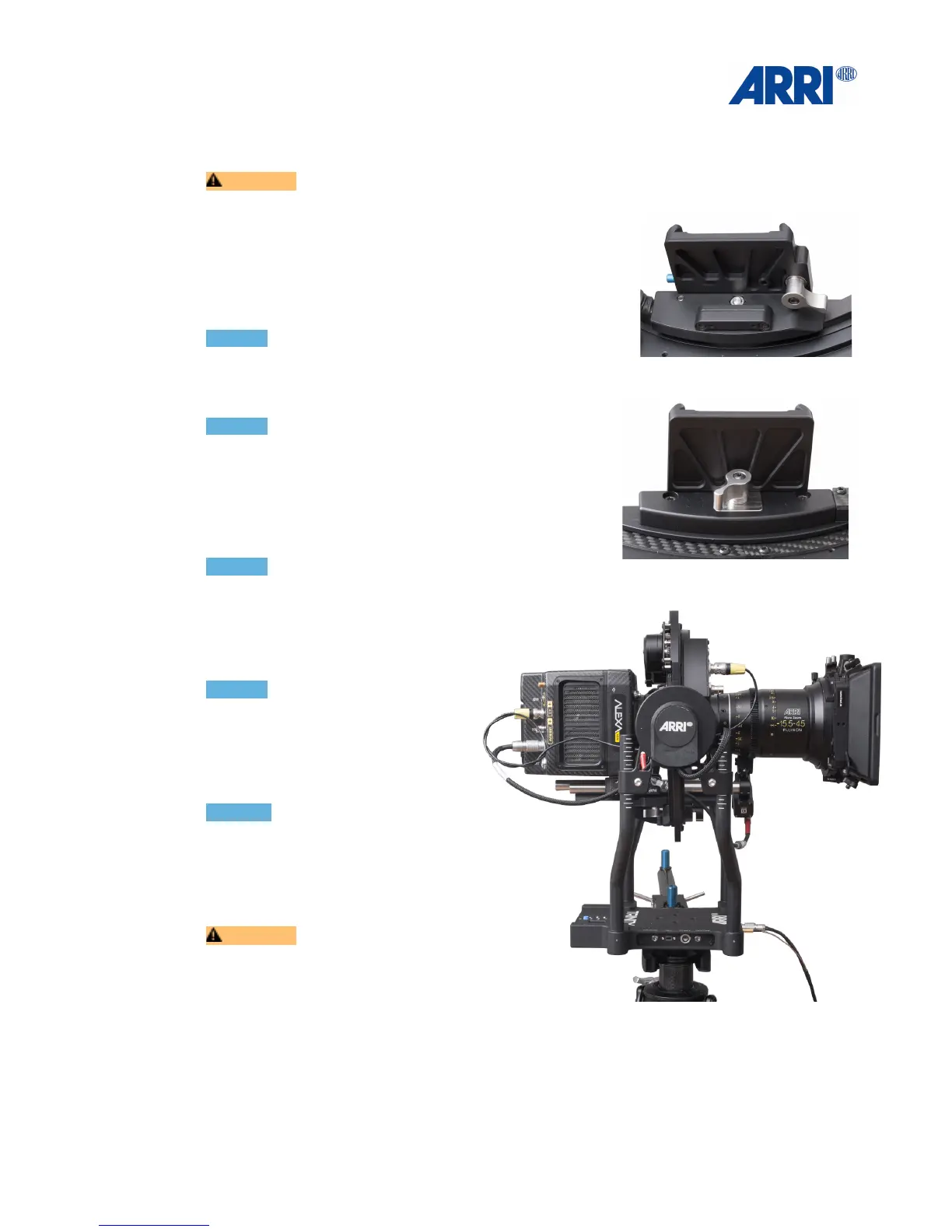
The TRINITY comes with a Quick Lock mounting
mechanism. It offers one clamp mechanism for the
Camera Dovetail Plate located at the right back of the
mount and a side to side adjustment located at the front of
the mount.!
!
NOTICE!
Make sure that the side to side adjustment is in a
center position before you start with the balancing
procedure.!
!
NOTICE!
A perfectly symmetric camera will NOT need any side
to side adjustment.
Open the clamp of the Quick Lock mounting
mechanism and slide the camera inside the ring.
!
NOTICE!
It may be necessary to detach
some accessories to mount the
camera inside the TRINITY head
ring. These can be reattached after
the camera is mounted. !
!
NOTICE!
Make sure that the camera is
always level front to back with the
COG fully neutral when the camera
is horizontally adjusting fore and
aft.
NOTICE !
When adding or removing
components from the camera
adjust the fore and aft to bring the
camera into a neutral and
horizontal position.!
!
CAUTION!
Under no circumstances push
fingers or other limbs between the
TRINITY Yoke and the inner ring, as
injuries can result.!
!
!
!


 To Next Page