"
7."
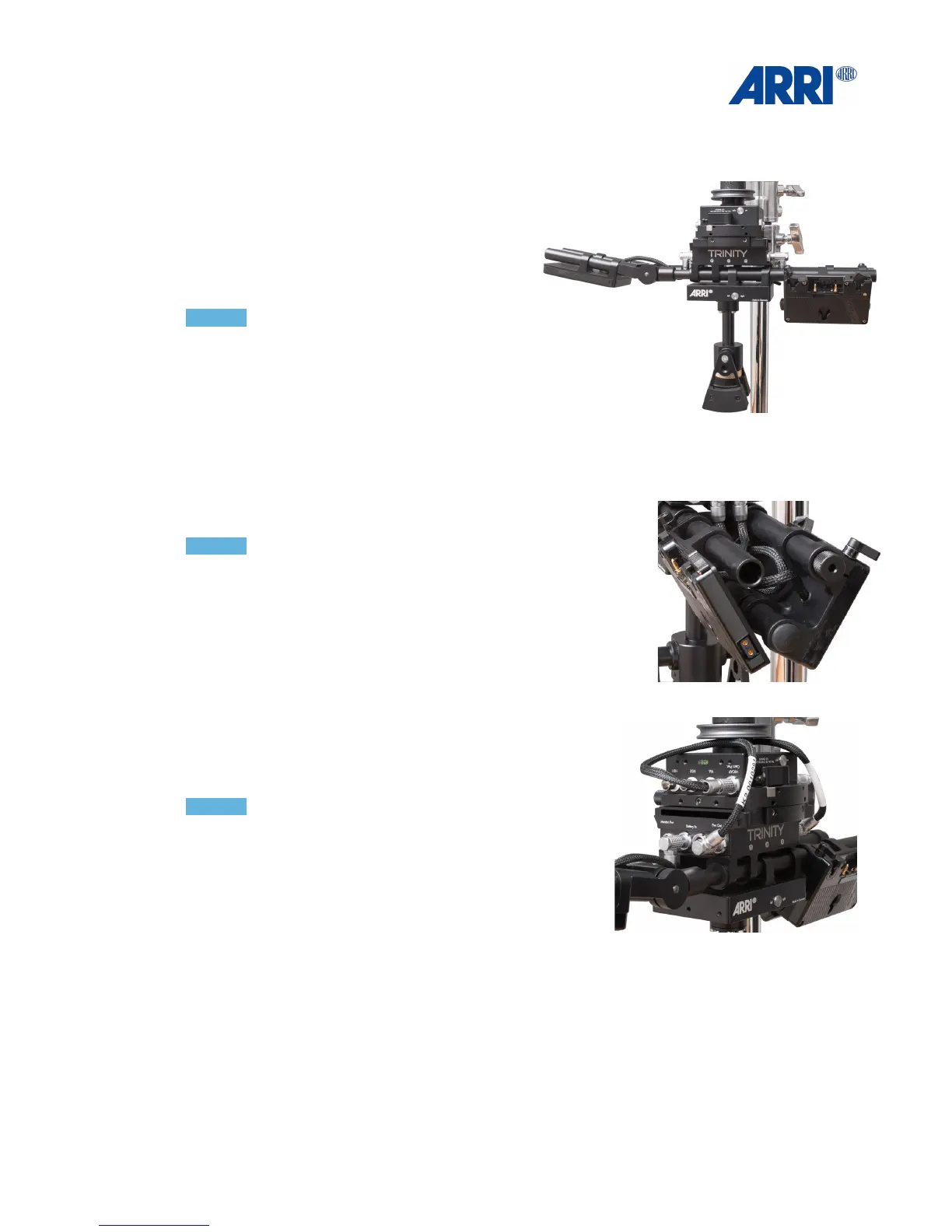
Open the clamping mechanism of the Top
Stage !
and mount the Battery Hanger.!
!
8.!
Slide the Pendulum assembly onto the rods of
the Battery Hanger and center it under the post
and clamp tight.!
!
NOTICE !
The Clamp Lever of the Pendulum has to be
aligned to the front.!
!
9.!
Slide the 3 Battery Mounts onto the rods of the
Battery Hanger. Two in the front and one in the
back as shown.!
!
10.!
You can use the extra rod to mount the two batteries onto the
rods in the front V shaped as shown.!
!
NOTICE !
The clamp lever of the right battery mount has to be close to
the knurled fore and aft adjustment knob without touching the
knob."
"
11."
Connect the batteries to the Battery In !
Power sockets at both sides of the !
Battery Hanger.!
!
12.!
Connect the Pwr Out of the Battery Hanger to the Cam
Pwr Out of your Top Stage at the bottom of the Trinity!
!
NOTICE !
There are different Power cables in the package. !
Always ensure you are using the correct plug fitting to the
correct Camera Power Out sockets on the Top Stage.!
!
!
!
!
!
!
!
!
!
!
!
!


 To Next Page