6 Access Levels and Supervisor Tasks
• Select, view, and print all sterilizer files
• Run diagnostic tests and print reports
• Set date and time
• Configure sterilizer options
• Configure the network connection and upload data to the network
Service-level access
is
onJy for use by ASP Service Representatives.
Additional Utilities Menu
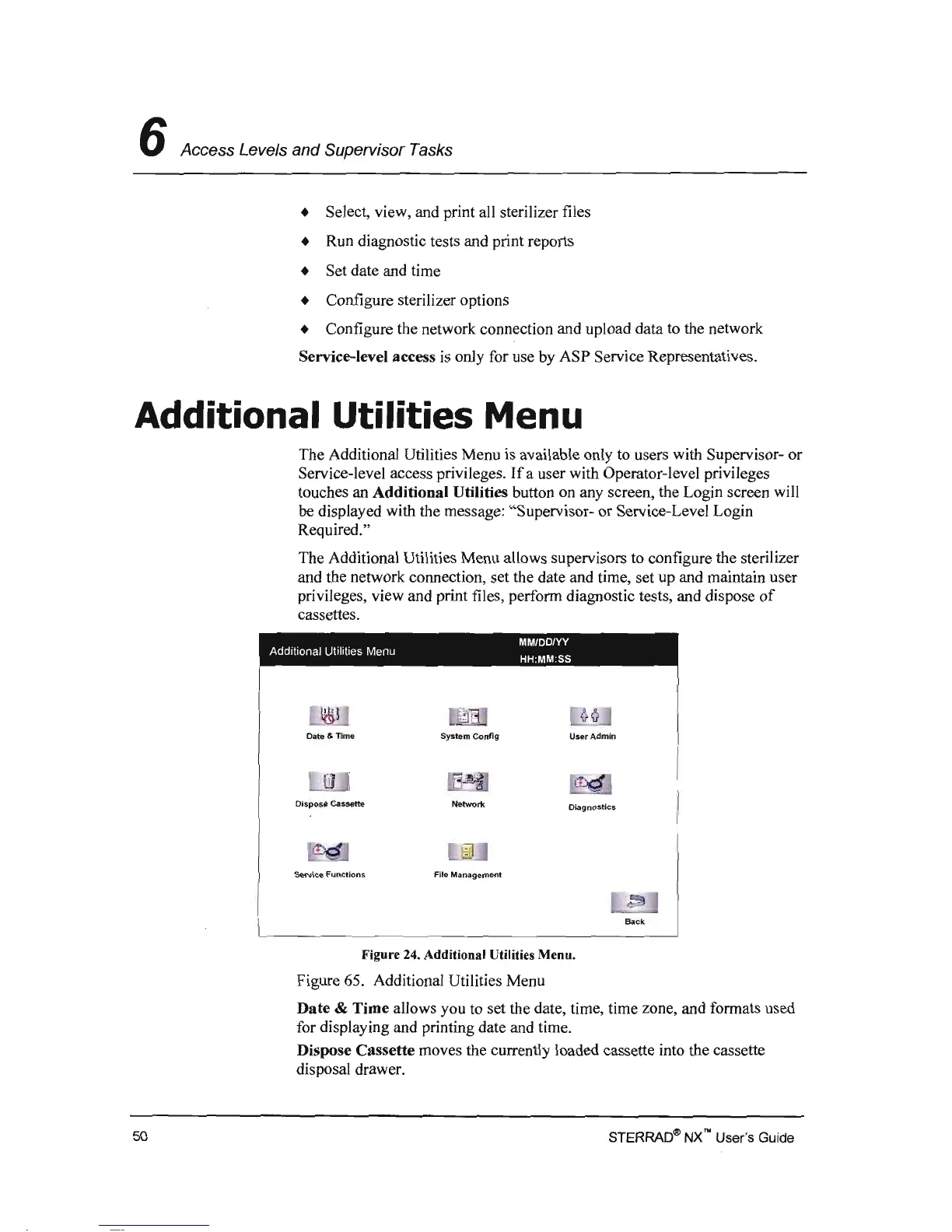
The Additional Utilities Menu
is
available only to users with Supervisor-
or
Service-level access privileges.
Ifa
user with Operator-level privileges
touches an
Additional Utilities button
on
any screen, the Login screen will
be displayed with the message: "Supervisor-
or
Service-Level Login
Required."
The Additional Utilities Menu allows supervisors to configure the sterilizer
and the network connection, set the date and time, set up and maintain user
privileges, view and print files, perform diagnostic tests, and dispose
of
cassettes.
MM/DDNY
Addllionai Utilities Menu HH:MM SS
Date & Time
System
ConfJg
User
Admin
Dispose
Cassette
Networl<
magnostics
Service
Functions
File
Management
Back
Figure 24. Additional Utilities Menu.
Figure 65. Additional Utilities Menu
Date
& Time allows you to set the date, time, time zone, and formats used
for displaying and printing date and time.
Dispose Cassette moves the currently loaded cassette into the cassette
disposal drawer.
STERRAD~
NX"
User's Guide
50



 To Next Page