Access Levels
and
Supervisor Tasks 6
Modify User
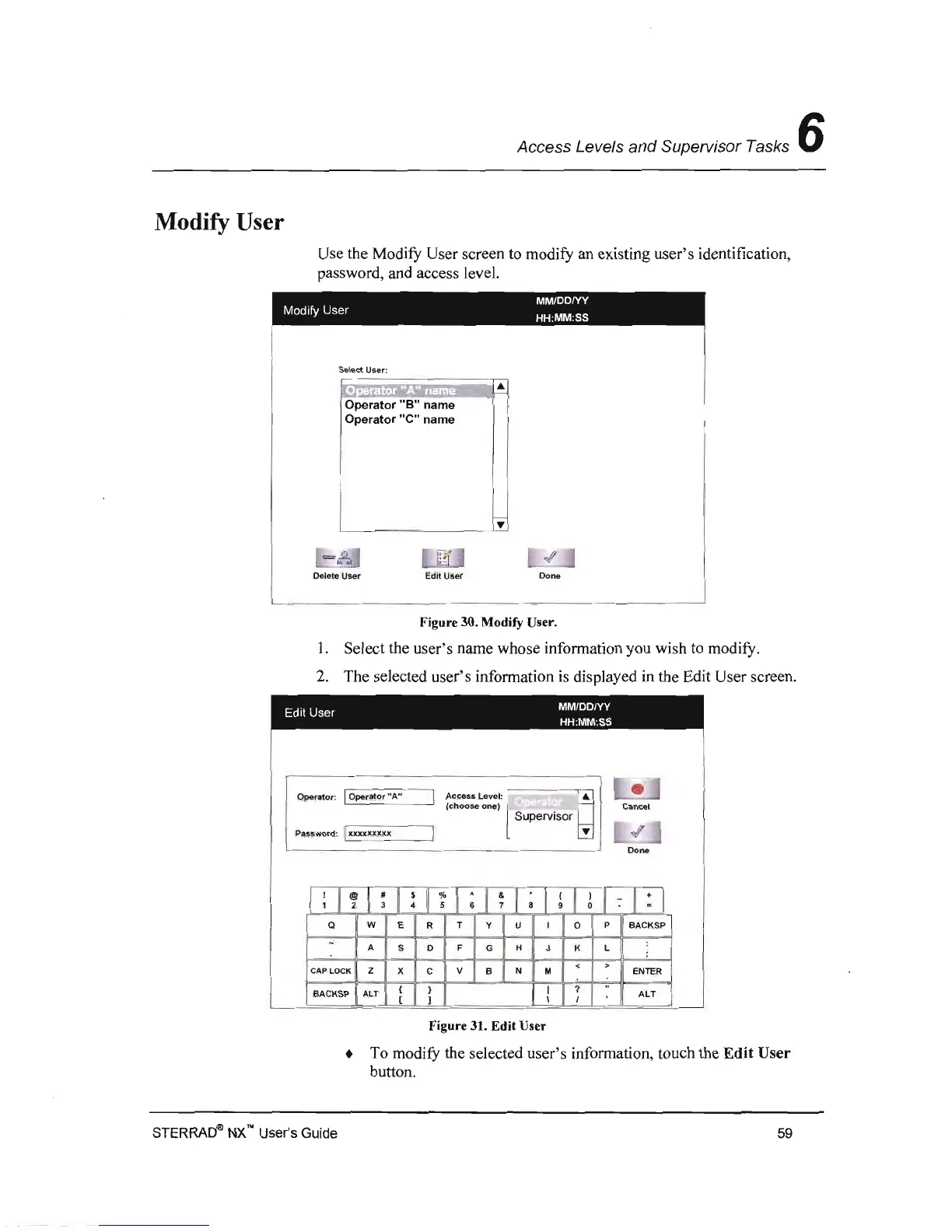
Use the Modity User screen to modity an existing user's identification,
password, and access level.
MM/DDIYY
Modify
User
HH
:
MM
:SS
Select
User
:
, .,
:.
: .
Operator
"8"
name
Operator
"e"
name
Delete User
Edit
User
Done
Figure 30. Modify User.
1.
Select the user's name whose information you wish to modity.
2.
The selected user's information
is
displayed in the Edit User screen.
MM/DD/YY
Edit
User
HH:MM:SS
Operator:
IOperator
"A
"
I
Access Level:
~
•
Cancel
(choose one) l .'
~
Supervisor
Password:
I
XXXXJO<XXX
I
«/
'"
Done
;
I
~
I
~
I
!
I
~'
I
;
I
~
I
~
I
!
I
~
I
~
I
:I
Q
w E R
T Y U
I
0 P
BACKSP
:
-
A S D
F
G H J K L
;
<
>
CAP
LOCK
Z X
C
V
B
N M
ENlER
( )
I
?
"
BACKSP
ALl
ALT
[ ) \
I
Figure 31.
Edit
User
• To
modifY
the selected user's information, touch the
Edit
User
button.
STERRADQ!>
NX'" User's Guide
59



 To Next Page