Chapter 4 Digital Output Settings (DIGITAL OUTPUT)
93
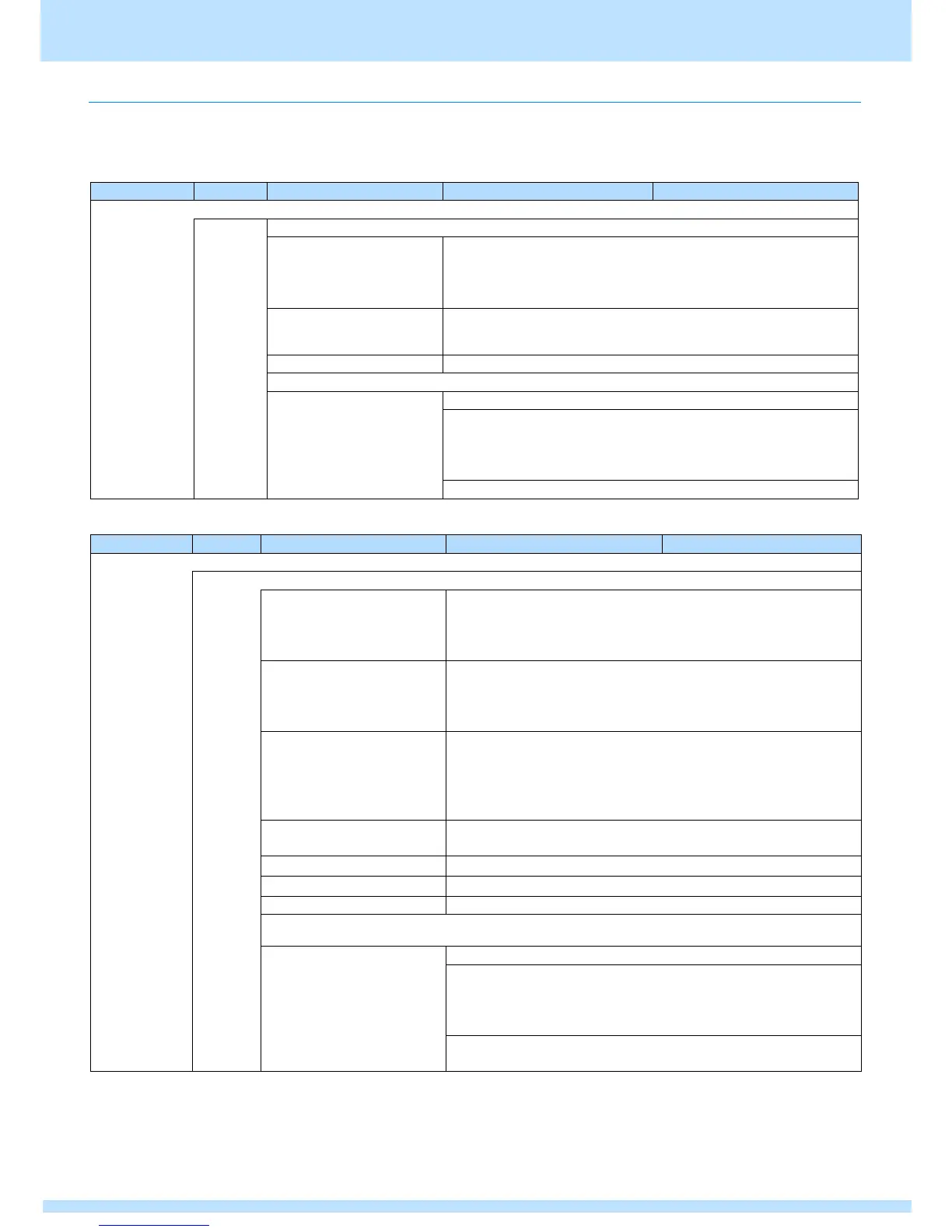
4.3.6 SDI configuration setting items
This section describes configuration settings for the SDI unit.
Set these settings from MENU > Configuration.
[VM-1876-M5]
Configuration SDI Setting Time Code
0: OFF
Does not insert a time code.
1: ON
Inserts a time code.
h(0 - 23) :m(0 - 59) : s(0 - 59)
Sets the time of Time Code.
Sets the time set in Start Time.
Configuration SDI Setting Clock Delay
Delay Clock1 - 8
Sets the delay on a clock
basis for the SDI signal.
This cannot be set when
SDI output.
Sign: Sign (delay/advance)
0: +
Advances by the clock amount set in Time.
1: -
Delays by the clock amount set in Time.
Time: Sets the time. (Value that is half of the 0 to H period)
Configuration SDI Setting Time Code
0: OFF
Does not insert VITC.
1: ON
Inserts VITC.
0: OFF
Does not insert LTC.
1: ON
Inserts LTC.
0: OFF
Does not use drop frames.
1: ON
Uses drop frames.
* Applicable only when 29.97, 59.94 fps.
h(0 - 23) :m(0 - 59) : s(0 - 59)
Sets the time of Time Code.
Sets the time set in Start Time.
Resets the counter to zero for the time code.
Configuration SDI Setting Clock Delay
Delay Clock1 - 8
Sets the delay on a clock
basis for the SDI signal.
This cannot be set when SDI
output.
Sign: Sign (delay/advance)
0: +
Advances by the clock amount set in Time.
1: -
Delays by the clock amount set in Time.
Time: Sets the time. (Value that is half of the 0 to H period)



 To Next Page