Chapter 4. Panel Profile
23
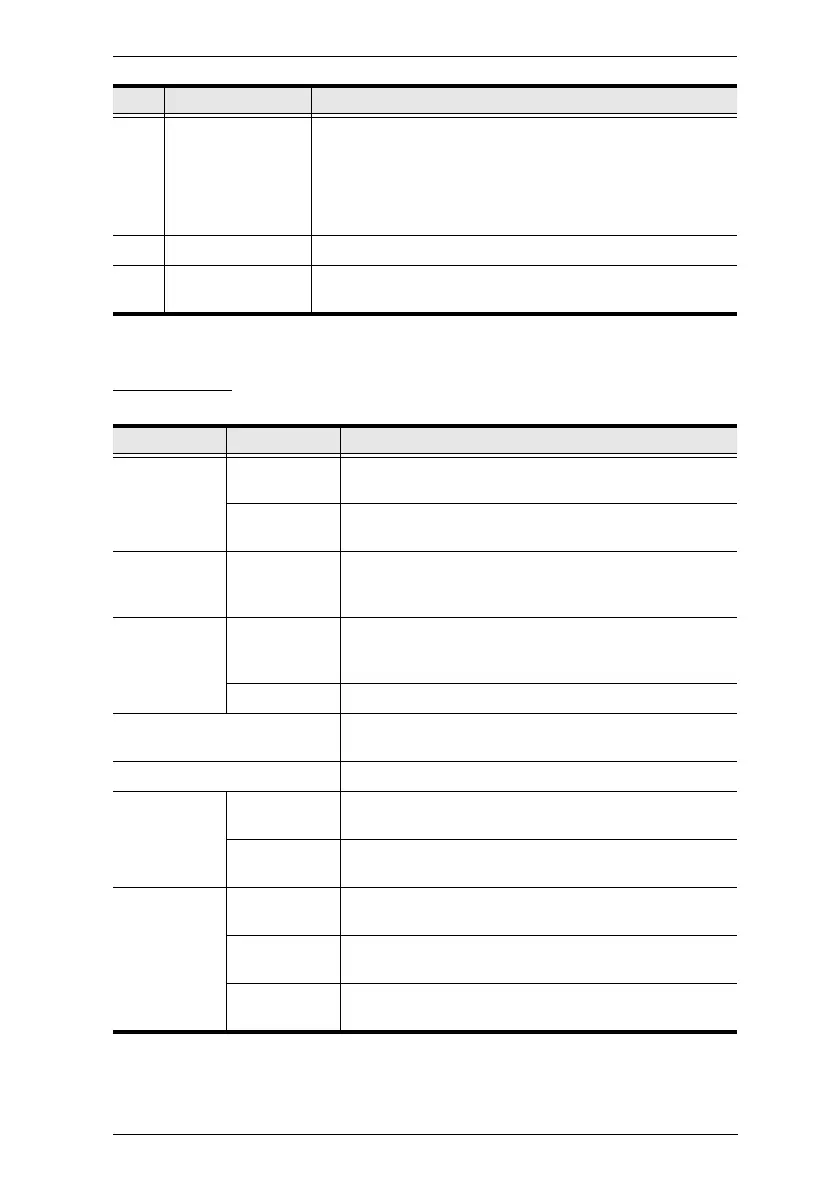
GUI Design
B Interactive Display Contains the following:
GUI Design: Defines the profile’s layout design related
settings.
Booking Settings: Sets the profile’s booking-related
settings
C Check-in Panel Used for checking-in to a meeting room and quick booking.
D Daily Schedule
Area
Displays the room’s reservation schedule for the day.
Item Sub-Item Description
Date and
Time
Date Format Sets the format in which date is displayed on the RBS
Panel.
Time Format Sets the format in which time is displayed on the RBS
Panel.
Brand/Logo
Upload
Upload
Company
Logo
Uploads a brand logo image (.jpg, .jpeg, .png, or
.bmp), up to 140*140 pixels, to be displayed on the
upper-left of the RBS Panel.
Background Main Page Defines the background of the RBS Panel’s main
page, either by selecting a color or uploading an image
(.jpg, .jpeg, .png, or .bmp), up to 1280*732 pixels.
Sub Page Sets the display style of the RBS Panel’s sub page.
Time Color Sets the color in which time is displayed on the RBS
Panel.
Check-in Panel Color Sets the color of the RBS Panel’s check-in panel.
Daily
Schedule
Area
Icon Color Sets the color of icons on the RBS Panel’s daily
schedule area.
Display Style Sets the display style and color of the RBS Panel’s
daily schedule area.
Status Color Available Sets the color of the LED bars of the RBS Panel, and
its status color, when it is available for use.
Reserved Sets the color of the LED bars of the RBS Panel, and
its status color, when it is reserved for a meeting.
Occupied Sets the color of the LED bars of the RBS Panel, and
its status color, when it is occupied.
No. Item Description



 To Next Page