12
GDO-10V3L2 Toro
™
Owner Installation Instructions
HELPFUL TIP: To access the PREV, NEXT
and SET buttons, unscrew the screws at
the bottom of the logic console cover
and remove cover.
tip
9. Coding Transmitter
The GDO-10V3L2 can store up to five hundred and eleven (511)
transmitters in its memory. Each transmitter can be allocated an
alpha-numeric ID label up to eleven (11) characters in length and
each button can be assigned to one of several control functions.
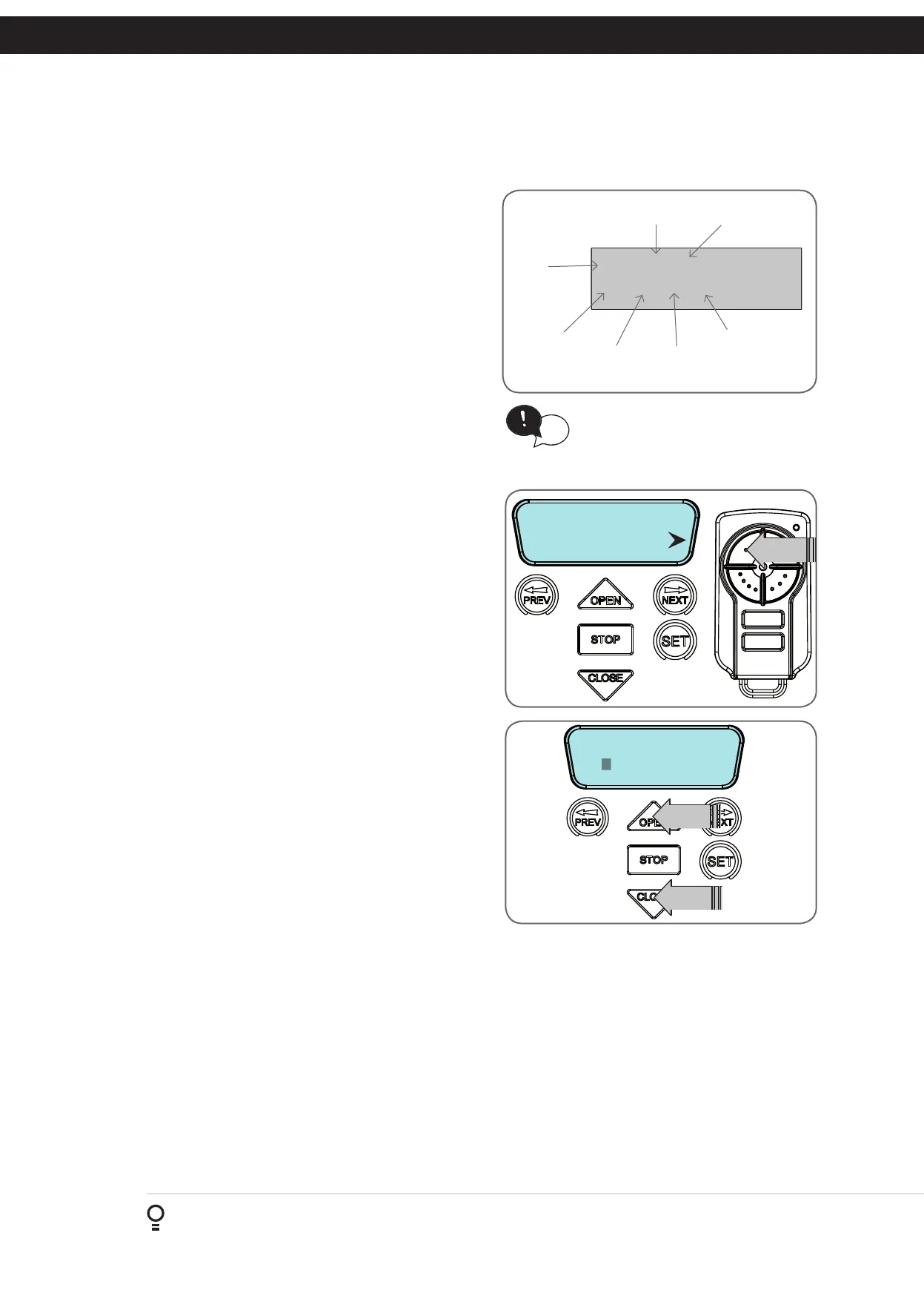
The settings for a transmitter are represented in (Fig. 9.1). It
shows the transmitter’s store number, ID label or serial number
and the functions assigned to each of its four buttons. To toggle
between ID/SN display, press UP/DOWN with the cursor on the
ID/SN indicator. The procedures below code, delete, replace,
edit and copy transmitter records.
IMPORTANT NOTE: Only TrioCode
TM
128 Technology
Transmitters are compatible with this product.
9.1 Coding Transmitter Button
Navigating To Menu 1 “Code Transmitter”
a. Press NEXT to navigate to Menu 1).
b. Press SET to enter the code set procedure.
Storing Transmitter Code
a. The logic console will prompt to press one of the transmitter’s
buttons.
b. Press the transmitter button you wish to use to operate the
opener (e.g. button 1) (Fig. 9.2) .
c. Press the same transmitter button again as prompted by the
display.
9.2 Selecting Function Of The Button
The logic console will now show the transmitter’s record, with
a cursor on the field for the button being coded (Fig. 9.3).
Use OPEN/CLOSE to select the function for the button.
Available functions:
OSC (Open/Stop/Close) PED (Pedestrian access)
SWP (Swipe) CLS (Close)
OPN (Open) STP (Stop)
LGT (Courtesy Light) VAC (Vacation Mode)
AUX (Auxiliary ) OFF (No action)
NOTE: OSC can change to OS and CLS (Close) function, but is
not available in the case where PE Beams are not installed.
Press SET to save the settings or STOP to abort without saving.
9.3 Returning To Main Screen
Press STOP to return to the MAIN SCREEN and test the
transmitter.
NOTE: To edit the other settings, refer to transmitter edit
procedure in Appendix F.
123
ID
Name/SN
OSC PED LGT VAC
# 1 [No Name]
OSC OFF OFF OFF
I.D label/Serial
number
Button 4
function
Button 3
function
Button 2
function
Button 1
function
Store
number
ID/SN display
indicator
Fig 9.1
Fig 9.2
Fig 9.3











 To Next Page