Chapter 4 --- Operation
39
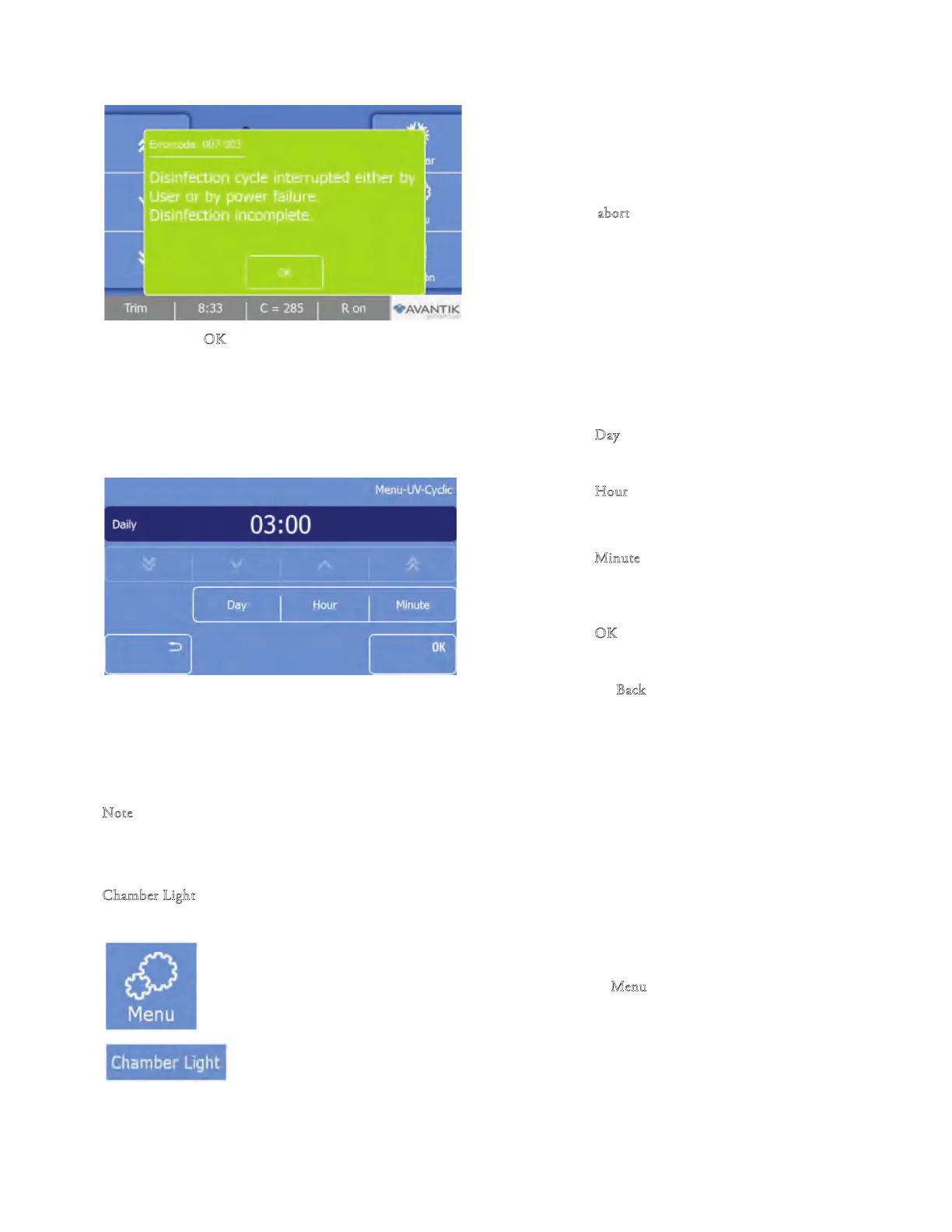
• Press ‘‘a
bort’’ to stop the cycle.
• Press ‘‘O
K’’ when the Errorcode: 007-003 window comes
up.
• Set the Time for the UV cycle to start:
• Press ‘‘Cyclic” to set a programmed time for the UV cycle to start:
• Press ‘‘D
ay’’ and select the day for the UV
cycle to run.
• Press ‘‘Hour’’ and use the arrow keys to set the
hour for the UV cycle to start on the indicated
day.
• Press ‘‘M
inute’’ and use the arrow keys to set
the additional minutes to the hour for the UV
cycle to start on the indicated day.
• Press "O
K
" to conrm the settings and to
return to the Main screen.
• Press the "B
ack" button three t
imes to exit
back to the Main scree
n withou
t saving the
changes.
• Do not open the window during the disinfectant cycle.
• Do not look directly into the UV light.
N
ote
e avera
ge life span of a UVC lamp is approx. 9000 operation hours with a dissipation down to approx.80%. It is recommended
to renew the UVC lamp every 3 years.
C
hamber Light
e Chamber light is located in the sliding window. To adjust the brightness of the chamber light:
• Press the "M
enu" button on the Main screen.
• e Menu screen will be displayed.



 To Next Page