AVerTV 6
22
(15)
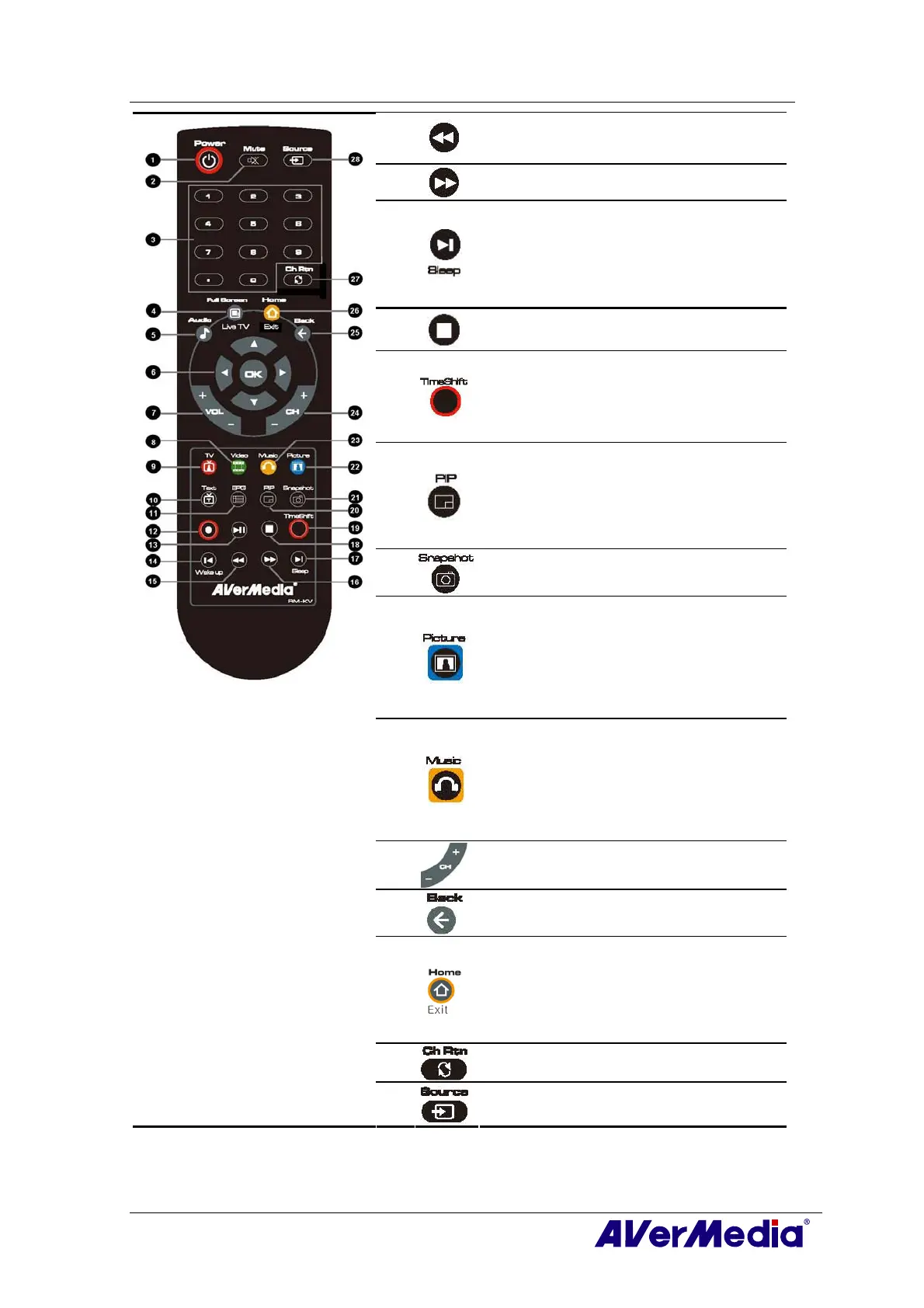
Move backwards in intervals.
(16)
Skip forward in intervals.
(17)
- Go to the next item in the playlist.
- Set the time to put your computer into Stand
By / Hibernate mode, exit the application or
turn off the computer. (This function is only
available for AVerTV 6)
(18)
Stop the playback, recording, TimeShift, etc.
(19)
- Switch from real-time TV or Radio to
TimeShift mode.
- Temporarily freeze the playback. (This
function is only available for AVerTV 6)
(20)
- Activate the Picture in Picture (PIP) (This
function is only available for AVerTV 6)
- Multi-Channel Display function. (This
function is only available for AVer
MediaCenter)
(21)
Capture an image or a continuous sequence of
images.
(22)
Main Screen: A shortcut to the main menu--
“Pictures”. (This function is only available for
AVer MediaCenter)
Teletext Mode: Jump to the teletext page of
the corresponding color according to this
button.
(23)
Main Screen: A shortcut to the main menu--
“Music”. (This function is only available for
AVer MediaCenter)
Teletext Mode: Jump to the teletext page of
the corresponding color according to this
button.
(24)
Channel up and channel down.
(25)
Go back to the previous page. (This function is
only available for AVer MediaCenter)
(26)
- Go to the main menu. (This function is only
available for AVer MediaCenter)
- Exit from CI/CA Information dialog. (This
function is only available for the device with
CI/CA function)
(27)
Return to previously accessed channel.
(28)
Change between available signal sources.











 To Next Page