AVerTV 6
89
¾ Video Quality Enhancement Plug-in (for Microsoft Vista /
Windows 7 MCE only)
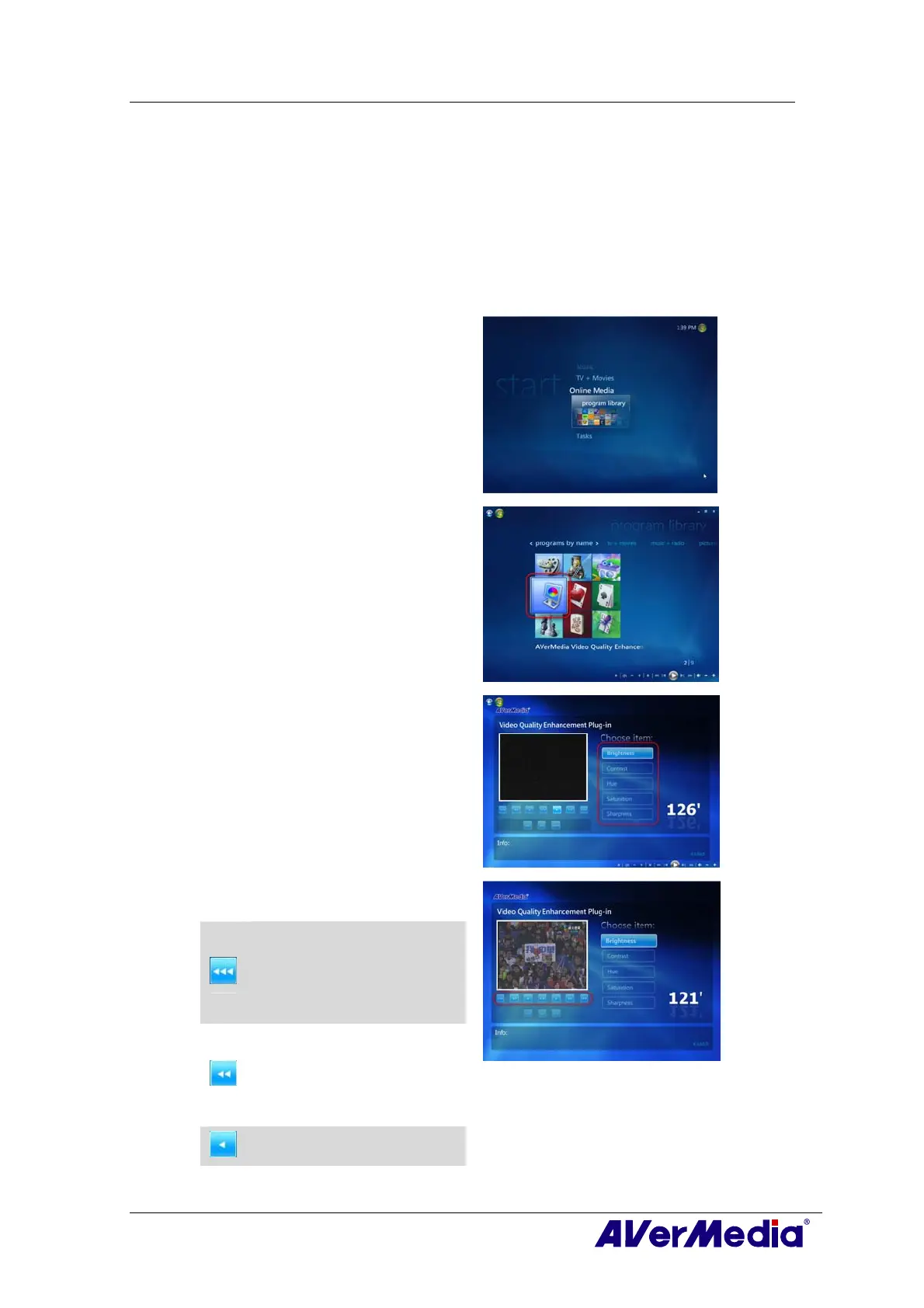
MCE “Video Quality Enhancement Plug-in” support is for Vista MCE only. After installing the driver,
you can access it through the program library in Online Media. This function enables you to adjust the
Brightness, Contrast, Hue, Saturation and Sharpness until the image color is accurate. The setting you
made will be applied to Analog TV, and composite/S-Video signal source.
1
1
.
.
Start the Media Center in Vista.
2
2
.
.
Select “Online Media” Î
“program library”.
3
3
.
.
Select “Video Quality
Enhancement Plug-in”.
4
4
.
.
Select the item you want to adjust.
5
5
.
.
Use the following buttons to adjust
the value of the item.
•
•
Decrease Brightness and Hue values
by 32.
•
•
Decrease Contrast and Saturation
values by 16.
•
•
Decrease Sharpness value by 8.
•
•
Decrease Brightness and Hue values
by 16.
•
•
Decrease Contrast and Saturation
values by 8.
•
•
Decrease Sharpness value by 4.
•
•
Decrease the item value by 1.











 To Next Page