AVerTV 6
20
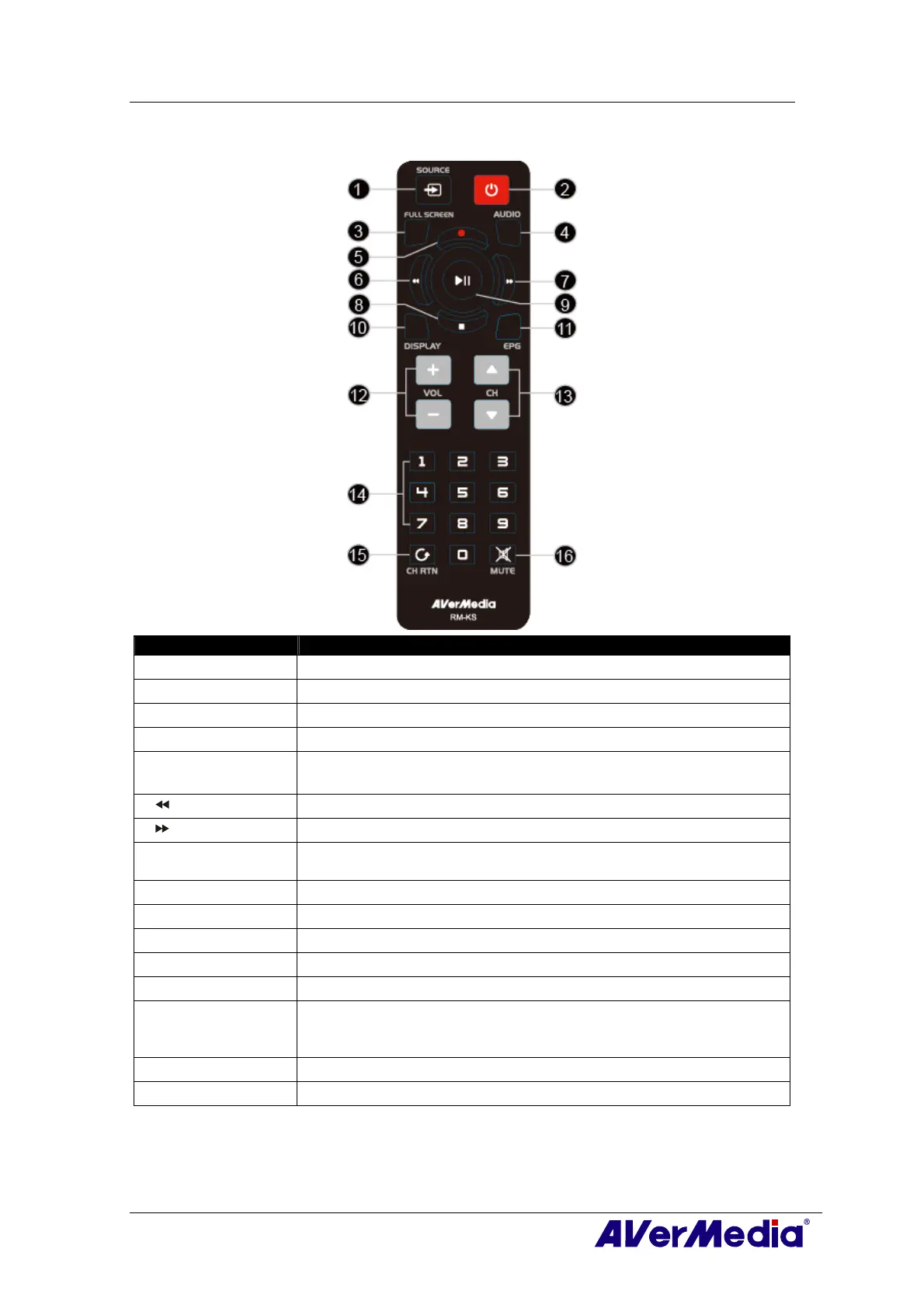
3.5.5 Remote Control Buttons (Model 5) (RM-KS)
Button Description
1. SOURCE
Switch between available signal sources.
2. POWER
Turn on/off the application
3. FULL SCREEN
Display TV in full screen.
4. AUDIO
Switch between available audio modes.
5. ● (Record)
Switch to PVR mode and record the current program or video into
your hard drive.
6. (Rewind)
Rewind the playback.
7. (Forward)
Advance the playback.
8. ■ (Stop) - End the Playback or recording.
- End the TimeShift mode and return to real-time TV or Radio mode.
9. ► (Play) / PAUSE
Play the last recorded or played file. / Freeze the playback.
10.DISPLAY
Display information.
11.EPG
Launch the Electronic Program Guide. (DVB-T only)
12.VOL+/-
Volume up/down.
13.CH ▲/▼
Go up or down to the next active channel.
14.Numeric Buttons - Select a TV channel.
- Under the 16-Channel preview mode, use 2 4 6 8 to highlight the
intended channel.
15.CH RTN
Go to the previously selected channel.
16.MUTE
Turn on/off the sound.











 To Next Page