AVerTV 6
85
Appendix
¾
Satellite Internet Access (for Windows XP only)
Satellite Internet Access allows users to get faster connection to the internet via satellite.
Simply follow the steps below:
If you are using one specific satellite service to watch satellite TV
and access to the internet, click Insert > Import to apply the
existing satellite data from AVerTV 6 or AVer MediaCenter and
you may skip step 1 to 4.
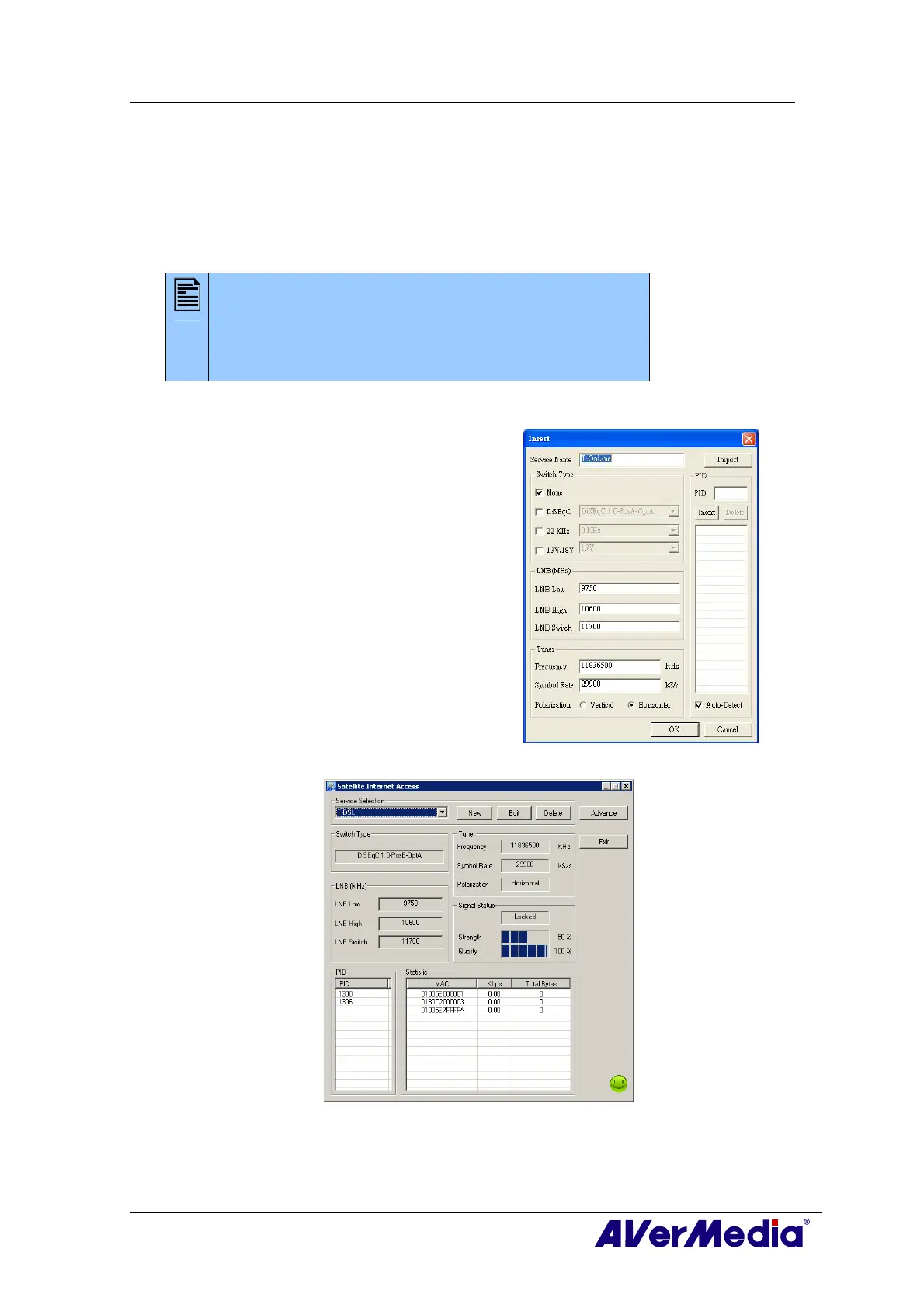
1. In the Satellite Internet Access dialog box, click
Insert and an Insert dialog box appears.
2. Enter the desired name in the Service Name text
box.
3. In the Switch Type section, choose the type that is
used by your satellite system.
4. In the LNB (MHz) section, configure your own
LNB information, such as input range.
5. In the Tuner section, specify the correct frequency,
symbol rate, and polarization.
6. In PID section, enter the correct PID value. If there
are PID values missing, it is recommended to use
Auto-Detect to search for more PID values.
After searching, all active PID will be displayed
inside the box.
7. Click OK to save the settings or Cancel to leave
without saving.
8. In the Satellite Internet Access dialog box, click
Edit to modify the data or Delete to permanently
remove the selected data.











 To Next Page