AVerTV 6
88
¾ Video Gaming Plug-in (for Microsoft Vista / Windows 7
MCE only)
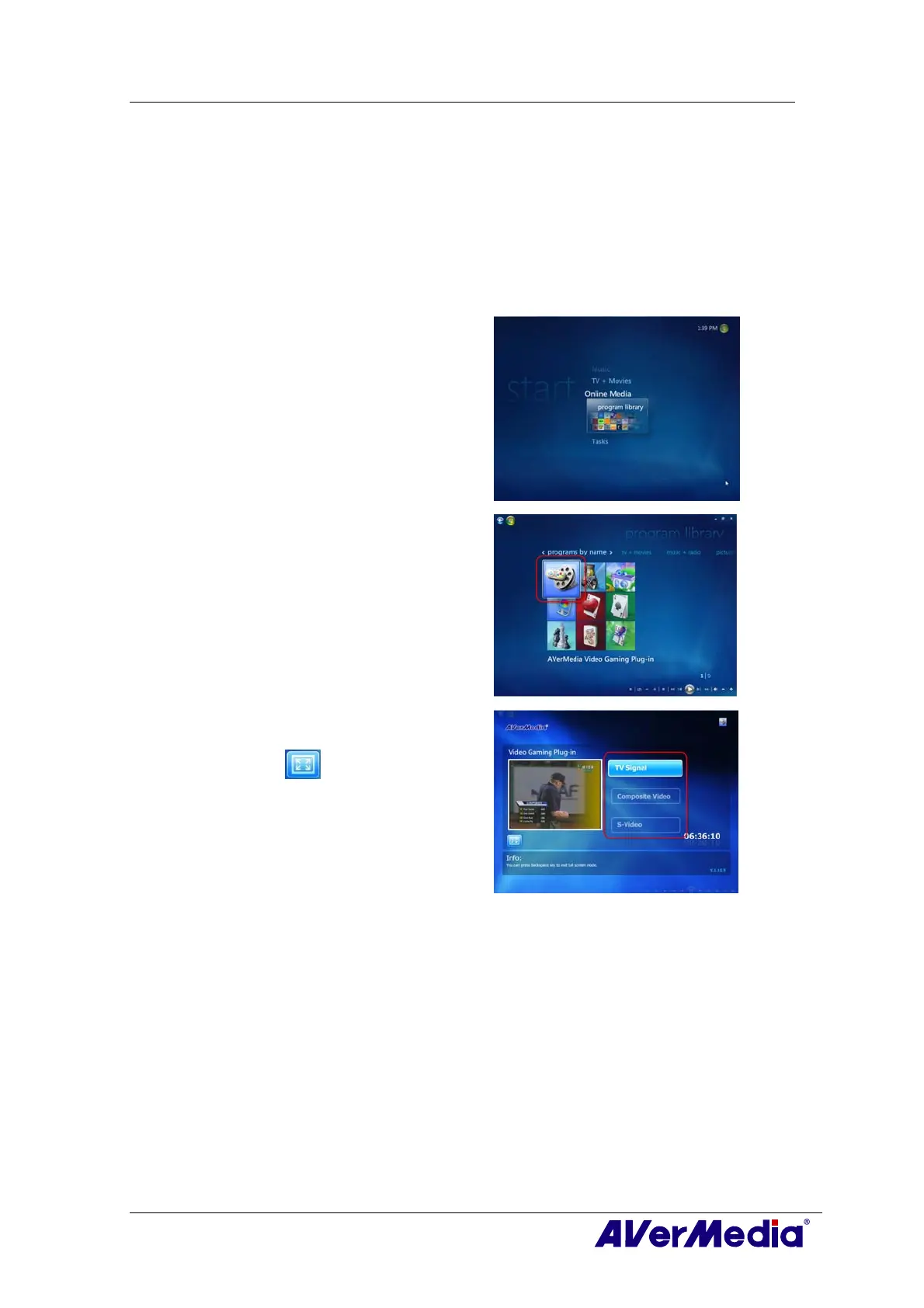
MCE “Video Gaming Plug In” support is for Vista MCE only. After installing the driver, you can access
it through the program library in Online Media. This function enables you to watch composite/S-Video
signal source or play games in Vista MCE platform. (Playing games with MCE may cause delay, but you
can choose “Video Gaming Plug In” to avoid it and enjoy real-time game play.)
1
1
.
.
Start the Media Center in Vista.
2
2
.
.
Select “Online Media” Î “program
library”.
3
3
.
.
Select “Video Gaming Plug In”.
4
4
.
.
Select the video source you want to view
via “Video Gaming Plug In”.
5
5
.
.
Click button to view images in a full-
screen window. Press ESC to exit the full-
screen mode.











 To Next Page