37
3PRIOR TO OPERATING
3.2 INSERT THE LABELLING MATERIAL – ALS 450
ALS
450
Insert new label roll
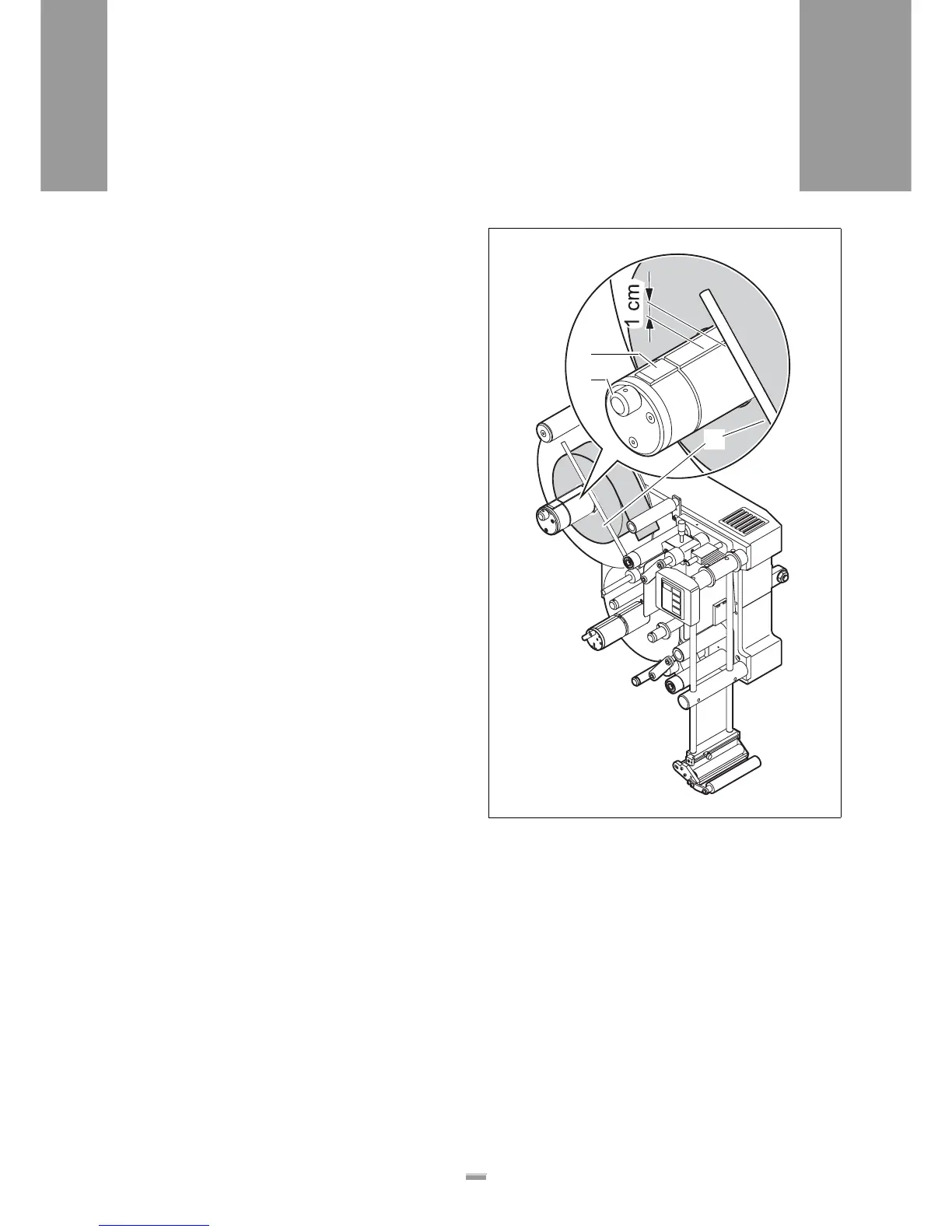
£ Loosen the set-screw at the guiding rod [25C] and
swing the guiding rod to the side.
£ Rotate the knurled knob [25B] clockwise, to retract
the chucking wedge [25A] in the unwinding spindle.
£ If there is still an old roll core on the unwinding spin-
dle: remove the old roll core.
£ Completely push on the new label roll. Make sure
the assembly is correctly positioned (see next page,
chapter Overview of the threading path diagram):
– Label material with labels positioned on the outside
of ribbon band: loose end to the right
– Label material with labels positioned on the inside of
ribbon band: loose end to the left
£ Rotate the knurled knob counter-clockwise to se-
cure the label roll on the unwinding spindle.
£ Allow the guiding rod to lightly rest against the label
roll and swing it approximately 1 cm over the un-
winding spindle.
£ Tighten the set-screw at the guiding rod.
[25] New label roll on the unwinding spindle, secured to the guiding
rod on the side
A Chucking wedge in the unwinding spindle
B Knurled knob on the unwinding spindle
C Guiding rod
A
B
C







 To Next Page