52
4OPERATION
4.1 ACTIVATION AND SHUT-DOWN
ALS
350
450
Prerequisites
– Both machines are configured and tested for tan-
dem operation and automatic dispensing speed ad-
justment.
– Label material is inserted, machines are switched
on, material is initialised.
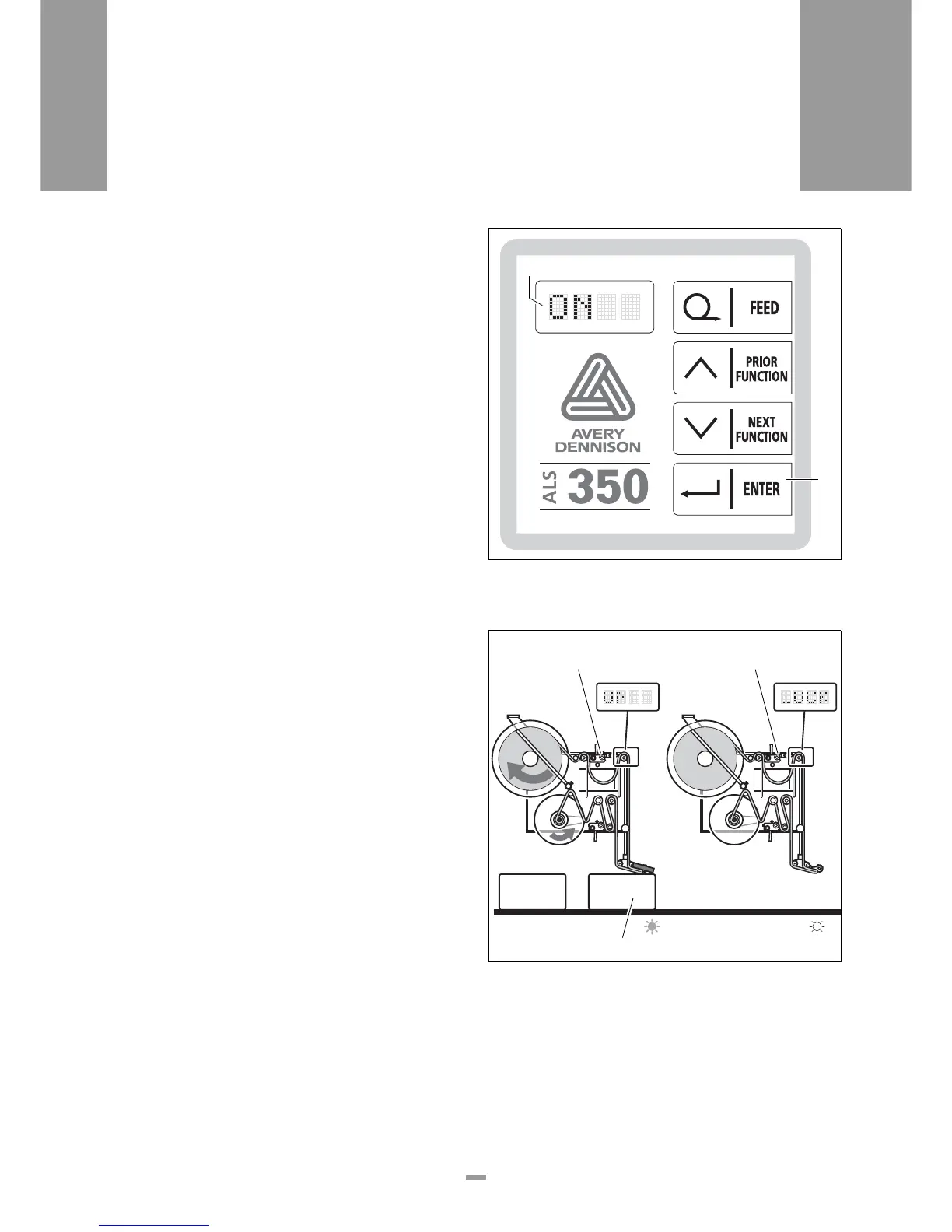
– „OFF“ appears on the operator panels of both ma-
chines.
On the machine that is to begin labelling first:
£ Press the ENTER key [48B].
– The operator panel of this machine indicates
ON [48A]. This machine is activated.
On the other machine:
£ Press the ENTER key.
– The operator panel of this machine indicates LOCK.
Start dispensing labels
– The conveyor belt starts up. The first product reach-
es the product sensor [49A] of the activated ma-
chine.
– The product sensor sends a start signal.
– The machine with the ON indication starts dispens-
ing labels [49B].
– The machine with the LOCK indication remains in
standby [49C].
[48] Operator panel
A „ON“ LED indicator
B ENTER key
[49] Start of the label dispensing in tandem operation:
A The first product has reached the product sensor of the ma-
chine that is to begin labelling first.
B The machine with the ON indication starts dispensing labels.
C The machine with the LOCK indication remains in standby.
A
B
B C
A







 To Next Page