Monitor Profiles 41
MTRX Studio Page
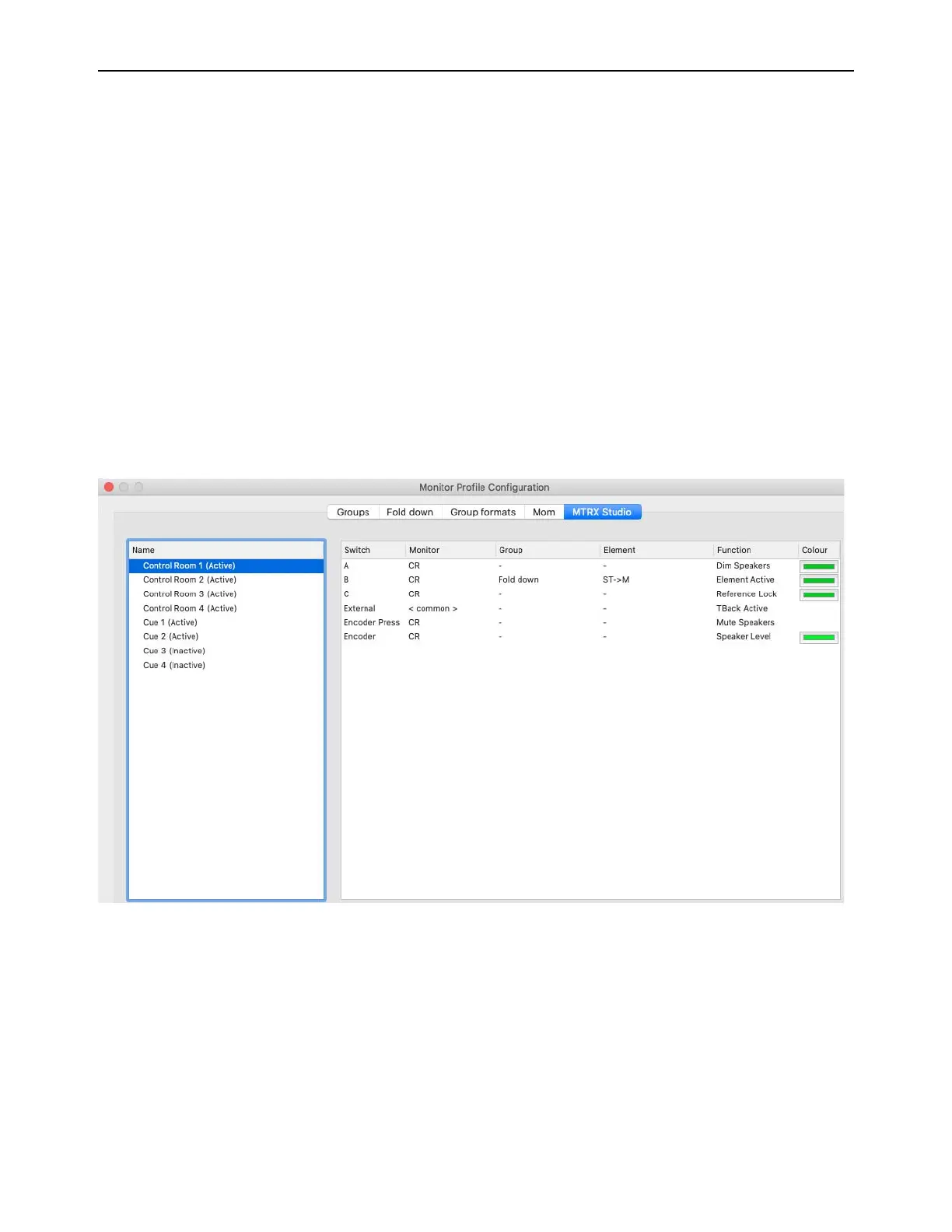
The MTRX Studio page lets you assign the footswitch, front panel buttons A, B, and C, and the main encoder (dial) on the front
panel of MTRX Studio to control talkback, monitor settings, outputs, and sources.
MTRX Studio lets you assign up to 4 layers of control for the main monitor (Control Room). You can also assign a single layer of
control to each headphone output (Cue 1 and Cue 2). The MTRX Studio page is organized into two panels. The left panel lists the
four control layers for the Control Room monitor and Cues 1–4 (only Cues 1 and 2 are active with MTRX Studio). The right panel
show the assignable controls for the selected Control Room layer or selected Cue.
The right pane is organized in 6 columns:
Switch, Monitor, Group, Element, Function, and Color.
Switch
Lists the front panel controls and footswitch that can be assigned to control monitor functions.
Monitor
Displays the monitor to be controlled (as selected in the left panel).
Group
Displays the group (if any), such as Output or Source set, or Fold down, within the Monitor group that is assigned control.
Element
Displays the element assigned to control within the designated group.
Function
Displays the assigned function for each Switch.
Color
Lets you select a color for identifying each switch’s assigned function. This color illuminated the corresponding Switch on
the front panel of the MTRX Studio.
MTRX Studio page, Control Room layer 1 assignments



 To Next Page