OmniCare EVC System
Installation & Commissioning Manual
10 OmniCare issue 1
C
O
M
M
U
N
I
C
A
T
I
O
N
S
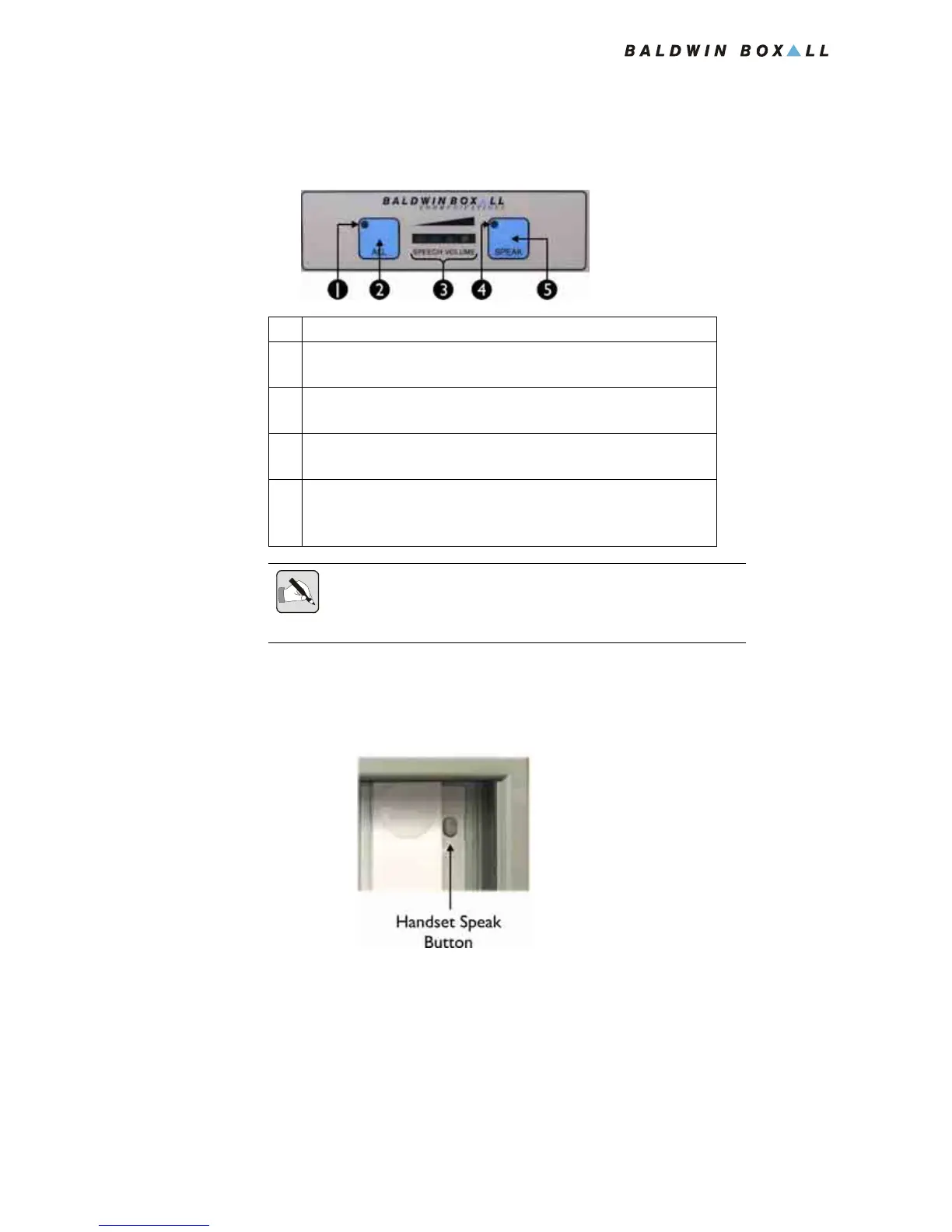
1.3.3 “All Call” and “Speak” Buttons
Figure 1.10 — “All Call” and “Speak” Buttons
1.3.4 Handset “Speak” Button
Figure 1.11 — Handset Speak Button
This button operates the “Speak” function to enable
communication to the selected Remote Unit.
This is the same as the “Speak” button on the control panel.
Pressing this button stops the voice-switching function and makes
the conversation PTT controlled. This can be useful if there is a
high level of ambient noise at the control panel.
1 Will illuminate to show the "All" button (2) is being pressed
2 Press to speak to All Occupied Remote Units, all Fire
Telephones and all Combined Refuge Remotes
3 Indicates speech level of the handset.
For clearest speech avoid lighting the yellow LED.
4 Will illuminate to show either the "Speak" button on the panel
(5) or the "Speak" button on the Handset has been pressed
5 Press to speak to the Selected Occupied Remote Unit.
Pressing this button stops the voice-switching function and makes the
conversation PTT controlled from the control panel
NOTE: The Speech Level Indicator (3) is permanently "live", even when
the Handset is not picked up or in use.
This is due to continuous monitoring of the microphone capsule.



 To Next Page