OmniCare EVC System
Installation & Commissioning Manual
OmniCare issue 1
55
C
O
M
M
U
N
I
C
A
T
I
O
N
S
4.5 FUNCTIONAL TESTING REMOTE UNITS
4.5.1 Introduction
Remote Units can only be functionally tested after the Control
Panel has successfully completed the Commissioning Process.
If Remote Units are to be re-addressed please refer to Section 5.1
on page 65 for further details on re-addressing.
4.5.2 Disabled Refuge Remote (BVOCECP)
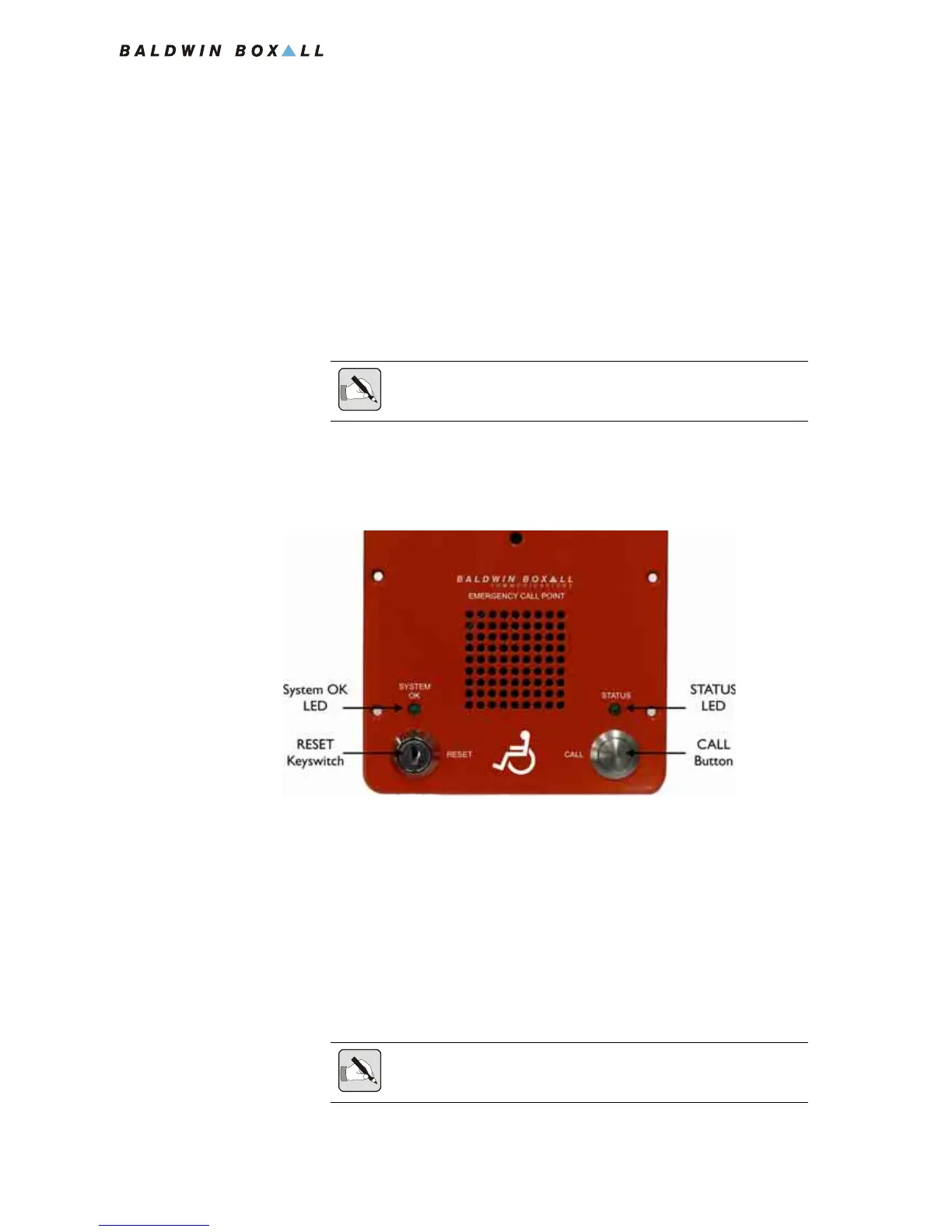
Figure 4.4 — BVOCECP Remote Unit Front Panel Controls
1. Ensure the “SYSTEM OK” LED is flashing, and press the
“CALL” button.
Ensure the “Status” LED illuminates.
2. Both the Remote Unit and the Control Panel(s) will 'ring'.
The associated red LED on the Control Panel(s) will flash to
indicate activity at that Remote Unit location.
Check that when the Control Panel handset is lifted and the
zone is selected communication can be established.
NOTE: To perform functional testing on Remote Units it will be necessary
to activate the Fire Panel input on the Control Panel.
NOTE: If only one Remote Unit is calling the Control Panel then that call
is automatically answered by lifting the handset.



 To Next Page