33
BARRETT PRC-4090 TACTICAL HF SDR TRANSCEIVER - SELCALL
Setting up a Self ID
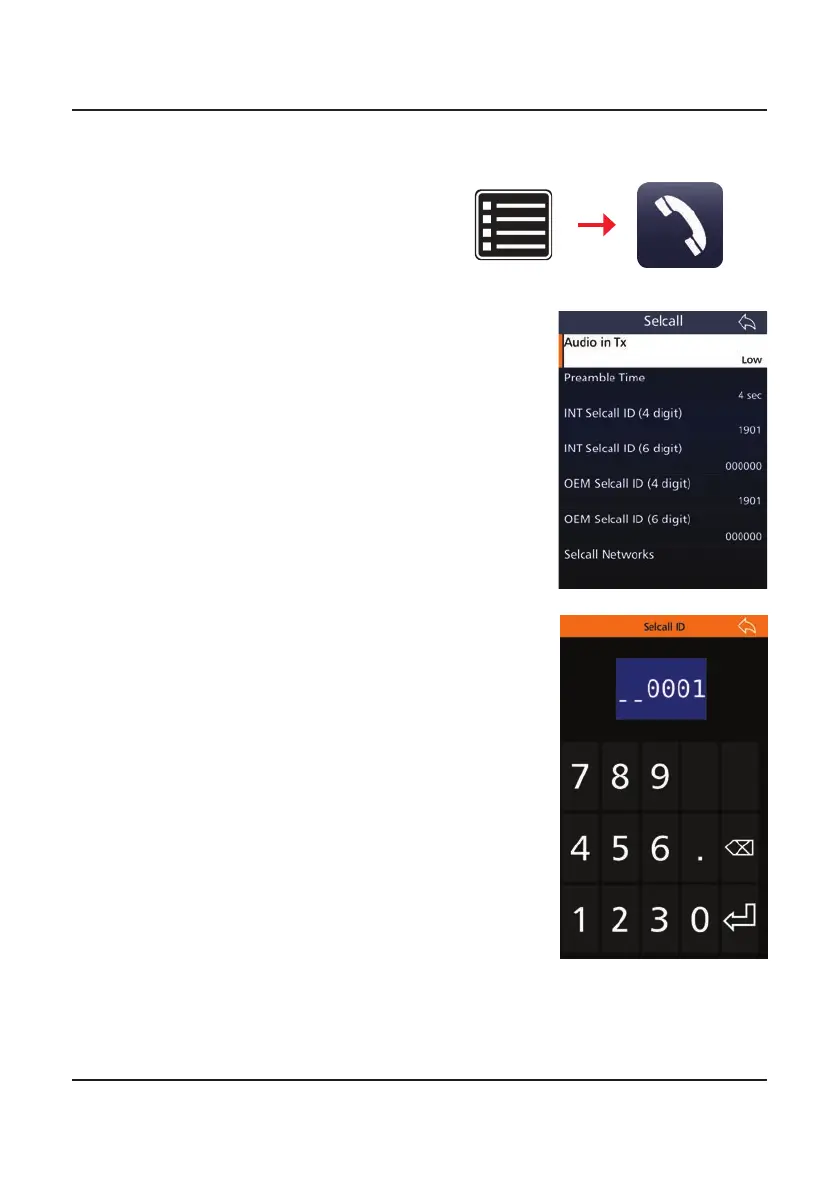
1. From the Settings menu, tap
the Selcall icon.
The procedure is the same for the Default Int Selcall
ID (6 digits), OEM Selcall ID (4 digits) and OEM Selcall
ID (6 digits).
Note: Having both a four digit and the six digit ID
is not required, either would still allow successful
operation. It is recommended that the four digit or
six digit INT and OEM IDs be the same for easy self
identication.
A list of all of a transceiver’s current IDs can
be found under Selcall Networks in the Selcall
menu.
This shows all the current Selcall IDs for a transceiver
and the networks that they are attached to, see page
56.
Settings Selcall
3. Type in a four digit number. This will either be
provided to you by your network provider or an
original ID may be able to be used if it does not
conict with another ID on the network.
2. Tap Default Int Selcall ID (4 digits). This will set
up a 4 digit ID.



 To Next Page