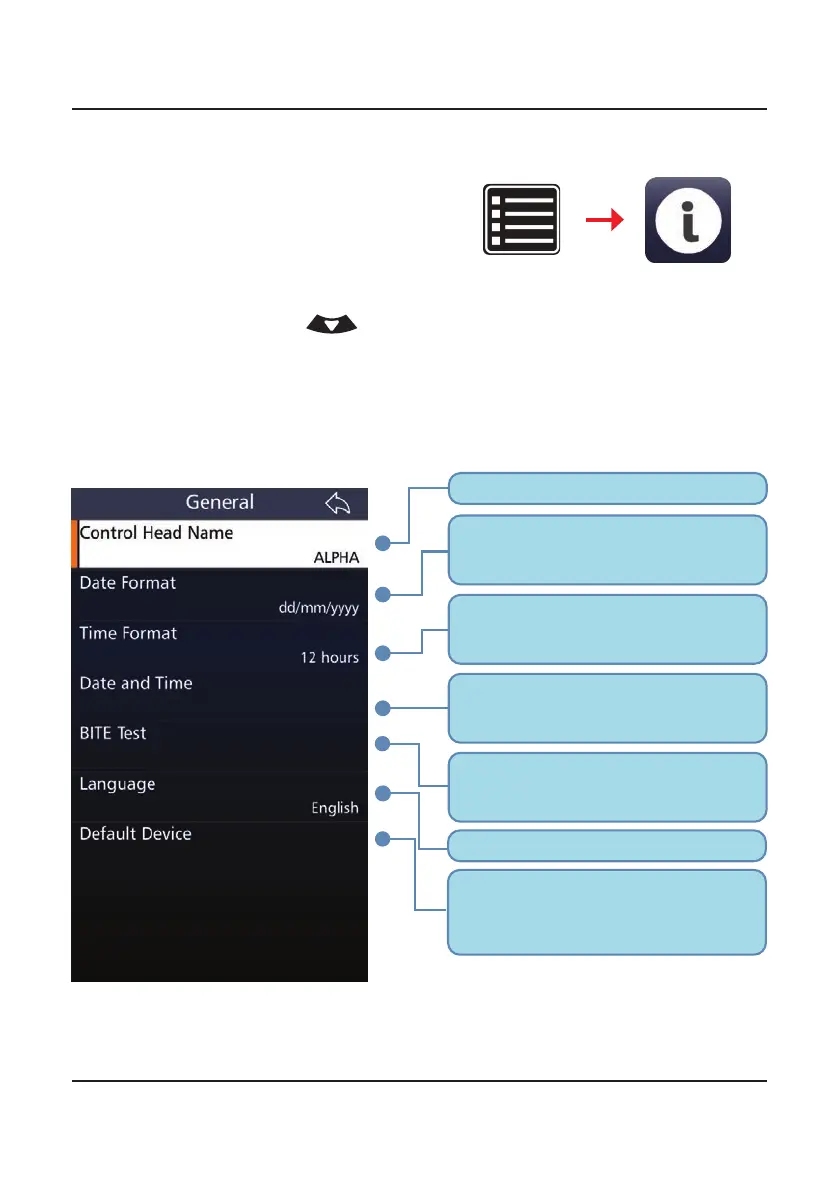
Sets the format in which the date is
displayed on the transceiver to one of
five options.
Toggles the time format between 12
and 24 hour displays. This displays on
the transceiver front panel.
Sets up the date, time and timezone
displayed on the transceiver. Swipe up
or down on the touchscreen to modify.
Language of the transceiver’s display.
Name of the control head/handset.
Will revert transceiver back to factory
settings. All channel info, ALE2G/3G
info, all security PINs and encryption
keys will be cleared.
Built in Testing Equipment. Provides a
basic indication of faults in the system.
See Appendix 4, page 211.
62
BARRETT PRC-4090 TACTICAL HF SDR TRANSCEIVER - BASIC SETTINGS
General Settings
Select General from the Settings
menu to display the General Con-
gurations screen.
A list of items that may be cong-
ured is displayed. To reveal more
items, either swipe down on the
touch screen or press
.
A brief description of each of the
items which may be congured is
described beneath the items.
The current status of each of the
items is displayed on the right.
Settings
General



 To Next Page