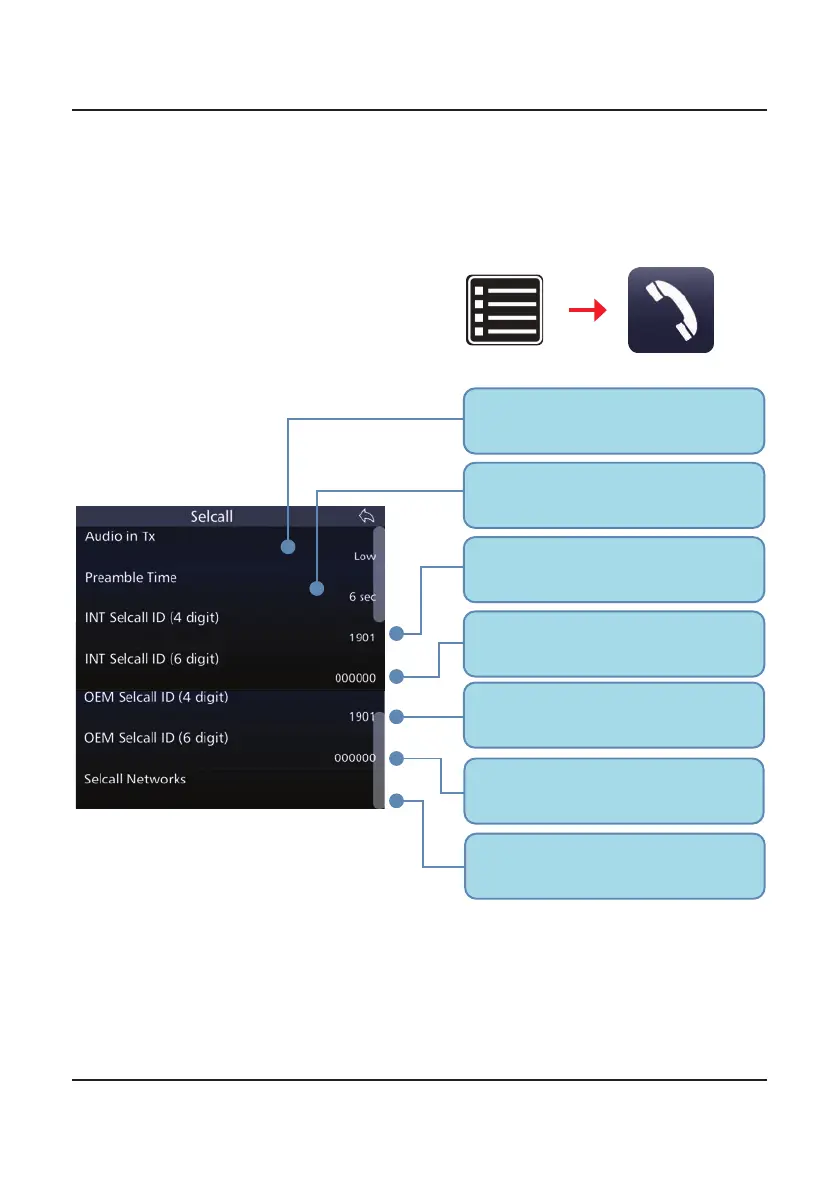
The volume of the Selcall audio during
Transmit. It can be Selected as Low,
High or Off.
Default 4-digit INT Selcall ID.
Identifies the transceiver to other
users when using an INT channel.
Default 6-digit INT Selcall ID. Identifies
the transceiver to other users when
using an INT channel.
4-digit OEM Selcall ID. Identifies the
transceiver to other users when using
an OEM channel.
6-digit OEM Selcall ID. Identifies the
transceiver to other users when using
an OEM channel.
A list of the transceiver’s Selcall IDs
on saved Selcall Networks. Can be
modified.
The length of the Selcall preamble.
500ms are recommended per channel in
the scan group + 1 second.
47
BARRETT PRC-4090 TACTICAL HF SDR TRANSCEIVER - SELCALL
Advanced Selcall Functions
Selcall Settings
From the Settings menu, select
Selcall to view the Selcall Settings
for the transceiver.
The following menu displays:
The Selcalls and settings in this section are less commonly used than those pre-
vious but are useful in all manner of situations.
Settings Selcall



 To Next Page