5-4
920512-768 Operator Manual Cycle and Control Value Programming
5.2 Supervisor Mode Supervisor mode access is secured by a password.
5.2.1 Accessing Supervisor
Mode
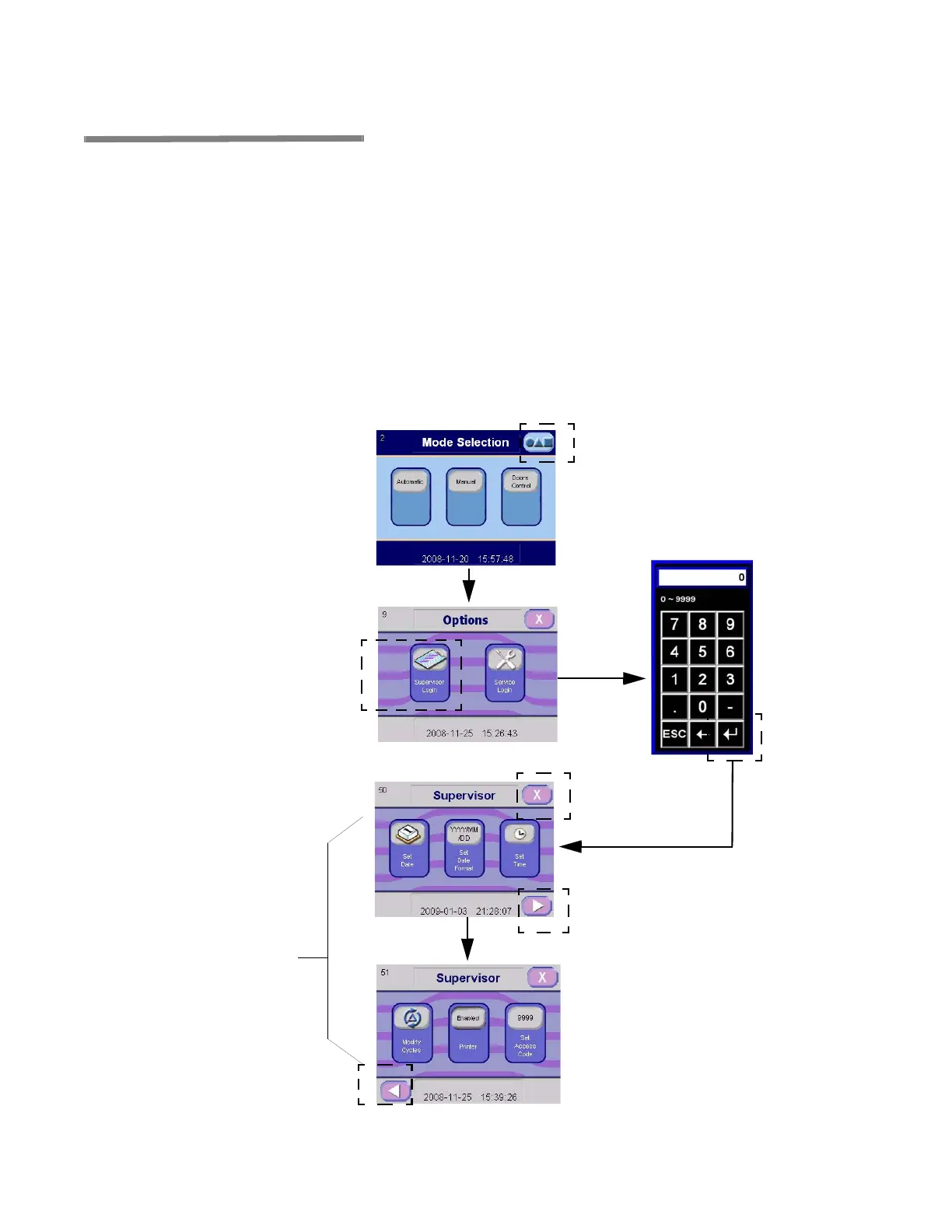
To access Supervisor mode, proceed as follows:
1. On Mode Selection screen, press OPTIONS touch pad.
2. On Options screen, press SUPERVISOR MODE touch pad. A
numeric keyboard appears.
3. Enter appropriate password (supervisor and service user can
access Supervisor Mode).
4. Press ENTER touch pad.
NOTE: If password entered is wrong, display shows USERNAME
OR PASSWORD NOT RECOGNIZED, PLEASE TRY AGAIN.
5. Display advances to first Supervisor Mode screen.
Press OPTIONS
Touch Pad
Press SUPERVISOR
Touch Pad
Enter
PASSWORD
Press ENTER
Touch Pad
RIGHT Arrow Touch Pad
Advances to Next Screen
X Touch Pad Returns
to OPTIONS Screen
LEFT Arrow Touch Pad to Return
to Previous Screen
Press Desired Touch
Pad According to
Action to Perform
Figure 5-1. Supervisor Mode Flowchart



 To Next Page