Procedure of the test-commissioning
Instruction Handbook b maXX (BM4-F-)ENC-XX (Encoder module)
Document No.: 5.01042.12 Baumüller Nürnberg GmbH
70
of 102
8.2
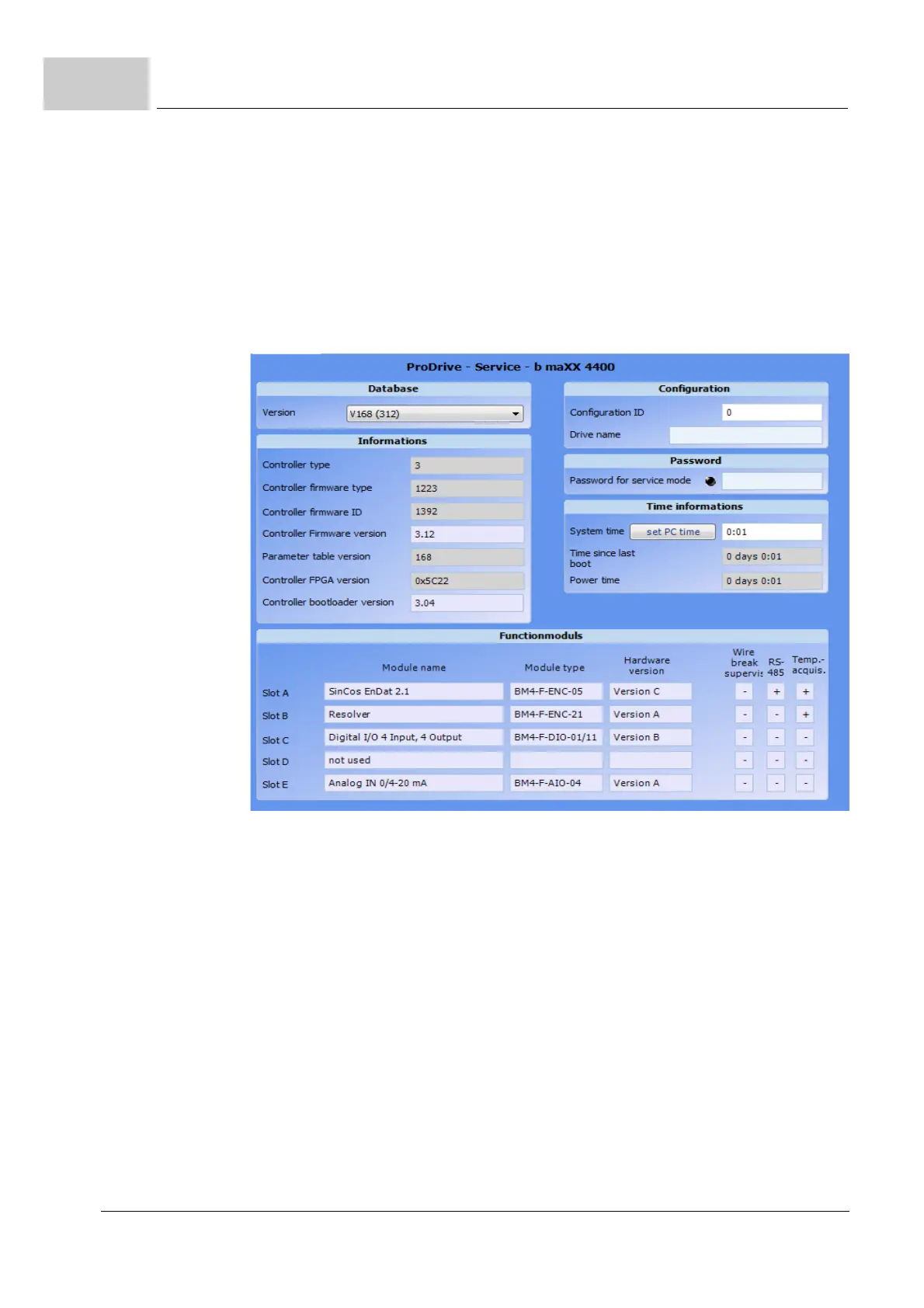
4 Choose sub-menu „Service“
Expectation:
m Module type: e.g. SinCos EnDat 2.1: (BM4-F-)ENC-05
Resolver: (BM4-F-)ENC-21
m Hardware version: (dependent on order), e. g. „Version A“.
5 Decide on the basis of the display:
Figure 16: ProDrive start screen
m If the (BM4-F-)ENC-XX has been correctly recognized, the commissioning can be
continued, refer to Instruction Handbook b
maXX 4000, 5.12008 or Parameter Man-
ual b maXX 4000, 5.03039.
m If the (BM4-F-)ENC-XX has not been correctly recognized, turn off the device, check
the mounting and the installation. After removing all errors, switch on the device
again.
m If the (BM4-F-)ENC-XX has not been correctly recognized again, it is defect or the
controller/controller slot (of standard controller) is defect. Contact Baumüller Nürn
-
berg GmbH for replacement.



 To Next Page
 Loading...

